跳到主要内容

指南与技巧

如何解密加密的 iPhone 备份

Aidan Fitzpatrick发布于 2012年7月25日更新于 2020年2月29日
本页内容
Cover image for: 如何解密加密的 iPhone 备份

借助我们适用于 iPhone、iPad 或 iPod 的备份提取工具,从加密的 iTunes 备份中提取数据非常简单。你只需要知道加密时使用的密码。

如何读取 iTunes 加密的 iPhone 备份

大多数人都希望个人数据保持高度安全,这也理所当然。然而,把个人数据从一台设备转移到另一台设备,确实会增加数据安全方面的风险。iPhone 以及在 iTunes 中创建的备份可能包含大量个人数据。为了在创建 iTunes 备份时保护数据安全,你可以在 iTunes 中设置密码加密备份。

不过,在某些情况下,例如 iOS 升级失败,或者换了新的 iPhone / iPad,你可能需要获取加密的 iTunes 数据。iPhone Backup Extractor 可以在不影响备份安全性的前提下解决这些问题。只要你知道 iTunes 备份密码,就能立即访问备份数据。我们认为,能够查看加密备份中存放的内容很有帮助,也有助于了解备份的价值。

如何解密加密的 iTunes 备份

如果你想从加密的 iTunes / iOS 备份中提取任何数据,可以通过我们的软件 iPhone Backup Extractor 轻松完成。

按照以下步骤解密你的加密 iTunes 备份:

  1. 下载 iPhone Backup Extractor。 从我们的网站下载 iPhone Backup Extractor 并安装。我们提供两个下载版本:Windows 版和 macOS 版,二者都兼容最新版本的 iOS。
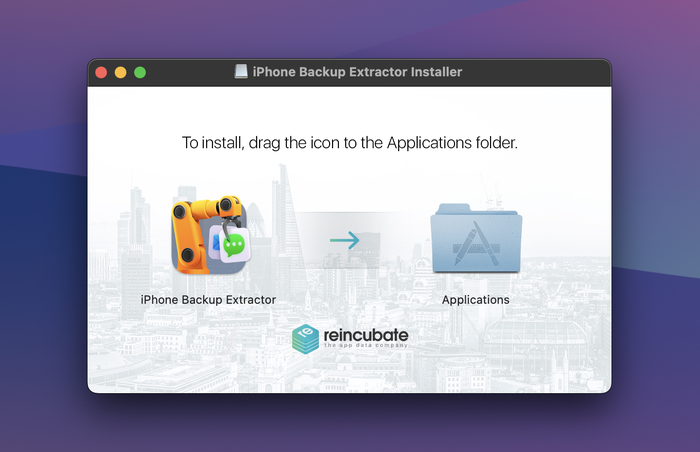
安装并启动 iPhone Backup Extractor

安装并启动 iPhone Backup Extractor

  1. 载入加密的 iTunes / iOS 备份。 启动 iPhone Backup Extractor,等待电脑上的备份载入完成。iPhone Backup Extractor 会自动载入电脑上默认备份文件夹中的备份。
    输入备份密码以解锁加密备份。只有记得密码,iPhone Backup Extractor 才能工作;如果密码不正确,它将无法打开你的备份。
    如果备份文件位于其他文件夹,请浏览文件夹并选择备份文件所在的位置。如果电脑上存有多个备份,请选择需要从中提取数据的那个加密备份。
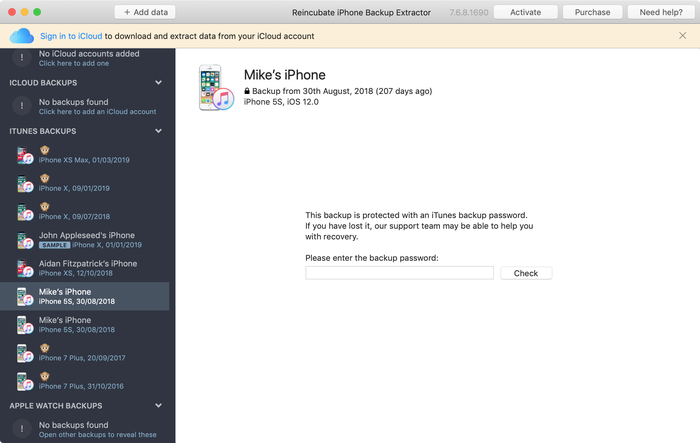
使用 iPhone Backup Extractor 解密加密的 iTunes 备份

使用 iPhone Backup Extractor 解密加密的 iTunes 备份

  1. 保存你的数据。 点击各类数据即可从备份中提取,也可以使用“文件”和“提取”菜单,或在“专家模式”中访问这些文件。
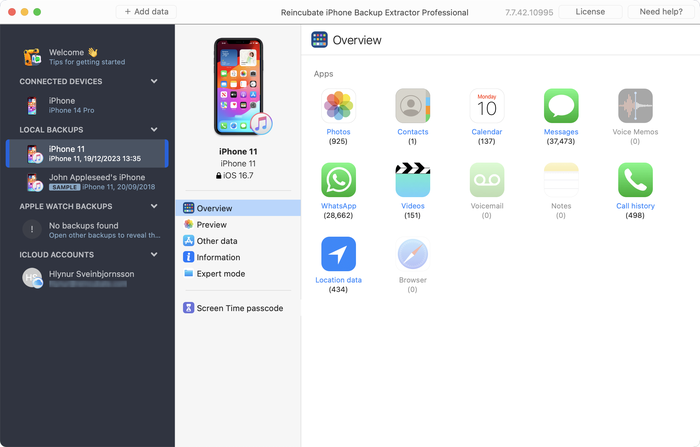
提取加密的 iTunes iOS 备份

提取加密的 iTunes iOS 备份

如何在 iTunes 中取消 iPhone 备份的加密

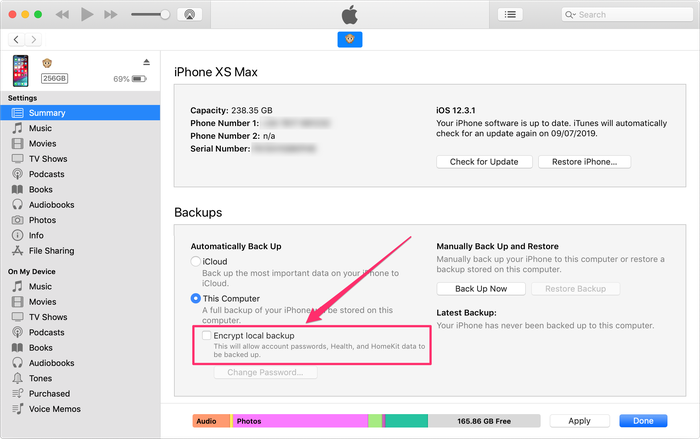
如果你需要从备份中取回某些文件,并且刚刚下载了 iPhone Backup Extractor,可能会发现它在读取任何加密备份之前都会要求输入密码。这说明你上一次同步或备份 iOS 设备时,在 iTunes 选项中勾选了“加密 iPhone 备份”。

如果你想把备份转换为未加密的备份,请按照以下步骤操作:

关闭加密后同步你的 iPhone、iPad 或 iPod

  1. 在 iTunes 中选择你的 iOS 设备。
  2. 选择“摘要”界面(标签页),并滚动到界面底部。
  3. 然后取消勾选“加密 iPhone 备份”(iPad 或 iPod 同理)。
  4. iTunes 随后会提示“输入密码以解锁你的 iPhone 备份”,请输入你最初设置的密码。
  5. 现在同步你的设备,创建一个未加密的备份。
取消 iTunes 备份的加密

取消 iTunes 备份的加密

提取文件后,你可以反向操作重新加密备份,再次保护你的备份。

启用加密后,你可以和不能对 iTunes 备份数据做的一些事

可以不可以
使用 iTunes 恢复在不知道密码的情况下恢复
使用 iPhone Backup Extractor 读取加密备份在加密备份损坏时完整读取备份,不过你可以通过 support@reincubate.com 联系我们的专家支持团队,获取实用的技巧和建议
将照片、联系人、短信、视频、备忘录、位置数据、WhatsApp 消息等加密备份数据保存到你的电脑本地在丢失备份密码后恢复数据。不过,请查看 Apple 的加密备份故障排除指南
持有 iPhone Backup Extractor 许可证,即可访问加密的 iTunes iPhone、iPod Touch 或 iPad 备份中的所有内容使用 iPhone Backup Extractor 免费版访问加密的 iTunes iPhone、iPod Touch 或 iPad 备份中的所有内容(免费版最多只能从加密的 iTunes 备份中提取四个文件)

iTunes 中的加密备份流程

创建备份时,iTunes 会用十六进制编码的 SHA1 哈希值作为文件名来存储备份文件,这些文件列在备份的“清单”中。

了解 iOS 设备的 iTunes 备份中有哪些文件,在备份或清单文件损坏时会很有帮助。你仍然可以使用 iPhone Backup Extractor 恢复损坏的备份文件,它会打开这些编码文件并提取可用的数据。

如果你想通过加密 iTunes 中的备份来保护文件,只需点击“加密备份”即可启用数据保护。iTunes 随后会提供一个选项,让你为这台电脑上创建的所有备份设置一个密码。每次恢复时都会要求你输入此密码,因此请牢记它,或把它放在安全的地方。

如果你想访问 iOS 设备上的数据,但 iTunes 已经加密了你的备份,该怎么办?只要文件仍在设备上,你可以在 iTunes 中轻松取消加密(创建一个新的未保护备份)。完成后,把“加密 iPhone 备份”选项重新打开,iTunes 会为你重新加密该备份。不过,通常没有必要这样做。

为了让事情更简单,我们制作了一段简短的视频,演示如何从加密备份中恢复 iPhone 数据。你会看到,在提取阶段我们提取的是联系人,但对于 iMessage、短信、日历、照片、视频、备忘录和应用数据,操作方法完全相同。

需要找回加密备份的密码吗?

我们发布了一篇关于找回 iTunes 备份密码的支持文章,可能对你有帮助。此外,如果你联系我们的恢复团队,我们也许能帮上忙,并会尽快回复。

关于作者

Aidan Fitzpatrick

创始人兼首席执行官

Aidan 于 2008 年创立了 Reincubate,此前他打造出了全球首款 iOS 数据恢复工具。自此,他带领公司成长为全球顶尖的独立软件开发商之一,与 AMD、Qualcomm、HP 等公司合作,率先为视频软件打造出具有重要意义的机器学习功能,其中以 Camo 应用生态系统最为突出。在 Aidan 的领导下,Reincubate 四次荣获英国商业界的最高荣誉,入选《星期日泰晤士报》百强科技企业榜单,并凭借 Apple Design Award 与 App Store 提名获得业界认可。他的研究成果与方法常被移动取证领域的学术论文引用,他还曾受邀在 Google、Microsoft、Snap 等公司举办的活动上发表演讲。

我们已帮助超过 1000 万人恢复丢失的 iPhone 数据。

也让我们来帮助你吧。

评论 (13)

Edwin 2018年1月9日

Unfortunately I forgot or mistyped my password. Anyway, I cannot get in. I made a backup for my whatsapp messages from my iPhone which I now have to give back to my employer. Hopefully I can still retrieve the back up (which I thought I had copied on to my pc) Thanks Edwin.

Reincubate 支持团队的回复 2018年1月9日

Hi Edwin, if you're at a loss to remember your iPhone backup password, our guide here might help.

Marcelo 2017年10月8日

Hi, I downloaded the trial version of your extractor but it could not decrypt my iPhone backup. I have my password written down but neither iTunes or your extractor will recognize that password. The odd thing is that I've successfully used my password in the past. I've gone through all passwords I can think of with the same result. What I find more puzzling is the fact that my backups cannot be seen via Keychain Access, even backups that were visible a year or two ago. Is your extractor capable of helping me?

Reincubate 支持团队的回复 2017年10月8日

Hey Marcelo, thanks for commenting. Sounds like the password's not quite what was written down. We've got a guide here which might be helpful when it comes to recovering lost iPhone passwords.

Juan 2017年10月1日

Hello, In preparation to unlock my iPhone, I did an encrypted backup onto my Mac (via iTunes). After erasing my phone, when I tried to restore it from backup, iTunes complained about my password being incorrect (I know I had it right). I used the Keychain Access app to view the password (as I've done multiple times in the past), but my phone's backup doesn't come. I checked my Library/MobileSync, and I can see the backup. I can also see past backups, which also show up in iTunes preferences, but even those old ones are not visible in Keychain Access. Did recent changes to iTunes affect my keychain? Is there any way to decrypt my iPhone's back and restore it? Thanks

Reincubate 支持团队的回复 2017年10月1日

Hi Juan, thanks for writing. That sounds like one to drop us a note directly about. Say hello in our live chat and we'll help you out.

elenie lachance 2017年9月11日

PLEASE HELP! I encrypted a back up of my old phone when i went through divorce, now new phone and I can't restore from back up because of forgotten password. I need the contents on the old phone to the new one - I'm in need!!!!!!

Reincubate 支持团队的回复 2017年9月11日

Oh no! Check out our guide on recovering backup passwords. There are some tips there that might help!

Lee Delany 2017年8月7日

That's all very well if one REMEMBERS their encrypted password. You will find that the people with this problem DIDN'T REALISE THEY ENCRYPTED THEIR PASSWORD AND NOW THEY CAN'T REMEMBER WHAT IT WAS. They want to un-or-de encrypt so that they can access their backup. What now? What do you do when you CAN'T REMEMBER your encrypted password? A different ballgame, don't you think? Blind Freddy can follow instructions how to de encrypt a password they do remember.....

Reincubate 支持团队的回复 2017年8月7日

Hi Lee: if you've forgotten your backup password, check out our tips here.

Leanne winn 2017年8月7日

I originally put a password on my encrypt iPhone backup now I have forgotten the password and am unable to restore all my data to my new phone. What can I do to restore my old stuff

Reincubate 支持团队的回复 2017年8月7日

We've got 5 ways around this in our guide here.

Shelley 2017年6月21日

I am trying to recover a note that got deleted. I've run this process until i get to the point where it need to extract my notes. I have 80 notes, but I just need one. Is there a way to choose which one to extract, or do i have to pay to extract all 80 when I don't need the other 79 (I still have those on my current phone)?

Reincubate 支持团队的回复 2017年6月21日

Hey Shelley, there's no need to get a license to recover a handful of notes. If you wait for the dialog it'll let you continue with the free version after a short while.

Lushane Abrahasms 2017年4月10日

I recently discovered that my iPhone was encrypted because I was accessing my work emails (encryption done through this process). I therefore don't know what the password is. Does this mean that all data in my iPhone cannot be transferred to my new device?

Reincubate 支持团队的回复 2017年4月10日

Hey Lushane, yes, you'll need to know your backup password in order to access the data for a restore. If it's your employer's phone, can they provide you with the password? Alternately, we could help them in carving out their data from the device if they're worried about the two intermingling.

Elgon Masaba 2016年8月4日

What's My password password

Reincubate 支持团队的回复 2016年8月4日

We don't know! But if you contact us via live chat, we might be able to help you find out...

Michael Craig 2014年5月6日

I've lost my encryption password. I have so much data that I need and would pay for. Is there any possible way to unlock the back up?

Reincubate 支持团队的回复 2014年5月6日

Hi Michael: if you drop us an email we might be able to help further, depending on the situation.

Randy Armstrong 2013年5月16日

My daughter just upgraded from an iphone 4 to a new iphone 5. Her latest backup was encrypted and it won't update her new phone. It gives the message that the backup is either corrupt or incompatible with the new iphone. Is the encryption the problem? Can you get past that?

Reincubate 支持团队的回复 2013年5月16日

Hi Randy! Encryption means that the backup has a password set on it, as long as you know the password you can use that backup to restore to the device or open the backup file with our software. Corruption means that the backup file itself is incomplete or damaged or, as the message states, incompatible with the device. If the backup file is corrupt and encrypted, even if you know the password to it you will not be able to restore. The best thing we can do is try to recover data from this corrupt backup file (if possible and data still exists). Please try out the free version of our software and see if it works to open your backup, or reach out to our suppor team if you need more help.

Pamela Miser 2012年11月3日

I purchased the Pro version of your software. When I attempted to open my backup, it asked for the password. I entered the password but was then advised that because the backup was encrypted in IOS3, it could not unencrypt the file. So is there no way to unencrypt an itunes backup file which was backed up in IOS3? I also tried to update my Iphone 4 as a "new phone" in itunes and then load the IOS 3 encrypted backup on the iphone 4. Itunes acted like it was loading the backup file onto the phone but once it was completed there was no information at all from the IOS 3 encrypted backup on the IPhone. Any suggestions?

Reincubate 支持团队的回复 2012年11月3日

Hi Pamela, thanks for writing. That doesn't sound right. We're going to email you directly to get to the bottom of this. We've not dropped support for iOS 3.

Pol VANDERICK 2012年8月1日

J'apprécie énormément votre produit qui semble faire l'unanimité sur le marché. Toutefois, quelle déception quand j'ai vu que nous ne pouviez pas traiter les sauvegardes cryptées. J'espère que vous pourrez résoudre ce problème à court terme. Je souhaite vous encourager dans ce sens. Par contre, j'estime que ce n'est pas une bonne idée de casser le mot de passe qui a toute son utilité.

Reincubate 支持团队的回复 2012年8月1日

Thanks for your support! We've recently added encrypted backup support -- check it out, and we hope you enjoy it.


热门文章

King's Award for Enterprise 标志

King's Award for Enterprise:Reincubate 已四次荣获英国最高官方商业荣誉,最近一次是表彰公司过去三年的卓越增长。

我们与用户和合作伙伴的关系是我们价值观和所创造产品的核心。查看 用户评价,听听他们对我们的评价。

通过 Centre for Assessment 的 ISO 27001 认证,获 UKAS 认可

© 2008-2026 Reincubate Ltd. 保留所有权利。在英格兰和威尔士注册,公司编号 5189175,增值税号 GB151788978。Camo®、Streamlight® 和 Reincubate® 是注册商标。专利申请中。

帮助