跳到主要内容

指南与技巧

如何修复损坏的 iPhone 备份并恢复其中的数据

Alexandra Malureanu发布于 2012年7月25日更新于 2020年3月2日
Cover image for: 如何修复损坏的 iPhone 备份并恢复其中的数据

从损坏的 iTunes 备份中恢复数据虽然困难,但并非不可能。“备份已损坏或与正在恢复的 iPhone 不兼容”之类的提示,并不意味着你的数据“已永久丢失”。使用 iPhone Backup Extractor,你很有机会自动恢复损坏的备份。

从未加密的损坏 iTunes 备份中恢复数据通常比较简单。已加密的损坏备份则更棘手,尤其是缺少“清单文件”时,因为这些文件描述了备份中数据的加密方式,是解密过程必不可少的。

备份可能在不同程度上损坏。例如,备份过程中磁盘空间耗尽、硬盘故障(或者 Dropbox 吞掉了你的文件!)、iOS 升级出错,或备份期间断电,都会以不同方式影响备份。

备份损坏时,你可能会遇到几种错误。我们来看看每种错误的原因和解决方法。

表明备份损坏的 iTunes 恢复错误

iTunes 无法恢复 iPhone,因为备份已损坏,或与正在恢复的 iPhone 不兼容

第一条提示很直接,说明你遇到的是损坏的备份。有时,iTunes 在备份 iOS 设备时,这个过程可能会失败,却没有任何错误提示。直到尝试用 iTunes 恢复时才发现备份已损坏,实在让人沮丧。想取出你的数据并不难:请查看下方关于从损坏的 iPhone 备份中取出数据的指南。
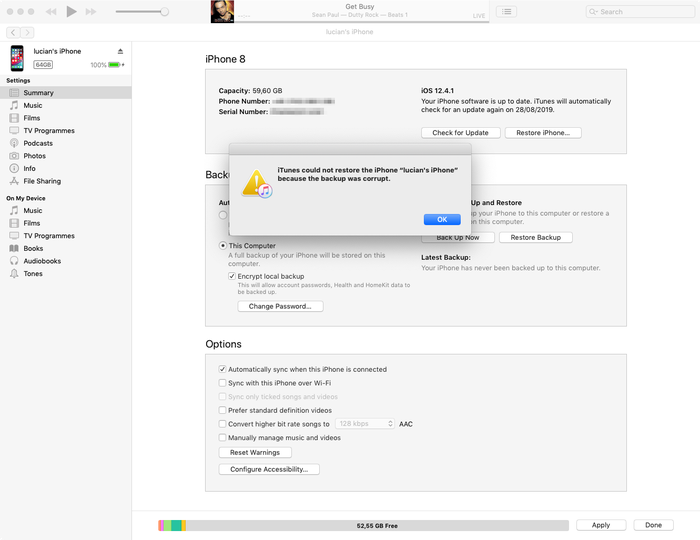
iTunes 的备份损坏错误提示

iTunes 的备份损坏错误提示

iTunes 无法恢复 iPhone,因为备份会话失败

这个错误与第一个类似,同样说明你遇到的是损坏或未完成的 iTunes 备份,原因也相似。请参阅下方关于从损坏的备份中恢复数据的提示。

iTunes 无法恢复,因为 iTunes 无法识别你的设备

对于第三条提示,你需要检查是否使用的是最新版本的 iTunes、USB 数据线是否连接妥当(且没有损坏),以及是否有第三方软件干扰 iTunes。

如果以上方法无效,通常可以使用恢复模式解决这个问题。恢复模式会抹除并恢复你的设备:如果你之前通过 iTunes 或 iCloud 同步过,恢复完成后就可以从备份中还原。

最糟糕的情况是你所连接的 iOS 设备本身存在根本性问题。如果有备用设备,可以试着用它连接。若仍不行,我们可以帮你从损坏的 iTunes 备份中提取数据。请继续往下看!

无法恢复 iPhone。发生未知错误

这个错误涵盖了一系列不同的问题。根据根本原因的不同,有多种解决办法:

  • 使用最新版本的 iTunes(而不是测试版!)是个不错的起点,如果还没有升级,请先升级
  • Windows 用户重启一下电脑可能会有帮助(如果你按上一步升级了 iTunes,本来也需要重启)
  • 彻底重置手机,并在 DFU 模式下执行恢复
  • Apple 针对此错误发布了一份简短的文档,其中有更多提示

如果仍然无法解决,请查看下方关于从损坏的 iTunes 备份中恢复数据的指南。

需要软件更新才能连接 iPhone

这条提示表示你需要更新才能连接 iPhone,但提示中并没有说明需要更新的是你的 PC 或 Mac,还是 iPhone。实际上,它指的是电脑。
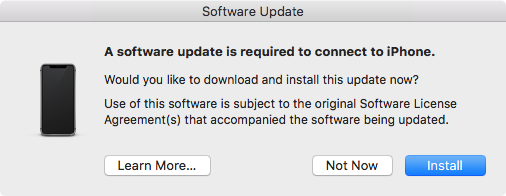
需要软件更新才能连接 iPhone

需要软件更新才能连接 iPhone

如果用户运行的是 iOS 测试版,却没有运行对应的 iTunes 测试版,通常就会看到这条提示。这种情况下,点击“安装”按钮不会起作用。系统会显示正在下载更新,过一会儿后失败,并提示“安装失败。无法安装该软件,因为目前无法从软件更新服务器获取。”解决办法是安装最新的 iTunes 测试版。

修复损坏的 iPhone 备份并取回数据的 4 个技巧

当备份无法通过 iTunes 正常恢复时,iPhone Backup Extractor 可以帮你取回数据。它能打开 iTunes 和 iCloud 备份并提取有价值的数据,即使备份已经损坏。

1. 使用 iPhone Backup Extractor 内置的损坏处理功能

即使是免费版 iPhone Backup Extractor,也内置了许多处理损坏备份的巧妙机制,它很可能可以正常提取你的数据。

试试“概览”中的数据提取快捷链接,并参阅我们关于恢复 iTunes 数据的常规指南。
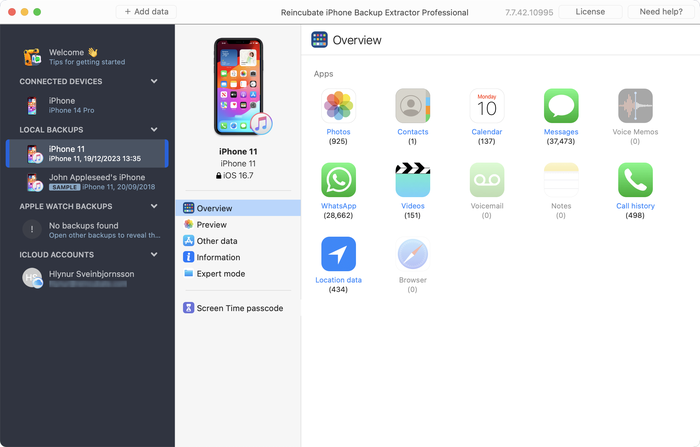
使用 iPhone Backup Extractor 从损坏的备份中提取数据

使用 iPhone Backup Extractor 从损坏的备份中提取数据

如果“概览”没有生成你需要的内容,还有两种方法可以尝试。

  1. 查看“预览”标签页,看是否有可供提取的数据。如果有数据,你可以点击应用名称,选择需要的信息,并以你想要的格式提取。如下图所示:
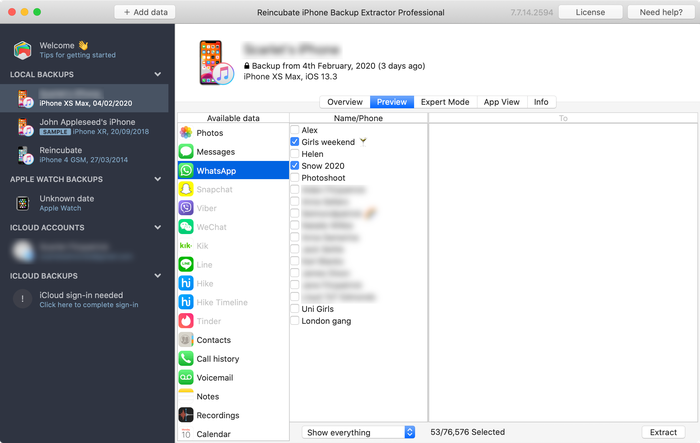
预览信息

预览信息

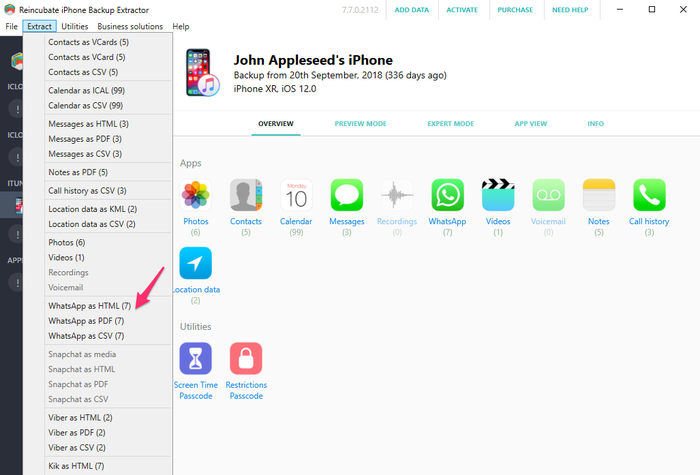
  1. 使用“提取”菜单将可用的信息导出为 HTML 或 CSV,如下方截图所示:
使用“提取”菜单提取信息

使用“提取”菜单提取信息

即使上述步骤不起作用,联系人、信息和照片等数据仍然可以从损坏的备份中取回。不要放弃希望,我们再深入一步……

2. 使用专家模式从单个文件中恢复 iPhone 数据

如果直接方法对你不起作用,你仍然可以使用“专家模式”和“应用视图”从备份中恢复文件。联系人、日历、短信、位置和备忘录等数据存储在备份中的特定文件里,只要把这些文件找出来,iPhone Backup Extractor 就能把它们转换为可读的格式。

使用 iPhone Backup Extractor 载入你的备份,然后通过“专家模式”浏览,挑选出代表你所需数据的文件。我们有一篇关于应用在 iTunes 备份中存储数据的位置的文章,对确定该去哪里查找会有帮助。
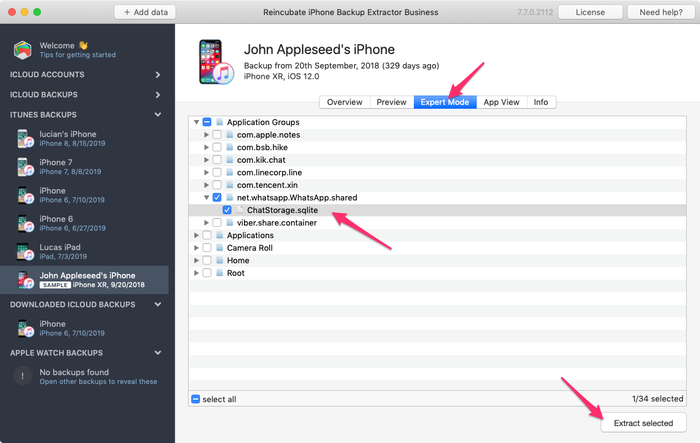
使用 iPhone Backup Extractor 手动提取 WhatsApp 数据库

使用 iPhone Backup Extractor 手动提取 WhatsApp 数据库

拿到所需文件后,就可以把它转换为可读格式:

  1. 点击 iPhone Backup Extractor 中的“文件”菜单
  2. 选择“将信息数据库转换为 CSV”“将联系人数据库转换为 vCard”,或最适合你文件的其他选项
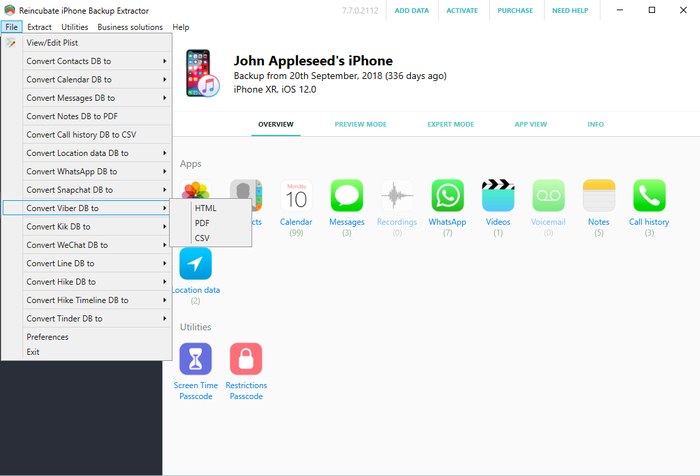
使用文件菜单进行转换……

使用文件菜单进行转换……

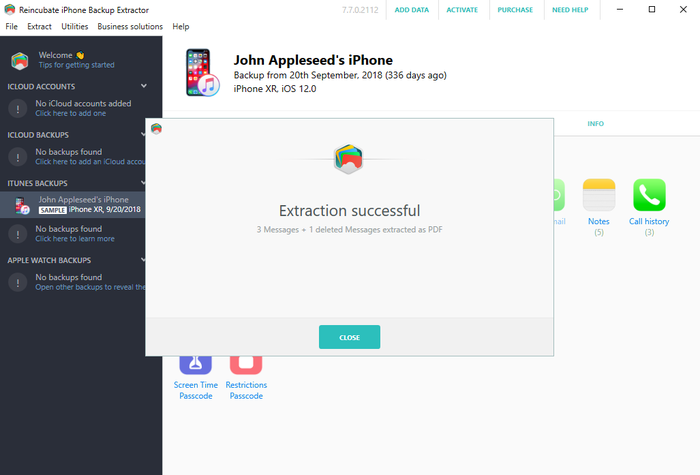
  1. 应用会导出你的联系人和信息。
恢复成功!

恢复成功!

3. 从未加密的 iPhone 备份中筛选照片和视频

即使 iTunes 的备份过程未完成并导致备份文件损坏,你仍有可能在 iTunes 备份中找到照片和视频。要做到这一点,备份在创建时必须没有启用加密。

请试试这样做:

  1. 找到相应的备份文件夹(可以在 iPhone Backup Extractor 中右键点击该备份,选择“显示所在文件夹”)
  2. 复制整个文件夹,因为我们要对它做大量修改……
  3. 将其中的文件按大小排序,并删除所有小于 300KB 的文件
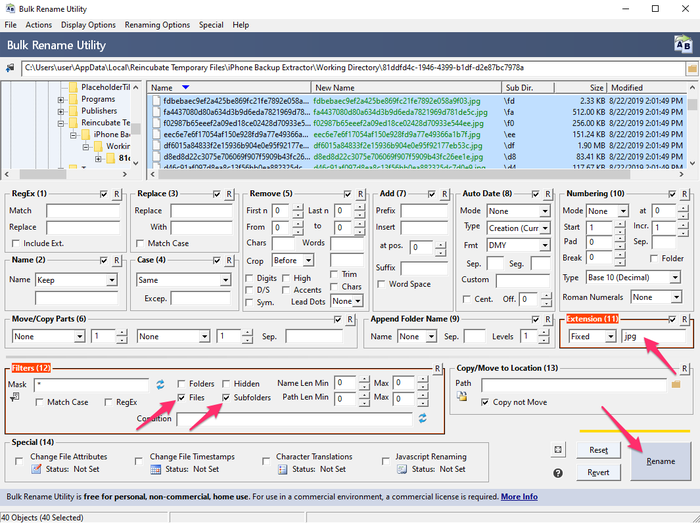
  4. 下载并安装 Bulk Rename Utility,它是免费的,非常适合这里的需求
  5. 打开“Bulk Rename Utility”,导航到你复制的备份文件夹并选中它
  6. 使用 Add > Suffix (7) 菜单,将 jpg(不带点)添加到 Extension Section (11) 或 .jpg(带点)
  7. 在上方窗口中选中所有文件(它们会显示为绿色)
  8. 点击“重命名”按钮,所有选中的文件都会被重命名为 jpg 文件
Bulk Rename Utility 运行中

Bulk Rename Utility 运行中

  1. 在保存这些文件的文件夹中,选择 Windows 资源管理器或 macOS 访达中的“缩略图视图”,这样你就能看出哪些文件是照片,因为它们会显示预览
  2. 将恢复的照片移动到一个安全的新文件夹,然后用其他文件扩展名(例如 .mov 和 .heic)从第 5 步开始重复这一过程,直到全部恢复

4. 交给 Reincubate 的专家来帮你处理

如果以上方法都不奏效,或者操作变得过于技术化,你随时可以联系我们。我们很乐意提供帮助。我们的支持团队可能会请你把“清单文件”的副本分享给他们,下方的信息面板中有关于这些文件的更多说明。

关于作者

Alexandra Malureanu

我们已帮助超过 1000 万人恢复丢失的 iPhone 数据。

也让我们来帮助你吧。

评论 (30)

unplugged 2019年9月13日

Dear reincubate professionals, I desperately need your help because Apple does not. I summarized the situation below. Is there any possible way that I can try to recover my photos and videos: On the date 7 September I saved a backup of my phone to my PC via iTunes. The next day (8 September) I wiped the phone and left to the service for battery change. After receiving I wiped the phone again and then I choose to restore from backup at the beginning. However iTunes asked me a password which I never entered for backup (I don't recall that I ever entered a password in iTunes). I tried the password of the phone and my Apple ID password but never worked. I searched online the case and someone suggested to enter Apple ID credentials on iTunes. At that stage iTunes sent an authentication code to my phone and I had to open my phone set as a new phone. Than clicked the button "change password" below the encrypt iPhone backup section. At the moment iTunes synchronized my phone because at default that option was set on iTunes. It appears to be the backup of my empty phone was overwritten on previous backup. I managed to restore from that backup but my whole photos, videos and contacts was gone. When I look into backup folder I see a large amount of data which is approximately 45GB. And last change dates of the most files are 7 September which is my first backup date. I think my data is still kept in my computer but I cannot access them. I think when iTunes overwrite the empty backup it changed the manifest.db file and some other files then the old files are not recognized by iTunes. I installed the iPhone Backup Extractor but no photos are found. Then I tried to chance file extensions by bulk rename utility however no images are shown I suppose because of encryption. Is there any possible way to restore my photos and videos from that backup folder. Or are they gone for good? Thank you in advance. Kind regards.

Reincubate 支持团队的回复 2019年9月13日

Hi unplugged, thanks for commenting. Yes, there are a number of things we could try here. We've reached out to you directly. In the meantime, make sure the remaining files are safe from modification, and that any Time Machine backups that you may have from the time won't get overridden.

vardhan 2019年1月25日

Hi.. I recently sent my iPhone 7 to get the audio IC replaced. Before giving it to the technician I took a backup on itunes and wiped it clean. While the iphone 7 was with the technician, I restored the same back up to my old iphone 6S plus for use. This worked perfectly and im cureently typing from the same phone. But i had to manually delete a lot of photos and videos from my 6S as it was a 64GB. ( Roughly 5000 images + 100 videos deleted) Now my iPhone 7 has returned after getting fixed. I tried restoring from the same back up via iTunes and it gives me the following error " iTunes cannot restore the iPhone "iPhone" because and error occurred". So i tried all the usual stuff, updating of iTunes and the iPhone 7, restarting the devices, using different usb ports and different usb cables. I even tried restoring the same backup to my Wife's new iphone Xs. The entire process went through for 1.5 hours and right when it was about to finish itunes gave me and error "itunes cannot restore iphone "iphone Dee" because the backup is corrupted" I think i have tried all possible options but came up with no luck. I would really really love to have that entire backup as it was...Can you help?

Reincubate 支持团队的回复 2019年1月25日

Hi vardhan, thanks for commenting. I think we can probably help here: we're emailing you directly now.

Lola 2016年12月10日

This month, I recently upgraded from a 4s to an iPhone 6s with Verizon-I was assured my back up would go well especially with the additional 50mb I bought on icloud; well after 7 days of back and forth at Verizon & their techs talking to Apple support techs...no one was able to explain why all of my photos were lost from my 4s to my 6s to include all of my photos that I thought were safe in my photo stream on my iCloud account. Can ANYONE please help me? This Friday, 12/16/2016, I have to break it to my middle school students that their images for the town & school paper that were safe & sound on my iCloud account are now GONE. All that remains is a their ghost of images past....a screen shot of the back up where a grey box appears with the number 837...the mysterious location where the Verizon tech assured me that the images do live on are-in fact, somewhere'... Can anyone help me to find out where they are & make them reappear?? It would surely be a Christmas miracle that would make about 90 middle schoolers very happy. Happy Holidays. Thank you so much.

Reincubate 支持团队的回复 2016年12月10日

Hi Lola, we're sorry to read this! Might you have an old iPhone backup on your PC or Mac? Failing that, we have a few tricks up our sleeve to recover photos from iCloud that aren't in the app. Drop us a note and we'll see what we can do.

Francisco 2015年11月28日

My itunes keep saying not enough free space on computer, can't restore my iphone. I'm trying to restore my old iphone with the same backup, just to take it back and update to iOS 9. And then trying to backup again and restore my new iPhone 6s Plus with it. But the main thing it's i got 270gb free on my Mac, so I don't know what else to do. Please help I don't want to loose all my photos and data. One more thing, when i tried to restore my new iPhone with that backup, said it's corrupt or not compatible. Help!!

Reincubate 支持团队的回复 2015年11月28日

Hi Francisco, things can get difficult when you've got a lot of data in a backup but little space on your PC or Mac. One solution might be to use an approach like this to move your iPhone backup into a folder on another drive (or a USB stick) and restore from there. Reach out to us if you need help!

Lahmiekah 2015年11月19日

I just got had to swap my phone due to issues on the phone when I try to restore from my backup it say corrupted or not compatible

Reincubate 支持团队的回复 2015年11月19日

Oh no! Have you followed the steps in the guide? If so, and you're still stuck, drop us a note or ping us on live chat.

Ryan Pollock 2015年10月22日

Does this work in australia? I lost my iPhone 6, but luckily backed it up not long ago. Insurance have sent me another phone but when I plug it in it gives me the dreaded error saying that it is corrupt or uncompatible. I need all the files on the back up and your free version idenitifes all the files to be extracted. How much does it cost for you to put it onto my new IPhone. I am at a complete loss

Reincubate 支持团队的回复 2015年10月22日

Hey Ryan, it sure does. If things are getting fiddly, please drop us an email through our support page and we'll jump on a screen share with you to help sort things out.

Robert Rayner 2015年7月2日

I need a way to extract music and eBooks from a corrupt backup, any ideas?

Reincubate 支持团队的回复 2015年7月2日

Hey Robert. iTunes' music isn't stored in a backup, and won't be available there. However, eBooks are, and so is music from many third-party apps. Which apps are you using for the books and music?

Dave H 2015年3月23日

How do you extract a voice memo from a corrupted backup? Thanks!

Reincubate 支持团队的回复 2015年3月23日

The simplest way is just to click "Recordings" on the main iPhone Backup Extractor window when your backup is selected. Alternately, you can find them in iPhone Backup Extractor's "Expert mode" in the folder described here.

PATRICK 2015年1月12日

After doing the ios 8 update on my Iphone 5 it started acting up. On and off every two minutes. Only 180 pictures were backed up into icloud from 2000. i trie backing up the rest but phone turn off and on. Can some one help me recover my pictures. they are very important because they are from a loved one that passed away. please help!

Reincubate 支持团队的回复 2015年1月12日

Hi Patrick, I'd recommend backing up with iTunes, and then restoring that way. It's a lot quicker, and it's much easier to verify all of your data is there.

Glenn 2014年11月2日

I used time machine to replace the corrupted file that wouldn't allow me to backup from the restore files, figured out which of my iTunes backup files to replace, then clicked on that folder with all the files in it ( I figured it out based on the date modified as I had several from various iPods and an iPad and clicked on get info of each of them to figure this out ) Go in to library/application support/mobilesync/backup

Kevin McCarthy 2014年10月24日

Is it possible to restore messages back on an iPhone

Reincubate 支持团队的回复 2014年10月24日

Hey Kevin, there sure is: check out this guide.

Val Hill 2014年10月16日

Got a new iPhone 6. Tried to restore it from iTunes. No backups were found in ITunes. Found the backup folder on my PC but three of the .plist files are missing. Status.plist is the only one I have and it looks incomplete. Need some help..

Reincubate 支持团队的回复 2014年10月16日

Uh-oh, missing files indeed. Drop us a note and we'll guide you through recreating those missing files.

Andre Ivasenko 2014年10月4日

My Iphone backup was corrupt. Please help me to restore data. I found physical stored data (10GB) on my lop top. I need help to backup this data on my iphone 5. There are very important files: app - gflash, and my contacts. Please help me to restore data. Thank you a lot.

Reincubate 支持团队的回复 2014年10月4日

Hi Andre, no problem. The guide above should help with accessing the backed up data, and this guide should help you restore is. Does that help?

CO 2014年9月27日

After being able,to extract those data from corrupted files, can theses data able to import back to the phone for data like SMS, WhatApps, other App database?

Reincubate 支持团队的回复 2014年9月27日

Hi Chanco, yes, they can. We've got a guide on restoring that data here.

Stacey 2014年9月26日

I am trying to recover some lost voicemails using iExplorer. There are 4 backups to my phone and all are damaged. Is there a way to fix that or get the voicemails back from the damaged backup file? Any help you could give me would be greatly appreciated. The voicemails are from my gramma who passed away. Thanks.

Reincubate 支持团队的回复 2014年9月26日

Yes, try iPhone Backup Extractor. If it won't automatically recover them for you, ping us on live chat and we'll help you get them back manually.

Jeffrey Nebot 2014年9月24日

I backed up my iPhone 5s IOS 7 in preparation of receiving my iPhone 6. I tried to restore from my backup iOS 7 onto my new iPhone 6. It downloaded all of the music all of the apps but it is being hung up on the photographs. It just keep saying downloading. It has been doing it for two days. I have used your software in the past I'm wondering if it will be helpful again for this situation? Some of the pictures downloaded but only a fraction. I didn't upgrade the 5s to IOS8 because I didn't have enough room on the 5S.

Reincubate 支持团队的回复 2014年9月24日

Hi Jeffrey, it's nice to hear from you. Two days of downloading sounds like a long time! I'd recommend turning off iCloud Photo Library, before turning it back on. That should sort this out.

Elsie Leong 2014年7月8日

Hi, I'd extracted out all the files, but how can I restore inside my phone?

Reincubate 支持团队的回复 2014年7月8日

Hi Elsie, we've got a guide for that here.

Morgan Phillips 2014年6月24日

Good day I would be very grateful fr a workaround for the issue I face, please. I removed the cable, like an idiot, during a backup process, it was third party software (iBackupBot) and the progress indicator had been stuck at zero for several minutes, i panicked. Right now, I can't back up to or from my device, I am pretty sure it is a corrupted manifest file. Please could you direct me to workarounds for this error: Invalid name size [E9B1] at [30E77]: (null) Prev Domain:C:\Users\........ /manifest.db Prev Path:CameraRollDomain I realise I have probably boxed this thing, is it even possible to restore a new iOS version? Thank you in advance Morgan

Reincubate 支持团队的回复 2014年6月24日

Hi Morgan, that sounds nasty! We're not experts on iBackupBot, but we can certainly help with your phone. Have you tried a factory reset?

Avenshen 2014年6月22日

Hi, hope you can help me. I backed up my old iPhone 5 on iTunes in my laptop as the phone has a hardware defect and needs to be replaced with a new unit. I made sureall was backed up in itunes. I now got the new unit and attemptied to restore the data backed up from the old unit, however, the data restore in iTunes is greyed so I assume the data was lost. Is it still possible to recover all the lost data back up?

Reincubate 支持团队的回复 2014年6月22日

Hey Avenshen, I'd guess that's because the newer device is on an older version of iOS than your newer one. If that's the case, an update will resolve the issue. If not, drop us a note and we'll get you sorted out.

carlo 2013年10月29日

hi! The files of my ipad get deleted. I already try the backup in itunes, but I dont have any backup there. All files are very important to me. Please help me. THANKS!

Reincubate 支持团队的回复 2013年10月29日

Hi Carlo, that doesn't sound good. Have you manually checked your iTunes backup folder? There's guidance on how to find them, here. Failing that, do you have a a backup of your computer in Time Machine, or another backup service?

Noel 2013年9月26日

I have just upgraded my Iphone 4 to IOS7 and I lost my pictures and contacts after it got frozen showing the I tunes and USB picture. I was able to restore it, but nomore contacts and pictures in it. I did not back up any of my contacts and pictures. Can I still recoever them?

Reincubate 支持团队的回复 2013年9月26日

Hi Noel, that sounds nasty! When you say you were able to restore the phone, I presume you mean from a backup? If so, it's worth looking through that backup with iPhone Backup Extractor to see if there are any traces of your images or contacts. You might get lucky.

Preau 2013年8月30日

good morning, my backup(11 G0) is incomplete and encrypted, i have the password. Do your soft can extract any data?

Reincubate 支持团队的回复 2013年8月30日

It certainly can. Try the free version linked to the side of this page, and reach out if you need help.

Richard 2013年7月29日

my ipod does not work as it says my ipod back-up has been corrupted and i am unable to sync with itunes

Reincubate 支持团队的回复 2013年7月29日

Reach out to us directly on live chat and we'll guide you through it with a screen-share.

Johan Bernow 2013年6月25日

What if I only can find status.plist? The info.plist, manifest.plist and the manifest.mbdb is missing. Is there any way to recreate them?

Reincubate 支持团队的回复 2013年6月25日

Hi Johan: yes. Move your backup out safely to another folder, and then create a new backup. If the device contents are similar enough, you may be able to reuse those files. Good luck!

Sonia 2013年6月25日

Hi, I have updated my iphone to ios7 beta release and later on downgraded back to ios 6.1.3. But restore backup is not compatiable. Tried after changing Product version and Build Version in Info.plist. But now it says data is corrupt or not compatiable. Please help me to restore my backup data

Reincubate 支持团队的回复 2013年6月25日

Right, this is a problem for a number of users. We can help you patch your messages etc. back into your older database if you drop us a message directly.

Devin 2013年6月24日

Hi, some how my iphone backup got corrupted. And so I tried to restore it with another back up, but it was my ipod backup and when i tried restoring it back it said "itunes could not restore the phone because the phone refused the request" and this is frustrating because it wont let me send any messages and all my contacts and stuff are gone.

Reincubate 支持团队的回复 2013年6月24日

Hey Devin, drop us a note and we'll give you a hand with your backup. There'll be a way!

dominic 2013年2月28日

i want to simply reset my iphone pin to purchase apps for the phone. i dont require resetting my ios and i dont want to affect the ios, but can iphone extractor reveal the pin if i run it?

Reincubate 支持团队的回复 2013年2月28日

Dominic: see our article on resetting the restrictions passcode for a solution to this.

Kerry Miller 2013年2月16日

My iPad had begun to have more and more apps crashed so I took it to the apple store. The genius read the incident report and said I had corrupt files so I needed to plug it into my MacBook and backup it up then reset the device. He said since the file would also be corrupted on the backup that I would need to start new instead of restore the backup. I did so and now I have a few apps that I have lost data from. I have since been informed that one app can't corrupt the whole iPad because of sandbox. So who do I believe and how do I proceed? I did try restoring the iPad's backup and the problem was still there so I reset and made new and that's where I'm at now.

Reincubate 支持团队的回复 2013年2月16日

Oh no! That's frustrating. Drop us a note directly and we'll help you recover that data. It shouldn't be possible for any of your iOS apps to corrupt your backup.

nighto 2013年1月5日

Hi, My last backup of my iPhone 5 somehow got corrupted after a failed iOS 6.0.2 upgrade. I can see all the files in the backup folder but it is missing all the manifest files. I use iPhone Backup Extractor to review the Backup file and it doesn't recognize the last backup taken before the upgrade. I would like to know is there a way to recover the last backup? Thanks Nighto

Reincubate 支持团队的回复 2013年1月5日

Nighto, this is because the previous backup can sometimes get overwritten after the upgrade (Yes, I did say after! And yes, this does happen ever now and then). Without the manifests it can cause issues reading files, but iPhone Backup Extractor can certain find data without the manifests by using the File menu. However if data does exist in the backup, we are experts at extracting, so please contact our help desk for more information.

haider 2012年1月13日

hey, i am having some problems with understanding how to re-establish all my backed up data back onto my iphone, i was wondering if there is any further help or personal assistance i could receive? thank you

Reincubate 支持团队的回复 2012年1月13日

Hi Haider, of course! Drop us a note on support@reincubate.com and we'd be happy to set up a screens-share to guide you through it.


热门文章

King's Award for Enterprise 标志

King's Award for Enterprise:Reincubate 已四次荣获英国最高官方商业荣誉,最近一次是表彰公司过去三年的卓越增长。

我们与用户和合作伙伴的关系是我们价值观和所创造产品的核心。查看 用户评价,听听他们对我们的评价。

通过 Centre for Assessment 的 ISO 27001 认证,获 UKAS 认可

© 2008-2026 Reincubate Ltd. 保留所有权利。在英格兰和威尔士注册,公司编号 5189175,增值税号 GB151788978。Camo®、Streamlight® 和 Reincubate® 是注册商标。专利申请中。

帮助