
Ga naar hoofdinhoud

Handleidingen en tips

Een beschadigde iPhone-back-up repareren en de gegevens terugzetten

Alexandra MalureanuGepubliceerd op 25 juli 2012Bijgewerkt op 2 maart 2020
Cover image for: Een beschadigde iPhone-back-up repareren en de gegevens terugzetten

Gegevens herstellen uit een beschadigde iTunes-back-up is lastig, maar niet onmogelijk, en berichten als “de back-up is beschadigd of niet compatibel met de iPhone die wordt teruggezet” betekenen niet dat je gegevens “onherstelbaar verloren” zijn. Met iPhone Backup Extractor heb je een goede kans om beschadigde back-ups automatisch te herstellen.

Gegevens uit een niet-versleutelde, beschadigde iTunes-back-up herstellen is meestal eenvoudig. Versleutelde beschadigde back-ups zijn lastiger, vooral als de “manifestbestanden” ontbreken, want die beschrijven hoe de gegevens in de back-up zijn versleuteld en zijn essentieel voor het ontsleutelingsproces.

Back-ups kunnen in verschillende mate beschadigd raken. Een vol geheugen midden in een back-up, een defecte harde schijf (of Dropbox die je bestanden opeet!), een mislukte iOS-update of een stroomstoring tijdens de back-up kunnen elk op een andere manier invloed hebben op de back-up.

Er zijn een handvol fouten die je kunt krijgen als een back-up beschadigd is. We bekijken de oorzaak en de oplossing van elk.

iTunes-foutmeldingen bij het terugzetten die op beschadiging wijzen

iTunes kon de iPhone niet terugzetten omdat de back-up beschadigd of niet compatibel was met de iPhone die wordt teruggezet

Deze eerste melding is duidelijk en vertelt je dat je met een beschadigde back-up te maken hebt. Soms gebeurt het dat iTunes bij het maken van een back-up van je iOS-apparaat zonder foutmelding mislukt. Het is vervelend om pas bij het terugzetten met iTunes te ontdekken dat je een beschadigde back-up hebt. Het is niet zo moeilijk om je gegevens eruit te halen: bekijk hieronder onze handleiding voor het ophalen van gegevens uit een beschadigde iPhone-back-up.
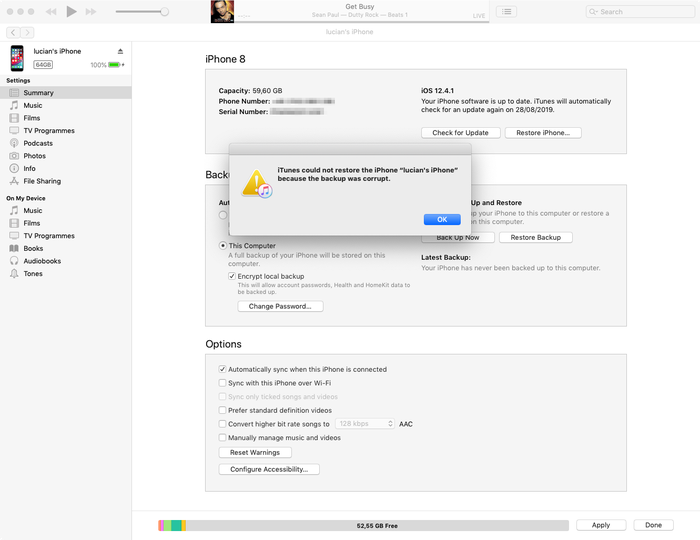
De foutmelding van iTunes over een beschadigde back-up

De foutmelding van iTunes over een beschadigde back-up

iTunes kon iPhone niet terugzetten omdat de back-upsessie is mislukt

Deze fout lijkt op de eerste en geeft ook aan dat je te maken hebt met een beschadigde of onvoltooide iTunes-back-up. De oorzaak is vergelijkbaar. Bekijk hieronder onze tips voor het herstellen van gegevens uit beschadigde back-ups.

iTunes kon niet terugzetten omdat iTunes je apparaat niet herkent

Bij deze derde melding moet je controleren of je de nieuwste versie van iTunes gebruikt, of je usb-kabel goed is aangesloten (en niet beschadigd is) en of er geen software van derden met iTunes interfereert.

Werkt het bovenstaande niet, dan kan dit probleem meestal worden opgelost met de herstelmodus. De herstelmodus wist je apparaat en zet het terug: als je eerder met iTunes of iCloud hebt gesynchroniseerd, kun je na het herstel een back-up terugzetten.

In het slechtste geval is er een fundamenteel probleem met het iOS-apparaat dat je aansluit. Heb je een reserveapparaat, probeer dat dan te gebruiken. Lukt dat niet, dan kunnen we je helpen gegevens uit een beschadigde iTunes-back-up te halen. Lees verder!

De iPhone kon niet worden teruggezet. Er is een onbekende fout opgetreden

Deze fout is een verzamelbak voor allerlei verschillende problemen. Afhankelijk van de onderliggende oorzaak zijn er verschillende oplossingen:

  • De nieuwste versie van iTunes gebruiken (en geen bèta!) is een goed begin: werk iTunes bij als je dat nog niet hebt gedaan
  • Windows-gebruikers merken vaak dat een herstart helpt (als je de stap hierboven volgt en iTunes bijwerkt, moet je sowieso herstarten)
  • De telefoon volledig resetten en een herstel uitvoeren in DFU-modus
  • Apple publiceert een kort document met aanvullende tips voor deze fout

Lukt het hiermee niet, bekijk dan hieronder onze handleiding voor het herstellen van gegevens uit een beschadigde iTunes-back-up.

Er is een software-update nodig om verbinding te maken met de iPhone

Deze melding betekent dat er een update nodig is om verbinding met de iPhone te maken. Uit de melding blijkt niet of het gaat om een update voor je pc of Mac, of voor de iPhone. Het gaat om de computer, zo blijkt.
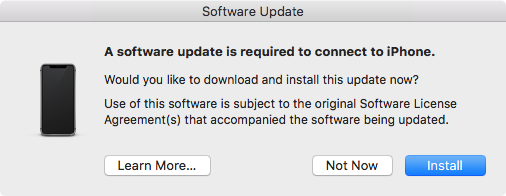
Er is een software-update nodig om verbinding te maken met de iPhone

Er is een software-update nodig om verbinding te maken met de iPhone

Gebruikers krijgen dit vaak als ze een bètaversie van iOS gebruiken, maar niet de bijbehorende bètaversie van iTunes. In dat geval werkt de knop “Installeer” niet. Er staat dan een tijdje dat er een update wordt gedownload voordat het mislukt met de melding “Installatie mislukt. De software kan niet worden geïnstalleerd omdat deze momenteel niet beschikbaar is op de server voor software-updates.” De oplossing is de nieuwste bèta van iTunes te installeren.

4 trucs om een beschadigde iPhone-back-up te repareren en je gegevens op te halen

iPhone Backup Extractor is ontworpen om je te helpen aan je gegevens te komen als een back-up niet goed via iTunes kan worden teruggezet. Het opent iTunes- en iCloud-back-ups en pakt waardevolle gegevens uit, zelfs als die back-up beschadigd is.

1. Gebruik de ingebouwde afhandeling van beschadigingen in iPhone Backup Extractor

Zelfs de gratis versie van iPhone Backup Extractor heeft veel slimmigheden ingebouwd om met beschadigde back-ups om te gaan, en het kan zijn dat je gegevens daarmee gewoon kunnen worden uitgepakt.

Probeer de snelkoppelingen voor het uitpakken van gegevens in “Overzicht” en bekijk onze gewone handleidingen over het herstellen van iTunes-gegevens.
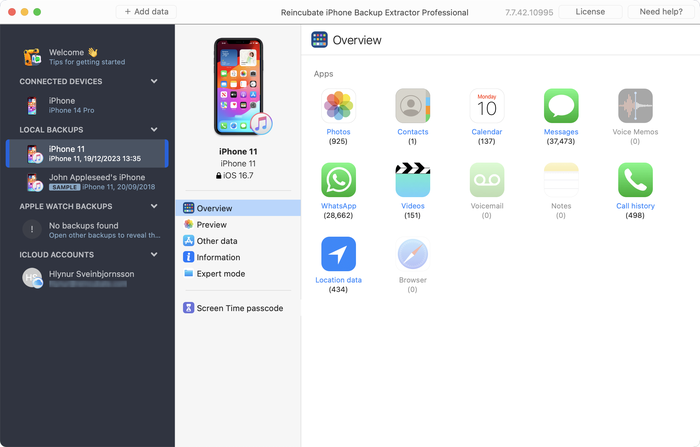
Gegevens uitpakken uit een beschadigde back-up met iPhone Backup Extractor

Gegevens uitpakken uit een beschadigde back-up met iPhone Backup Extractor

Levert het overzicht niet op wat je nodig hebt, dan zijn er nog twee andere aanpakken om te proberen.

  1. Controleer op het tabblad “Voorvertoning” of er gegevens beschikbaar zijn om uit te pakken. Zijn die er, dan kun je op de naam van de app klikken, de berichten selecteren die je nodig hebt en ze uitpakken in het gewenste formaat. Zoals hieronder:
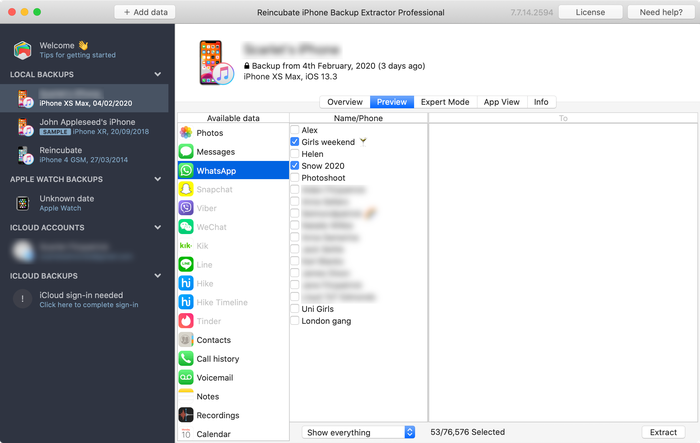
Berichten bekijken in het voorbeeld

Berichten bekijken in het voorbeeld

  1. Gebruik het menu “Extraheren” om beschikbare berichten te exporteren als html of csv, zoals te zien is op de onderstaande schermafbeelding:
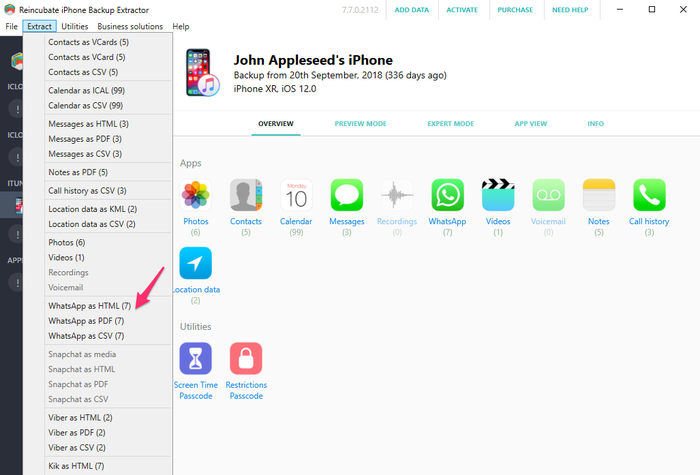
Berichten uitpakken met het menu “Extraheren”

Berichten uitpakken met het menu “Extraheren”

Gegevens zoals contacten, berichten en foto’s kunnen nog steeds uit de beschadigde back-up worden opgehaald, ook als de bovenstaande stappen niet werken. Geef de hoop niet op, we gaan dieper...

2. Gebruik Expert mode om iPhone-gegevens uit afzonderlijke bestanden te herstellen

Werkt de directe aanpak niet voor je, dan kun je nog steeds “Expertmodus” en “App-weergave” gebruiken om je bestanden uit de back-up te herstellen. Gegevens zoals contacten, agenda’s, sms-berichten, locaties en notities staan in specifieke bestanden in je back-up, en als je die bestanden eruit vist, kan iPhone Backup Extractor ze voor je omzetten naar leesbare formaten.

Laad je back-up met iPhone Backup Extractor en navigeer vervolgens door “Expertmodus” om de bestanden te kiezen die de gewenste gegevens bevatten. We hebben een artikel over waar apps hun gegevens opslaan in een iTunes-back-up dat handig is om te weten waar je moet zoeken.
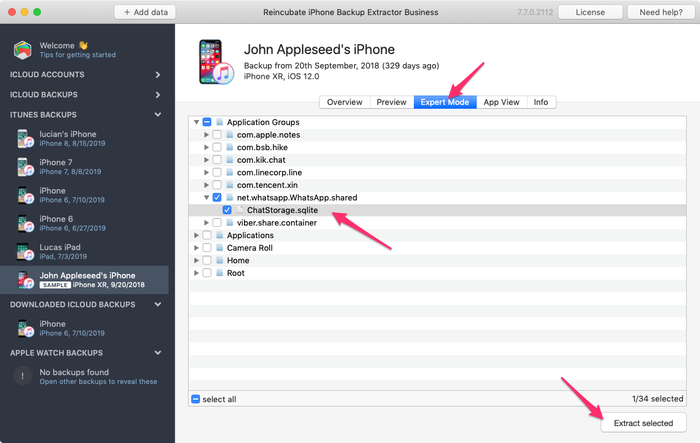
De WhatsApp-database handmatig uitpakken met iPhone Backup Extractor

De WhatsApp-database handmatig uitpakken met iPhone Backup Extractor

Zodra je het benodigde bestand hebt, kun je het omzetten naar een leesbaar formaat:

  1. Klik op het menu “Bestand” in iPhone Backup Extractor
  2. Selecteer “Berichten-database omzetten naar CSV”, “Contactendatabase omzetten naar vCards” of de optie die het best bij je bestand past
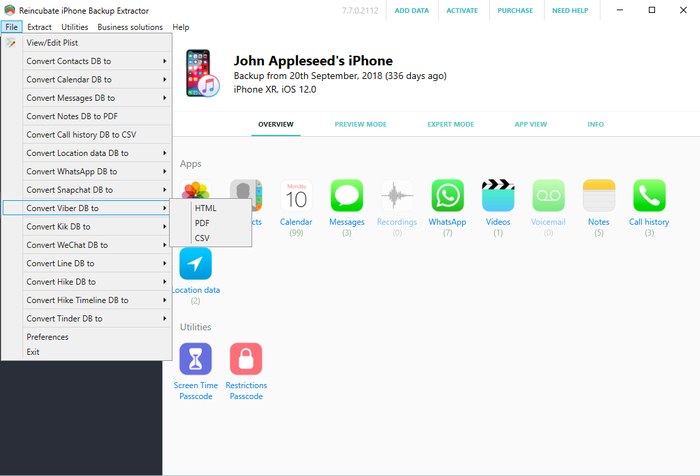
Het bestandsmenu gebruiken om om te zetten...

Het bestandsmenu gebruiken om om te zetten...

  1. De app exporteert je contacten en berichten.
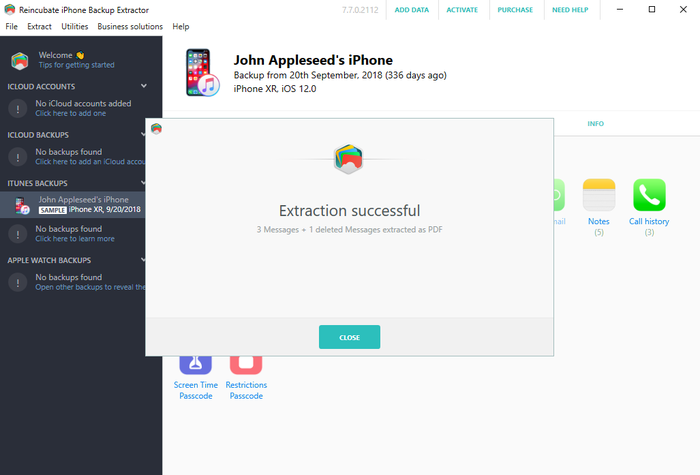
Herstel geslaagd!

Herstel geslaagd!

3. Doorzoek een niet-versleutelde iPhone-back-up op foto’s en video’s

Mogelijk vind je nog foto’s en video’s in je iTunes-back-up, ook als het iTunes-proces onvolledig was en tot een beschadigd back-upbestand heeft geleid. Hiervoor mag de back-up niet met versleuteling zijn gemaakt.

Probeer dit:

  1. Zoek de betreffende back-upmap (je kunt in iPhone Backup Extractor met de rechtermuisknop op de back-up klikken en “Toon in bovenliggende map” kiezen)
  2. Maak een kopie van de hele map, want we gaan er flink aan sleutelen...
  3. Sorteer de bestanden erin op grootte en verwijder alle bestanden kleiner dan 300 kB
  4. Download en installeer Bulk Rename Utility. Het is gratis en geschikt voor wat we hier nodig hebben
  5. Open “Bulk Rename Utility”, navigeer naar de kopie van de back-upmap die je hebt gemaakt en selecteer die
  6. Voeg jpg (zonder punt) toe aan Extension Section (11) of .jpg (met punt) via het menu Add > Suffix (7)
  7. Selecteer alle bestanden in het bovenste venster (ze verschijnen in het groen)
  8. Klik op de knop “Rename” en alle geselecteerde bestanden worden hernoemd naar jpg-bestanden
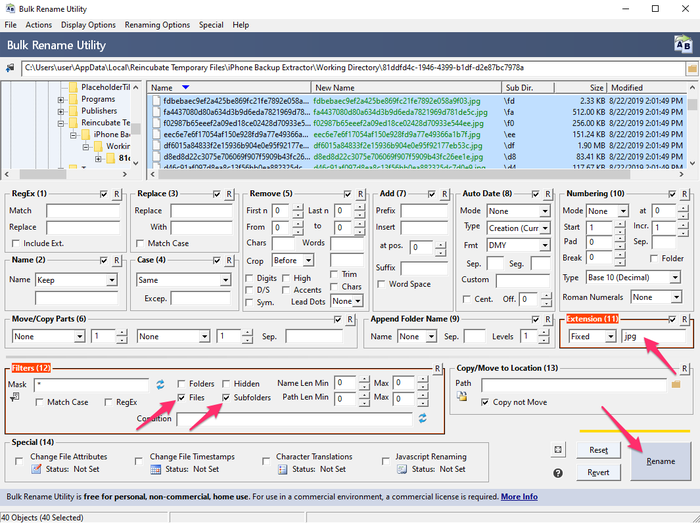
Bulk Rename Utility in actie

Bulk Rename Utility in actie

  1. Selecteer in de map waar je ze hebt opgeslagen “Miniatuurweergave” in Windows Verkenner of macOS Finder. Nu kun je zien welke bestanden foto’s zijn, omdat ze met een voorbeeld worden getoond
  2. Verplaats de herstelde foto’s naar een nieuwe, veilige map en herhaal het proces vanaf stap 5 met andere bestandsextensies, zoals .mov en .heic, totdat je alles hebt hersteld

4. Laat de experts van Reincubate het voor je doen

Werkt geen van de bovenstaande aanpakken, of worden ze te technisch, dan kun je altijd contact met ons opnemen. We helpen je graag. Ons supportteam zal je waarschijnlijk vragen een kopie van je “manifestbestanden” met hen te delen, en hieronder staat een informatiepaneel met meer informatie hierover.
Over de auteur

Alexandra Malureanu

We hebben al meer dan 10.000.000 mensen geholpen hun verloren iPhone-gegevens te herstellen.

Laat ons ook jou helpen.

Reacties (30)

unplugged 13 september 2019

Dear reincubate professionals, I desperately need your help because Apple does not. I summarized the situation below. Is there any possible way that I can try to recover my photos and videos: On the date 7 September I saved a backup of my phone to my PC via iTunes. The next day (8 September) I wiped the phone and left to the service for battery change. After receiving I wiped the phone again and then I choose to restore from backup at the beginning. However iTunes asked me a password which I never entered for backup (I don't recall that I ever entered a password in iTunes). I tried the password of the phone and my Apple ID password but never worked. I searched online the case and someone suggested to enter Apple ID credentials on iTunes. At that stage iTunes sent an authentication code to my phone and I had to open my phone set as a new phone. Than clicked the button "change password" below the encrypt iPhone backup section. At the moment iTunes synchronized my phone because at default that option was set on iTunes. It appears to be the backup of my empty phone was overwritten on previous backup. I managed to restore from that backup but my whole photos, videos and contacts was gone. When I look into backup folder I see a large amount of data which is approximately 45GB. And last change dates of the most files are 7 September which is my first backup date. I think my data is still kept in my computer but I cannot access them. I think when iTunes overwrite the empty backup it changed the manifest.db file and some other files then the old files are not recognized by iTunes. I installed the iPhone Backup Extractor but no photos are found. Then I tried to chance file extensions by bulk rename utility however no images are shown I suppose because of encryption. Is there any possible way to restore my photos and videos from that backup folder. Or are they gone for good? Thank you in advance. Kind regards.

Antwoord van Reincubate-support 13 september 2019

Hi unplugged, thanks for commenting. Yes, there are a number of things we could try here. We've reached out to you directly. In the meantime, make sure the remaining files are safe from modification, and that any Time Machine backups that you may have from the time won't get overridden.

vardhan 25 januari 2019

Hi.. I recently sent my iPhone 7 to get the audio IC replaced. Before giving it to the technician I took a backup on itunes and wiped it clean. While the iphone 7 was with the technician, I restored the same back up to my old iphone 6S plus for use. This worked perfectly and im cureently typing from the same phone. But i had to manually delete a lot of photos and videos from my 6S as it was a 64GB. ( Roughly 5000 images + 100 videos deleted) Now my iPhone 7 has returned after getting fixed. I tried restoring from the same back up via iTunes and it gives me the following error " iTunes cannot restore the iPhone "iPhone" because and error occurred". So i tried all the usual stuff, updating of iTunes and the iPhone 7, restarting the devices, using different usb ports and different usb cables. I even tried restoring the same backup to my Wife's new iphone Xs. The entire process went through for 1.5 hours and right when it was about to finish itunes gave me and error "itunes cannot restore iphone "iphone Dee" because the backup is corrupted" I think i have tried all possible options but came up with no luck. I would really really love to have that entire backup as it was...Can you help?

Antwoord van Reincubate-support 25 januari 2019

Hi vardhan, thanks for commenting. I think we can probably help here: we're emailing you directly now.

Lola 10 december 2016

This month, I recently upgraded from a 4s to an iPhone 6s with Verizon-I was assured my back up would go well especially with the additional 50mb I bought on icloud; well after 7 days of back and forth at Verizon & their techs talking to Apple support techs...no one was able to explain why all of my photos were lost from my 4s to my 6s to include all of my photos that I thought were safe in my photo stream on my iCloud account. Can ANYONE please help me? This Friday, 12/16/2016, I have to break it to my middle school students that their images for the town & school paper that were safe & sound on my iCloud account are now GONE. All that remains is a their ghost of images past....a screen shot of the back up where a grey box appears with the number 837...the mysterious location where the Verizon tech assured me that the images do live on are-in fact, somewhere'... Can anyone help me to find out where they are & make them reappear?? It would surely be a Christmas miracle that would make about 90 middle schoolers very happy. Happy Holidays. Thank you so much.

Antwoord van Reincubate-support 10 december 2016

Hi Lola, we're sorry to read this! Might you have an old iPhone backup on your PC or Mac? Failing that, we have a few tricks up our sleeve to recover photos from iCloud that aren't in the app. Drop us a note and we'll see what we can do.

Francisco 28 november 2015

My itunes keep saying not enough free space on computer, can't restore my iphone. I'm trying to restore my old iphone with the same backup, just to take it back and update to iOS 9. And then trying to backup again and restore my new iPhone 6s Plus with it. But the main thing it's i got 270gb free on my Mac, so I don't know what else to do. Please help I don't want to loose all my photos and data. One more thing, when i tried to restore my new iPhone with that backup, said it's corrupt or not compatible. Help!!

Antwoord van Reincubate-support 28 november 2015

Hi Francisco, things can get difficult when you've got a lot of data in a backup but little space on your PC or Mac. One solution might be to use an approach like this to move your iPhone backup into a folder on another drive (or a USB stick) and restore from there. Reach out to us if you need help!

Lahmiekah 19 november 2015

I just got had to swap my phone due to issues on the phone when I try to restore from my backup it say corrupted or not compatible

Antwoord van Reincubate-support 19 november 2015

Oh no! Have you followed the steps in the guide? If so, and you're still stuck, drop us a note or ping us on live chat.

Ryan Pollock 22 oktober 2015

Does this work in australia? I lost my iPhone 6, but luckily backed it up not long ago. Insurance have sent me another phone but when I plug it in it gives me the dreaded error saying that it is corrupt or uncompatible. I need all the files on the back up and your free version idenitifes all the files to be extracted. How much does it cost for you to put it onto my new IPhone. I am at a complete loss

Antwoord van Reincubate-support 22 oktober 2015

Hey Ryan, it sure does. If things are getting fiddly, please drop us an email through our support page and we'll jump on a screen share with you to help sort things out.

Robert Rayner 2 juli 2015

I need a way to extract music and eBooks from a corrupt backup, any ideas?

Antwoord van Reincubate-support 2 juli 2015

Hey Robert. iTunes' music isn't stored in a backup, and won't be available there. However, eBooks are, and so is music from many third-party apps. Which apps are you using for the books and music?

Dave H 23 maart 2015

How do you extract a voice memo from a corrupted backup? Thanks!

Antwoord van Reincubate-support 23 maart 2015

The simplest way is just to click "Recordings" on the main iPhone Backup Extractor window when your backup is selected. Alternately, you can find them in iPhone Backup Extractor's "Expert mode" in the folder described here.

PATRICK 12 januari 2015

After doing the ios 8 update on my Iphone 5 it started acting up. On and off every two minutes. Only 180 pictures were backed up into icloud from 2000. i trie backing up the rest but phone turn off and on. Can some one help me recover my pictures. they are very important because they are from a loved one that passed away. please help!

Antwoord van Reincubate-support 12 januari 2015

Hi Patrick, I'd recommend backing up with iTunes, and then restoring that way. It's a lot quicker, and it's much easier to verify all of your data is there.

Glenn 2 november 2014

I used time machine to replace the corrupted file that wouldn't allow me to backup from the restore files, figured out which of my iTunes backup files to replace, then clicked on that folder with all the files in it ( I figured it out based on the date modified as I had several from various iPods and an iPad and clicked on get info of each of them to figure this out ) Go in to library/application support/mobilesync/backup

Kevin McCarthy 24 oktober 2014

Is it possible to restore messages back on an iPhone

Antwoord van Reincubate-support 24 oktober 2014

Hey Kevin, there sure is: check out this guide.

Val Hill 16 oktober 2014

Got a new iPhone 6. Tried to restore it from iTunes. No backups were found in ITunes. Found the backup folder on my PC but three of the .plist files are missing. Status.plist is the only one I have and it looks incomplete. Need some help..

Antwoord van Reincubate-support 16 oktober 2014

Uh-oh, missing files indeed. Drop us a note and we'll guide you through recreating those missing files.

Andre Ivasenko 4 oktober 2014

My Iphone backup was corrupt. Please help me to restore data. I found physical stored data (10GB) on my lop top. I need help to backup this data on my iphone 5. There are very important files: app - gflash, and my contacts. Please help me to restore data. Thank you a lot.

Antwoord van Reincubate-support 4 oktober 2014

Hi Andre, no problem. The guide above should help with accessing the backed up data, and this guide should help you restore is. Does that help?

CO 27 september 2014

After being able,to extract those data from corrupted files, can theses data able to import back to the phone for data like SMS, WhatApps, other App database?

Antwoord van Reincubate-support 27 september 2014

Hi Chanco, yes, they can. We've got a guide on restoring that data here.

Stacey 26 september 2014

I am trying to recover some lost voicemails using iExplorer. There are 4 backups to my phone and all are damaged. Is there a way to fix that or get the voicemails back from the damaged backup file? Any help you could give me would be greatly appreciated. The voicemails are from my gramma who passed away. Thanks.

Antwoord van Reincubate-support 26 september 2014

Yes, try iPhone Backup Extractor. If it won't automatically recover them for you, ping us on live chat and we'll help you get them back manually.

Jeffrey Nebot 24 september 2014

I backed up my iPhone 5s IOS 7 in preparation of receiving my iPhone 6. I tried to restore from my backup iOS 7 onto my new iPhone 6. It downloaded all of the music all of the apps but it is being hung up on the photographs. It just keep saying downloading. It has been doing it for two days. I have used your software in the past I'm wondering if it will be helpful again for this situation? Some of the pictures downloaded but only a fraction. I didn't upgrade the 5s to IOS8 because I didn't have enough room on the 5S.

Antwoord van Reincubate-support 24 september 2014

Hi Jeffrey, it's nice to hear from you. Two days of downloading sounds like a long time! I'd recommend turning off iCloud Photo Library, before turning it back on. That should sort this out.

Elsie Leong 8 juli 2014

Hi, I'd extracted out all the files, but how can I restore inside my phone?

Antwoord van Reincubate-support 8 juli 2014

Hi Elsie, we've got a guide for that here.

Morgan Phillips 24 juni 2014

Good day I would be very grateful fr a workaround for the issue I face, please. I removed the cable, like an idiot, during a backup process, it was third party software (iBackupBot) and the progress indicator had been stuck at zero for several minutes, i panicked. Right now, I can't back up to or from my device, I am pretty sure it is a corrupted manifest file. Please could you direct me to workarounds for this error: Invalid name size [E9B1] at [30E77]: (null) Prev Domain:C:\Users\........ /manifest.db Prev Path:CameraRollDomain I realise I have probably boxed this thing, is it even possible to restore a new iOS version? Thank you in advance Morgan

Antwoord van Reincubate-support 24 juni 2014

Hi Morgan, that sounds nasty! We're not experts on iBackupBot, but we can certainly help with your phone. Have you tried a factory reset?

Avenshen 22 juni 2014

Hi, hope you can help me. I backed up my old iPhone 5 on iTunes in my laptop as the phone has a hardware defect and needs to be replaced with a new unit. I made sureall was backed up in itunes. I now got the new unit and attemptied to restore the data backed up from the old unit, however, the data restore in iTunes is greyed so I assume the data was lost. Is it still possible to recover all the lost data back up?

Antwoord van Reincubate-support 22 juni 2014

Hey Avenshen, I'd guess that's because the newer device is on an older version of iOS than your newer one. If that's the case, an update will resolve the issue. If not, drop us a note and we'll get you sorted out.

carlo 29 oktober 2013

hi! The files of my ipad get deleted. I already try the backup in itunes, but I dont have any backup there. All files are very important to me. Please help me. THANKS!

Antwoord van Reincubate-support 29 oktober 2013

Hi Carlo, that doesn't sound good. Have you manually checked your iTunes backup folder? There's guidance on how to find them, here. Failing that, do you have a a backup of your computer in Time Machine, or another backup service?

Noel 26 september 2013

I have just upgraded my Iphone 4 to IOS7 and I lost my pictures and contacts after it got frozen showing the I tunes and USB picture. I was able to restore it, but nomore contacts and pictures in it. I did not back up any of my contacts and pictures. Can I still recoever them?

Antwoord van Reincubate-support 26 september 2013

Hi Noel, that sounds nasty! When you say you were able to restore the phone, I presume you mean from a backup? If so, it's worth looking through that backup with iPhone Backup Extractor to see if there are any traces of your images or contacts. You might get lucky.

Preau 30 augustus 2013

good morning, my backup(11 G0) is incomplete and encrypted, i have the password. Do your soft can extract any data?

Antwoord van Reincubate-support 30 augustus 2013

It certainly can. Try the free version linked to the side of this page, and reach out if you need help.

Richard 29 juli 2013

my ipod does not work as it says my ipod back-up has been corrupted and i am unable to sync with itunes

Antwoord van Reincubate-support 29 juli 2013

Reach out to us directly on live chat and we'll guide you through it with a screen-share.

Johan Bernow 25 juni 2013

What if I only can find status.plist? The info.plist, manifest.plist and the manifest.mbdb is missing. Is there any way to recreate them?

Antwoord van Reincubate-support 25 juni 2013

Hi Johan: yes. Move your backup out safely to another folder, and then create a new backup. If the device contents are similar enough, you may be able to reuse those files. Good luck!

Sonia 25 juni 2013

Hi, I have updated my iphone to ios7 beta release and later on downgraded back to ios 6.1.3. But restore backup is not compatiable. Tried after changing Product version and Build Version in Info.plist. But now it says data is corrupt or not compatiable. Please help me to restore my backup data

Antwoord van Reincubate-support 25 juni 2013

Right, this is a problem for a number of users. We can help you patch your messages etc. back into your older database if you drop us a message directly.

Devin 24 juni 2013

Hi, some how my iphone backup got corrupted. And so I tried to restore it with another back up, but it was my ipod backup and when i tried restoring it back it said "itunes could not restore the phone because the phone refused the request" and this is frustrating because it wont let me send any messages and all my contacts and stuff are gone.

Antwoord van Reincubate-support 24 juni 2013

Hey Devin, drop us a note and we'll give you a hand with your backup. There'll be a way!

dominic 28 februari 2013

i want to simply reset my iphone pin to purchase apps for the phone. i dont require resetting my ios and i dont want to affect the ios, but can iphone extractor reveal the pin if i run it?

Antwoord van Reincubate-support 28 februari 2013

Dominic: see our article on resetting the restrictions passcode for a solution to this.

Kerry Miller 16 februari 2013

My iPad had begun to have more and more apps crashed so I took it to the apple store. The genius read the incident report and said I had corrupt files so I needed to plug it into my MacBook and backup it up then reset the device. He said since the file would also be corrupted on the backup that I would need to start new instead of restore the backup. I did so and now I have a few apps that I have lost data from. I have since been informed that one app can't corrupt the whole iPad because of sandbox. So who do I believe and how do I proceed? I did try restoring the iPad's backup and the problem was still there so I reset and made new and that's where I'm at now.

Antwoord van Reincubate-support 16 februari 2013

Oh no! That's frustrating. Drop us a note directly and we'll help you recover that data. It shouldn't be possible for any of your iOS apps to corrupt your backup.

nighto 5 januari 2013

Hi, My last backup of my iPhone 5 somehow got corrupted after a failed iOS 6.0.2 upgrade. I can see all the files in the backup folder but it is missing all the manifest files. I use iPhone Backup Extractor to review the Backup file and it doesn't recognize the last backup taken before the upgrade. I would like to know is there a way to recover the last backup? Thanks Nighto

Antwoord van Reincubate-support 5 januari 2013

Nighto, this is because the previous backup can sometimes get overwritten after the upgrade (Yes, I did say after! And yes, this does happen ever now and then). Without the manifests it can cause issues reading files, but iPhone Backup Extractor can certain find data without the manifests by using the File menu. However if data does exist in the backup, we are experts at extracting, so please contact our help desk for more information.

haider 13 januari 2012

hey, i am having some problems with understanding how to re-establish all my backed up data back onto my iphone, i was wondering if there is any further help or personal assistance i could receive? thank you

Antwoord van Reincubate-support 13 januari 2012

Hi Haider, of course! Drop us a note on support@reincubate.com and we'd be happy to set up a screens-share to guide you through it.


Populaire artikelen

Logo van de King's Award for Enterprise

King's Award for Enterprise: Reincubate heeft vier keer de hoogste officiële zakelijke onderscheiding van het Verenigd Koninkrijk gewonnen, het meest recent als erkenning voor de uitzonderlijke groei van het bedrijf in de afgelopen drie jaar.

Onze relaties met gebruikers en partners staan centraal in onze waarden en de producten die we maken. Bekijk onze reviews om te horen wat zij over ons te zeggen hebben.

ISO 27001-gecertificeerd door Centre for Assessment, geaccrediteerd door UKAS

© 2008-2026 Reincubate Ltd. Alle rechten voorbehouden. Ingeschreven in Engeland en Wales onder nr. 5189175, btw-nummer GB151788978. Camo®, Streamlight® en Reincubate® zijn geregistreerde handelsmerken. Octrooien aangevraagd.

Hulp