본문으로 건너뛰기

가이드 및 팁

암호화된 iPhone 백업을 복호화하는 방법

Aidan Fitzpatrick게시일: 2012년 7월 25일업데이트: 2020년 2월 29일
이 페이지에서
Cover image for: 암호화된 iPhone 백업을 복호화하는 방법

iPhone, iPad, iPod용 백업 추출 프로그램을 사용하면 암호화된 iTunes 백업에서도 손쉽게 데이터를 추출할 수 있습니다. 암호화할 때 사용한 비밀번호만 알고 있으면 됩니다.

iTunes로 암호화된 iPhone 백업을 읽는 방법

대부분의 사람들은 개인 데이터를 매우 안전하게 보관하고 싶어 하며, 이는 당연한 일입니다. 하지만 개인 데이터를 한 기기에서 다른 기기로 옮기면 데이터 보안에 따르는 위험이 분명 커질 수 있습니다. iPhone과 iTunes에서 만든 백업에는 엄청나게 많은 개인 데이터가 담길 수 있습니다. iTunes 백업을 만들 때 데이터를 안전하게 지키려면 iTunes에서 비밀번호로 암호화된 백업을 설정하면 됩니다.

그렇지만 iOS 업그레이드에 실패했거나 새 iPhone / iPad로 바꾸는 등, 암호화된 iTunes 데이터를 꺼내야 하는 경우가 생길 수 있습니다. iPhone Backup Extractor는 백업의 보안을 해치지 않고 이런 문제를 해결할 수 있습니다. iTunes 백업 비밀번호만 알고 있다면 백업 데이터에 바로 접근할 수 있습니다. 암호화된 백업에 무엇이 저장되어 있는지 확인할 수 있으면 도움이 되고, 백업이 얼마나 유용한지 파악하는 데에도 좋다고 생각합니다.

암호화된 iTunes 백업을 복호화하는 방법

암호화된 iTunes / iOS 백업에서 데이터를 추출하려면 저희 소프트웨어인 iPhone Backup Extractor로 간단히 할 수 있습니다.

암호화된 iTunes 백업을 복호화하려면 다음 단계를 따르세요.

  1. iPhone Backup Extractor를 다운로드하세요. 저희 사이트에서 iPhone Backup Extractor를 다운로드한 다음 설치하세요. Windows용과 macOS용 두 가지 버전을 제공하며, 둘 다 최신 iOS 버전과 호환됩니다.
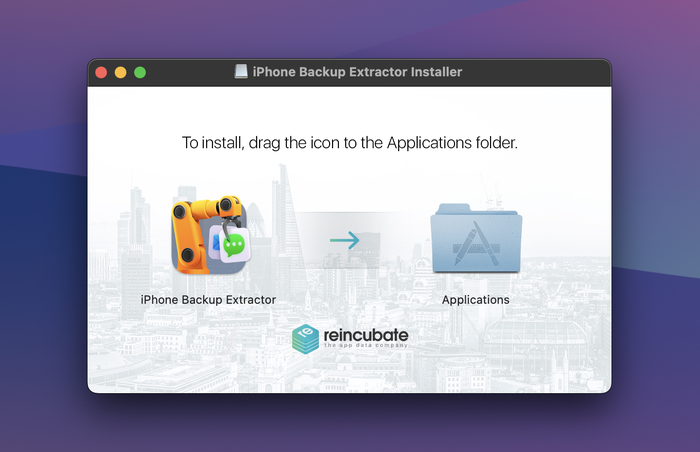
iPhone Backup Extractor 설치 및 실행

iPhone Backup Extractor 설치 및 실행

  1. 암호화된 iTunes / iOS 백업을 불러오세요. iPhone Backup Extractor를 실행하고 컴퓨터의 백업이 모두 로드될 때까지 기다리세요. iPhone Backup Extractor는 컴퓨터의 기본 백업 폴더에 있는 백업을 자동으로 불러옵니다.
    백업 비밀번호를 입력해 암호화된 백업의 잠금을 해제하세요. iPhone Backup Extractor는 비밀번호를 알고 있어야만 작동합니다. 비밀번호가 맞지 않으면 백업이 열리지 않습니다.
    백업 파일이 다른 폴더에 있다면 폴더를 찾아보며 백업 파일 위치를 선택하세요. 컴퓨터에 백업이 여러 개 저장되어 있다면, 데이터를 추출하려는 암호화된 백업을 선택해야 합니다.
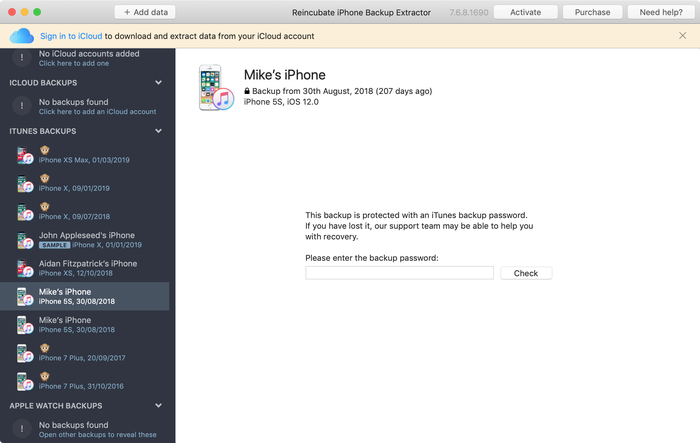
iPhone Backup Extractor로 암호화된 iTunes 백업 복호화하기

iPhone Backup Extractor로 암호화된 iTunes 백업 복호화하기

  1. 데이터를 저장하세요. 데이터 유형을 하나씩 클릭하거나 “파일”과 “추출” 메뉴를 사용하거나, “전문가 모드”에서 파일에 접근하여 백업에서 데이터를 추출하세요.
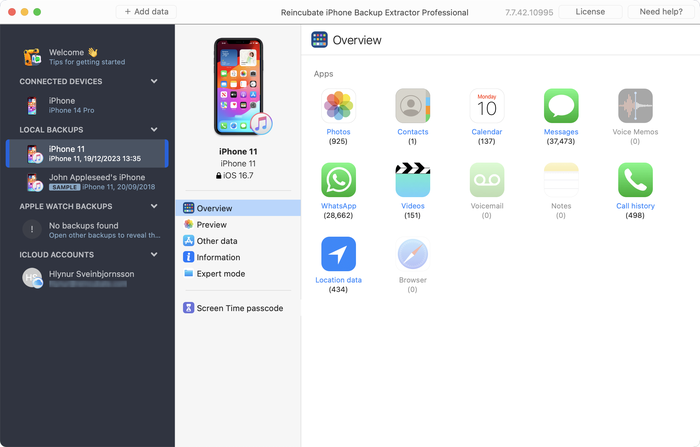
암호화된 iTunes iOS 백업 추출하기

암호화된 iTunes iOS 백업 추출하기

iTunes에서 iPhone 백업 암호화를 해제하는 방법

백업에서 특정 파일을 가져와야 해서 iPhone Backup Extractor를 막 다운로드했다면, 암호화된 백업을 읽기 전에 비밀번호를 요구하는 것을 볼 수 있습니다. 이는 iOS 기기를 마지막으로 동기화하거나 백업할 때 iTunes 옵션에서 “iPhone 백업 암호화” 체크박스를 선택했다는 뜻입니다.

백업을 암호화되지 않은 백업으로 바꾸고 싶다면 아래 단계를 따르세요.

암호화를 끈 상태로 iPhone, iPad 또는 iPod 동기화하기

  1. iTunes에서 iOS 기기를 선택합니다.
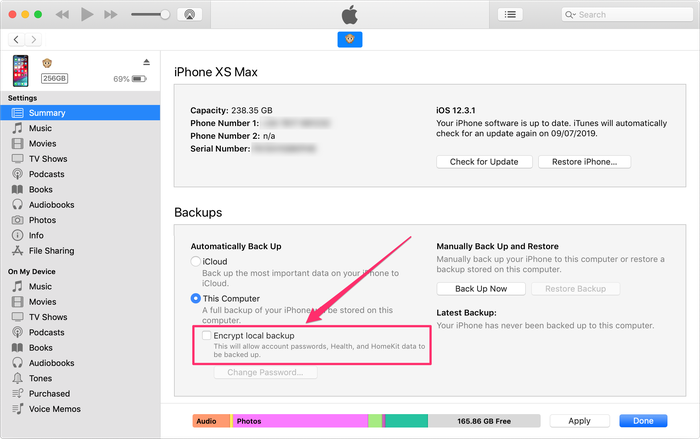
  2. “요약” 화면(탭)을 선택하고 화면 맨 아래로 스크롤합니다.
  3. 그런 다음 “iPhone 백업 암호화”를 선택 해제합니다(iPad나 iPod도 동일합니다).
  4. iTunes에서 “iPhone 백업의 잠금을 해제하려면 비밀번호를 입력하십시오”라는 메시지가 나타나면, 처음에 설정한 비밀번호를 입력합니다.
  5. 이제 기기를 동기화하여 암호화되지 않은 백업을 만듭니다.
iTunes 백업 암호화 해제하기

iTunes 백업 암호화 해제하기

파일을 추출한 뒤에는 같은 과정을 반대로 진행해 백업을 다시 암호화하여 보호할 수 있습니다.

암호화가 켜진 iTunes 백업 데이터로 할 수 있는 일과 할 수 없는 일

가능불가능
iTunes로 복원비밀번호를 모르는 상태에서 복원
iPhone Backup Extractor로 암호화된 백업 읽기손상된 암호화 백업을 완전하게 읽기. 다만 support@reincubate.com으로 문의하시면 전문 지원팀이 유용한 팁과 요령을 알려드립니다
사진, 연락처, SMS, 동영상, 메모, 위치 데이터, WhatsApp 메시지 등 암호화된 백업 데이터를 컴퓨터에 로컬로 저장백업 비밀번호를 분실했을 때 데이터 복구. 다만 암호화된 백업 문제 해결에 관한 Apple 가이드를 확인해 보세요
iPhone Backup Extractor 라이선스로 암호화된 iTunes iPhone, iPod Touch 또는 iPad 백업의 모든 항목에 접근iPhone Backup Extractor 무료 버전으로 암호화된 iTunes iPhone, iPod Touch 또는 iPad 백업의 모든 항목에 접근(암호화된 iTunes 백업에서는 파일 4개로 제한됩니다)

iTunes의 암호화된 백업 과정

iTunes는 백업을 만들 때 백업 파일을 16진수로 인코딩된 SHA1 해시 파일 이름으로 저장하며, 이 파일들은 백업의 “매니페스트”에 나열됩니다.

iOS 기기의 iTunes 백업 안에 어떤 파일이 있는지 알아 두면 백업이나 매니페스트 파일이 손상되었을 때 큰 도움이 됩니다. iPhone Backup Extractor로 인코딩된 파일을 열고 사용 가능한 데이터를 추출하여 손상된 백업 파일을 복원할 수도 있습니다.

iTunes에서 백업을 암호화해 파일을 보호하려면 “백업 암호화”를 클릭해 데이터 보호를 켜면 됩니다. 그러면 iTunes가 해당 컴퓨터에서 만드는 모든 백업에 사용할 비밀번호를 설정하는 옵션을 안내합니다. 복원할 때마다 이 비밀번호를 묻기 때문에, 비밀번호를 기억해 두거나 안전한 곳에 보관해 두세요.

iOS 기기의 데이터에 접근하고 싶은데 iTunes가 백업을 암호화해 둔 경우에는 어떻게 할까요? 파일이 아직 기기에 남아 있다면 iTunes에서 암호화를 쉽게 해제할 수 있습니다(보호되지 않은 새 백업을 만들면 됩니다). 작업이 끝나면 “iPhone 백업 암호화” 옵션을 다시 켜세요. 그러면 iTunes가 해당 백업을 다시 암호화해 줍니다. 다만 이렇게 할 필요는 없을 것입니다.

더 쉽게 이해하실 수 있도록 암호화된 백업에서 iPhone 데이터를 복구하는 방법을 보여 주는 짧은 영상을 만들었습니다. 추출 단계에서 연락처를 가져오는 모습을 볼 수 있는데, iMessage, SMS, 캘린더, 사진, 동영상, 메모, 앱 데이터도 똑같은 방식으로 가져올 수 있습니다.

암호화된 백업 비밀번호를 복구해야 하나요?

도움이 될 만한 iTunes 백업 비밀번호 복구 지원 문서를 게시해 두었습니다. 복구팀에 문의하시면 도와드릴 수 있으며, 최대한 빨리 답변해 드립니다.

작성자 소개

Aidan Fitzpatrick

창립자 겸 CEO

Aidan은 세계 최초의 iOS 데이터 복구 도구를 개발한 후, 2008년에 Reincubate를 설립했습니다. 이후 그는 AMD, Qualcomm, HP와 같은 기업들과 협력하여 Camo 앱 생태계를 필두로 비디오 소프트웨어를 위한 의미 있는 머신러닝 기능을 개척하며, 회사를 세계 최고의 ISV 중 하나로 성장시켰습니다. Aidan의 리더십 아래 Reincubate는 영국 최고의 비즈니스 상을 네 차례 수상했고, The Sunday Times의 100대 기술 기업 리스트에 이름을 올렸으며, Apple 디자인 어워드와 App Store 후보 지명으로 업계의 인정을 받았습니다. 그의 연구와 기법은 모바일 포렌식 관련 학술 논문에서 자주 인용되며, Google, Microsoft, Snap과 같은 기업이 주최하는 행사에 연사로 초청받은 바 있습니다.

저희는 1,000만 명 이상이 잃어버린 iPhone 데이터를 복구할 수 있도록 도왔어요.

여러분도 도와드릴게요.

댓글 (13)

Edwin 2018년 1월 9일

Unfortunately I forgot or mistyped my password. Anyway, I cannot get in. I made a backup for my whatsapp messages from my iPhone which I now have to give back to my employer. Hopefully I can still retrieve the back up (which I thought I had copied on to my pc) Thanks Edwin.

Reincubate 지원팀의 답변 2018년 1월 9일

Hi Edwin, if you're at a loss to remember your iPhone backup password, our guide here might help.

Marcelo 2017년 10월 8일

Hi, I downloaded the trial version of your extractor but it could not decrypt my iPhone backup. I have my password written down but neither iTunes or your extractor will recognize that password. The odd thing is that I've successfully used my password in the past. I've gone through all passwords I can think of with the same result. What I find more puzzling is the fact that my backups cannot be seen via Keychain Access, even backups that were visible a year or two ago. Is your extractor capable of helping me?

Reincubate 지원팀의 답변 2017년 10월 8일

Hey Marcelo, thanks for commenting. Sounds like the password's not quite what was written down. We've got a guide here which might be helpful when it comes to recovering lost iPhone passwords.

Juan 2017년 10월 1일

Hello, In preparation to unlock my iPhone, I did an encrypted backup onto my Mac (via iTunes). After erasing my phone, when I tried to restore it from backup, iTunes complained about my password being incorrect (I know I had it right). I used the Keychain Access app to view the password (as I've done multiple times in the past), but my phone's backup doesn't come. I checked my Library/MobileSync, and I can see the backup. I can also see past backups, which also show up in iTunes preferences, but even those old ones are not visible in Keychain Access. Did recent changes to iTunes affect my keychain? Is there any way to decrypt my iPhone's back and restore it? Thanks

Reincubate 지원팀의 답변 2017년 10월 1일

Hi Juan, thanks for writing. That sounds like one to drop us a note directly about. Say hello in our live chat and we'll help you out.

elenie lachance 2017년 9월 11일

PLEASE HELP! I encrypted a back up of my old phone when i went through divorce, now new phone and I can't restore from back up because of forgotten password. I need the contents on the old phone to the new one - I'm in need!!!!!!

Reincubate 지원팀의 답변 2017년 9월 11일

Oh no! Check out our guide on recovering backup passwords. There are some tips there that might help!

Lee Delany 2017년 8월 7일

That's all very well if one REMEMBERS their encrypted password. You will find that the people with this problem DIDN'T REALISE THEY ENCRYPTED THEIR PASSWORD AND NOW THEY CAN'T REMEMBER WHAT IT WAS. They want to un-or-de encrypt so that they can access their backup. What now? What do you do when you CAN'T REMEMBER your encrypted password? A different ballgame, don't you think? Blind Freddy can follow instructions how to de encrypt a password they do remember.....

Reincubate 지원팀의 답변 2017년 8월 7일

Hi Lee: if you've forgotten your backup password, check out our tips here.

Leanne winn 2017년 8월 7일

I originally put a password on my encrypt iPhone backup now I have forgotten the password and am unable to restore all my data to my new phone. What can I do to restore my old stuff

Reincubate 지원팀의 답변 2017년 8월 7일

We've got 5 ways around this in our guide here.

Shelley 2017년 6월 21일

I am trying to recover a note that got deleted. I've run this process until i get to the point where it need to extract my notes. I have 80 notes, but I just need one. Is there a way to choose which one to extract, or do i have to pay to extract all 80 when I don't need the other 79 (I still have those on my current phone)?

Reincubate 지원팀의 답변 2017년 6월 21일

Hey Shelley, there's no need to get a license to recover a handful of notes. If you wait for the dialog it'll let you continue with the free version after a short while.

Lushane Abrahasms 2017년 4월 10일

I recently discovered that my iPhone was encrypted because I was accessing my work emails (encryption done through this process). I therefore don't know what the password is. Does this mean that all data in my iPhone cannot be transferred to my new device?

Reincubate 지원팀의 답변 2017년 4월 10일

Hey Lushane, yes, you'll need to know your backup password in order to access the data for a restore. If it's your employer's phone, can they provide you with the password? Alternately, we could help them in carving out their data from the device if they're worried about the two intermingling.

Elgon Masaba 2016년 8월 4일

What's My password password

Reincubate 지원팀의 답변 2016년 8월 4일

We don't know! But if you contact us via live chat, we might be able to help you find out...

Michael Craig 2014년 5월 6일

I've lost my encryption password. I have so much data that I need and would pay for. Is there any possible way to unlock the back up?

Reincubate 지원팀의 답변 2014년 5월 6일

Hi Michael: if you drop us an email we might be able to help further, depending on the situation.

Randy Armstrong 2013년 5월 16일

My daughter just upgraded from an iphone 4 to a new iphone 5. Her latest backup was encrypted and it won't update her new phone. It gives the message that the backup is either corrupt or incompatible with the new iphone. Is the encryption the problem? Can you get past that?

Reincubate 지원팀의 답변 2013년 5월 16일

Hi Randy! Encryption means that the backup has a password set on it, as long as you know the password you can use that backup to restore to the device or open the backup file with our software. Corruption means that the backup file itself is incomplete or damaged or, as the message states, incompatible with the device. If the backup file is corrupt and encrypted, even if you know the password to it you will not be able to restore. The best thing we can do is try to recover data from this corrupt backup file (if possible and data still exists). Please try out the free version of our software and see if it works to open your backup, or reach out to our suppor team if you need more help.

Pamela Miser 2012년 11월 3일

I purchased the Pro version of your software. When I attempted to open my backup, it asked for the password. I entered the password but was then advised that because the backup was encrypted in IOS3, it could not unencrypt the file. So is there no way to unencrypt an itunes backup file which was backed up in IOS3? I also tried to update my Iphone 4 as a "new phone" in itunes and then load the IOS 3 encrypted backup on the iphone 4. Itunes acted like it was loading the backup file onto the phone but once it was completed there was no information at all from the IOS 3 encrypted backup on the IPhone. Any suggestions?

Reincubate 지원팀의 답변 2012년 11월 3일

Hi Pamela, thanks for writing. That doesn't sound right. We're going to email you directly to get to the bottom of this. We've not dropped support for iOS 3.

Pol VANDERICK 2012년 8월 1일

J'apprécie énormément votre produit qui semble faire l'unanimité sur le marché. Toutefois, quelle déception quand j'ai vu que nous ne pouviez pas traiter les sauvegardes cryptées. J'espère que vous pourrez résoudre ce problème à court terme. Je souhaite vous encourager dans ce sens. Par contre, j'estime que ce n'est pas une bonne idée de casser le mot de passe qui a toute son utilité.

Reincubate 지원팀의 답변 2012년 8월 1일

Thanks for your support! We've recently added encrypted backup support -- check it out, and we hope you enjoy it.


인기 게시글

King's Award for Enterprise 로고

King's Award for Enterprise: Reincubate는 영국 최고의 공식 비즈니스 영예를 네 차례 수상했으며, 가장 최근에는 지난 3년간의 뛰어난 성장을 인정받았습니다.

사용자 및 파트너와의 관계는 우리의 가치와 우리가 만드는 제품의 핵심입니다. 리뷰을(를) 통해 그들의 이야기를 들어보세요.

Centre for Assessment의 ISO 27001 인증, UKAS 공인

© 2008-2026 Reincubate Ltd. 모든 권리 보유. 잉글랜드 및 웨일스 등록 번호 5189175, VAT 번호 GB151788978. Camo®, Streamlight® 및 Reincubate®는 등록 상표입니다. 특허 출원 중.

도움말