본문으로 건너뛰기

가이드 및 팁

손상된 iPhone 백업을 고치고 데이터를 복원하는 방법

Alexandra Malureanu게시일: 2012년 7월 25일업데이트: 2020년 3월 2일
Cover image for: 손상된 iPhone 백업을 고치고 데이터를 복원하는 방법

손상된 iTunes 백업에서 데이터를 복구하기는 어렵지만 불가능하지는 않으며, “백업이 손상되었거나 복원 중인 iPhone과 호환되지 않습니다” 같은 메시지가 데이터를 “되돌릴 수 없이 잃었다”는 뜻은 아닙니다. iPhone Backup Extractor로 손상된 백업을 자동으로 복구할 가능성이 충분히 있습니다.

암호화되지 않은 손상된 iTunes 백업에서 데이터를 복구하는 일은 보통 간단합니다. 암호화된 손상 백업은 더 까다로우며, 특히 “매니페스트 파일”이 없는 경우에 그렇습니다. 매니페스트 파일은 백업의 데이터가 어떻게 암호화되었는지 설명하며 복호화 과정에 꼭 필요합니다.

백업은 여러 정도로 손상될 수 있습니다. 예를 들어 백업 도중 디스크 공간이 부족해지거나, 하드 드라이브가 고장 나거나(또는 Dropbox가 파일을 삼키거나!), iOS 업그레이드가 잘못되거나, 백업 중에 정전이 되면 각각 다른 방식으로 백업에 영향을 줄 수 있습니다.

백업이 손상되었을 때 나타날 수 있는 오류가 몇 가지 있습니다. 각각의 원인과 해결 방법을 살펴보겠습니다.

손상을 나타내는 iTunes 복원 오류

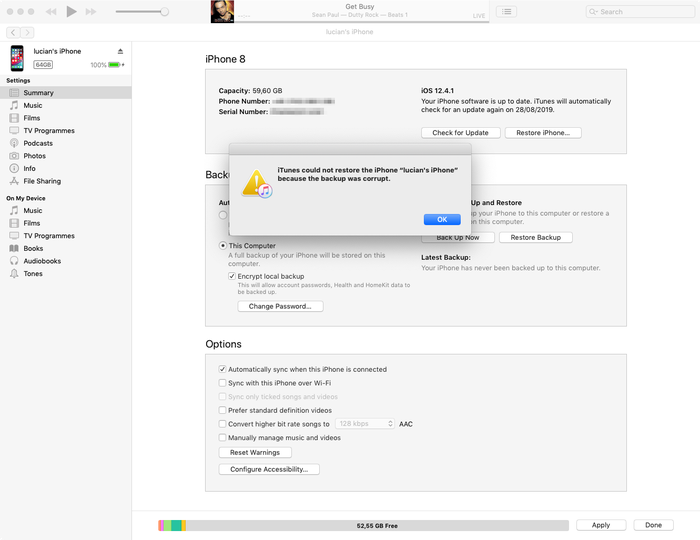
백업이 손상되었거나 복원 중인 iPhone과 호환되지 않아 iTunes에서 iPhone을 복원할 수 없습니다

첫 번째 메시지는 명확하며 손상된 백업을 다루고 있다는 뜻입니다. iTunes가 iOS를 백업하는 도중에 오류 메시지 없이 이 과정이 실패하는 경우가 가끔 있습니다. iTunes로 복원하려고 할 때에야 백업이 손상된 것을 알게 되면 속상할 수 있습니다. 하지만 데이터를 꺼내는 것은 그리 어렵지 않습니다. 아래의 손상된 iPhone 백업에서 데이터를 꺼내는 방법에 관한 가이드를 확인하세요.
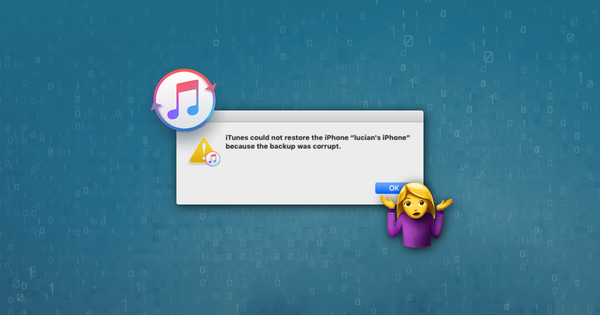
iTunes의 손상된 백업 오류 메시지

iTunes의 손상된 백업 오류 메시지

백업 세션이 실패하여 iTunes에서 *iPhone*을 복원할 수 없습니다

이 오류는 첫 번째와 비슷하며, 마찬가지로 손상되었거나 완료되지 않은 iTunes 백업을 다루고 있다는 뜻입니다. 원인도 비슷합니다. 아래에서 손상된 백업에서 데이터를 복구하는 방법을 확인하세요.

iTunes에서 기기를 인식하지 못하여 복원할 수 없습니다

세 번째 메시지가 나타나면 최신 버전의 iTunes를 사용하고 있는지, USB 케이블이 올바르게 연결되어 있는지(그리고 손상되지 않았는지), iTunes를 방해하는 서드파티 소프트웨어가 없는지 확인해야 합니다.

위 방법으로 해결되지 않으면 보통 복구 모드를 사용해 해결할 수 있습니다. 복구 모드는 기기를 지우고 복원합니다. 이전에 iTunes나 iCloud와 동기화한 적이 있다면 복구 후 백업에서 복원할 수 있습니다.

최악의 경우 연결하는 iOS 기기 자체에 근본적인 문제가 있는 것입니다. 여분의 기기가 있다면 그 기기를 사용해 보세요. 그래도 안 되면 손상된 iTunes 백업에서 데이터를 추출하는 것을 도와드릴 수 있습니다. 계속 읽어 보세요!

iPhone을 복원할 수 없습니다. 알 수 없는 오류가 발생했습니다

이 오류는 다양한 문제를 포괄하는 일반적인 오류입니다. 근본 원인에 따라 여러 가지 해결책이 있습니다.

  • 최신 버전의 iTunes(베타가 아닌 버전!)를 사용하는 것이 좋은 출발점입니다. 아직 최신 버전이 아니라면 업그레이드하세요
  • Windows 사용자는 재부팅이 도움이 될 수 있습니다(위의 단계대로 iTunes를 업그레이드했다면 어차피 재부팅해야 합니다)
  • 휴대폰을 완전히 초기화하고 DFU 모드에서 복원을 실행합니다
  • Apple은 이 오류에 대한 추가 팁이 담긴 짧은 문서를 게시했습니다

여기서도 해결되지 않으면 아래의 손상된 iTunes 백업에서 데이터를 복구하는 방법에 관한 가이드를 확인하세요.

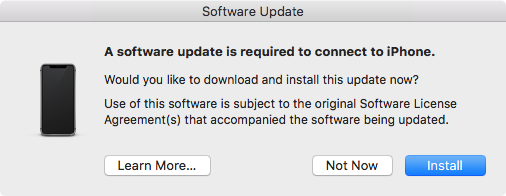
iPhone에 연결하려면 소프트웨어 업데이트가 필요합니다

이 메시지는 iPhone에 연결하려면 업데이트가 필요하다는 뜻인데, PC나 Mac을 업데이트하라는 것인지 iPhone을 업데이트하라는 것인지는 메시지에서 분명하지 않습니다. 가리키는 대상은 컴퓨터입니다.
iPhone에 연결하려면 소프트웨어 업데이트가 필요합니다

iPhone에 연결하려면 소프트웨어 업데이트가 필요합니다

iOS 베타 버전을 사용하면서 그에 맞는 iTunes 베타를 사용하지 않을 때 이 메시지가 자주 나타납니다. 이 경우 “설치” 버튼을 눌러도 소용이 없습니다. 한동안 업데이트를 다운로드하는 중이라고 표시되다가 “설치에 실패했습니다. 소프트웨어 업데이트 서버에서 현재 사용할 수 없으므로 소프트웨어를 설치할 수 없습니다.”라는 메시지와 함께 실패합니다. 해결 방법은 iTunes의 최신 베타를 설치하는 것입니다.

손상된 iPhone 백업을 복구하고 데이터를 가져오는 4가지 요령

iPhone Backup Extractor는 iTunes로 백업을 제대로 복원할 수 없을 때 데이터를 되찾을 수 있도록 설계되었습니다. 백업이 손상되었더라도 iTunes와 iCloud 백업을 열어 소중한 데이터를 추출합니다.

1. iPhone Backup Extractor의 내장 손상 처리 기능 사용하기

iPhone Backup Extractor는 무료 버전에도 손상된 백업을 처리하는 영리한 기능이 많이 내장되어 있어서, 데이터를 평소대로 추출할 수 있을 수도 있습니다.

“개요”의 데이터 추출 바로 가기를 사용해 보고, iTunes 데이터 복구에 관한 기본 가이드도 확인해 보세요.
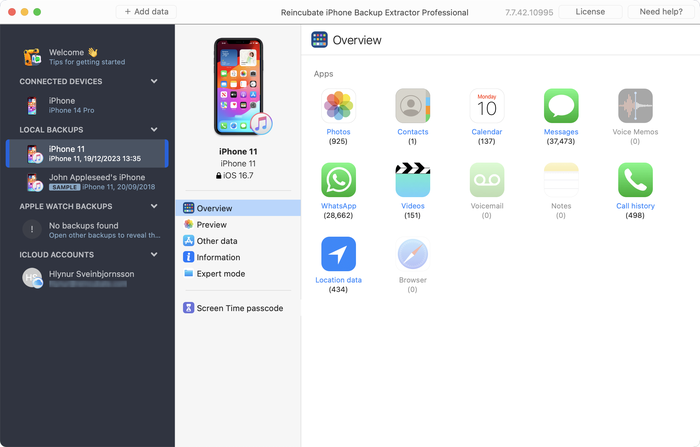
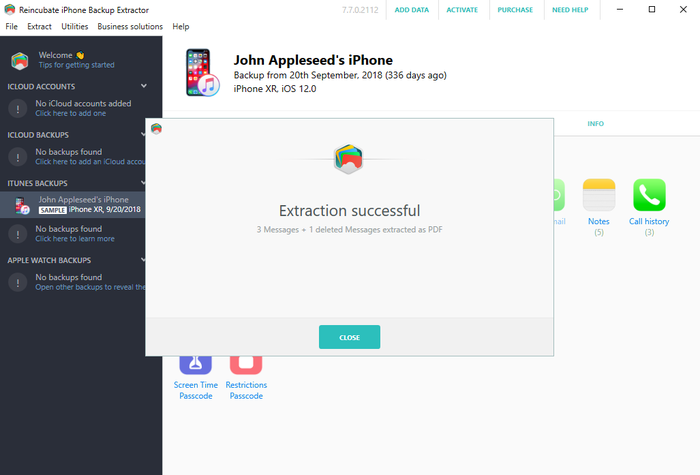
iPhone Backup Extractor로 손상된 백업에서 데이터 추출하기

iPhone Backup Extractor로 손상된 백업에서 데이터 추출하기

개요에서 필요한 결과를 얻지 못했다면 시도해 볼 다른 방법이 두 가지 있습니다.

  1. “미리보기” 탭에서 추출할 수 있는 데이터가 있는지 확인합니다. 데이터가 있다면 앱 이름을 클릭하고 필요한 메시지를 선택한 다음 원하는 형식으로 추출할 수 있습니다. 아래와 같이 진행합니다.
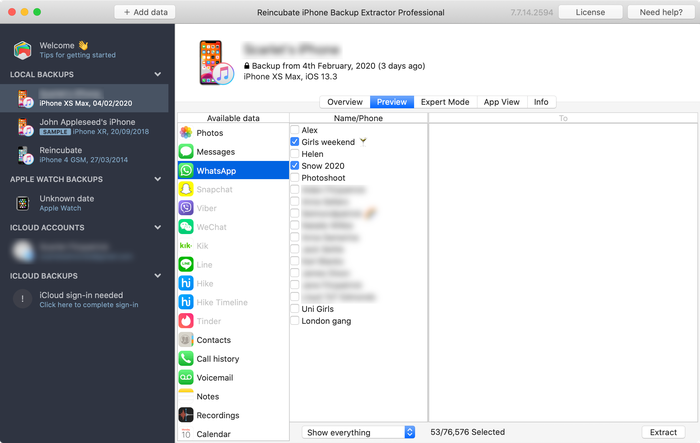
메시지 미리보기

메시지 미리보기

  1. 아래 스크린샷처럼 “추출” 메뉴를 사용해 사용 가능한 메시지를 HTML이나 CSV로 내보냅니다.
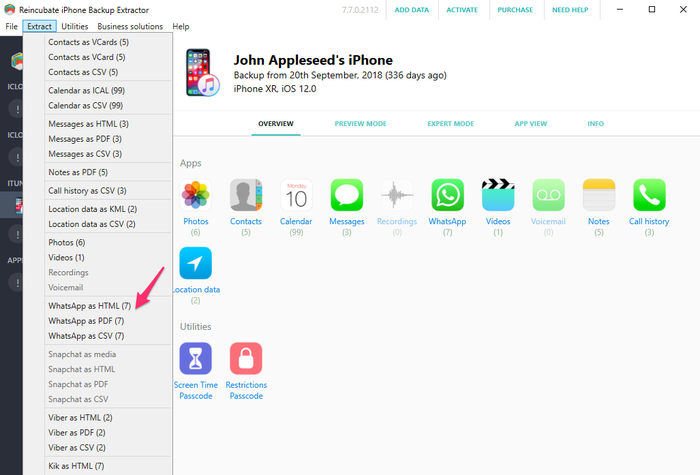
“추출” 메뉴로 메시지 추출하기

“추출” 메뉴로 메시지 추출하기

위 단계가 통하지 않더라도 연락처, 메시지, 사진 같은 데이터는 손상된 백업에서 여전히 가져올 수 있습니다. 포기하지 마세요. 더 깊이 들어가 보겠습니다…

2. 전문가 모드를 사용해 개별 파일에서 iPhone 데이터 복구하기

직접적인 방법이 통하지 않더라도 “전문가 모드”와 “앱 보기”로 백업에서 파일을 복구할 수 있습니다. 연락처, 캘린더, SMS 메시지, 위치, 메모 같은 데이터는 백업의 특정 파일에 저장되어 있으며, 그 파일을 꺼내면 iPhone Backup Extractor가 읽을 수 있는 형식으로 변환해 줍니다.

iPhone Backup Extractor로 백업을 불러온 다음 “전문가 모드”에서 필요한 데이터를 나타내는 파일을 찾아 가세요. 어디를 살펴봐야 하는지 알 수 있도록 iTunes 백업에서 앱이 데이터를 저장하는 위치에 관한 글이 도움이 됩니다.
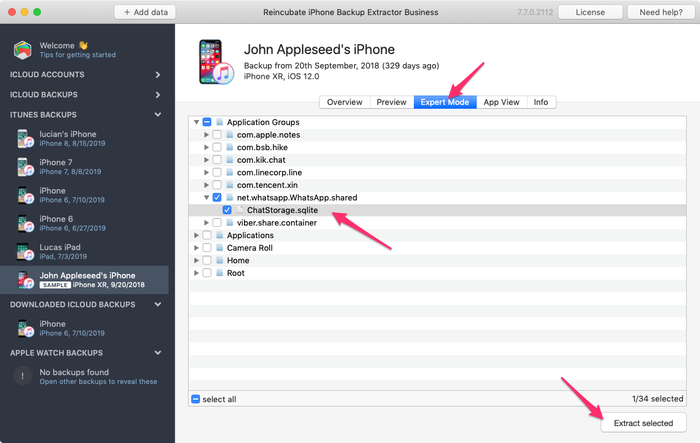
iPhone Backup Extractor로 WhatsApp 데이터베이스를 수동으로 추출하기

iPhone Backup Extractor로 WhatsApp 데이터베이스를 수동으로 추출하기

필요한 파일을 확보했다면 읽을 수 있는 형식으로 변환할 수 있습니다.

  1. iPhone Backup Extractor에서 “파일” 메뉴를 클릭합니다
  2. “메시지 DB를 CSV로 변환”, “연락처 DB를 vCard로 변환” 등 파일에 가장 알맞은 옵션을 선택합니다
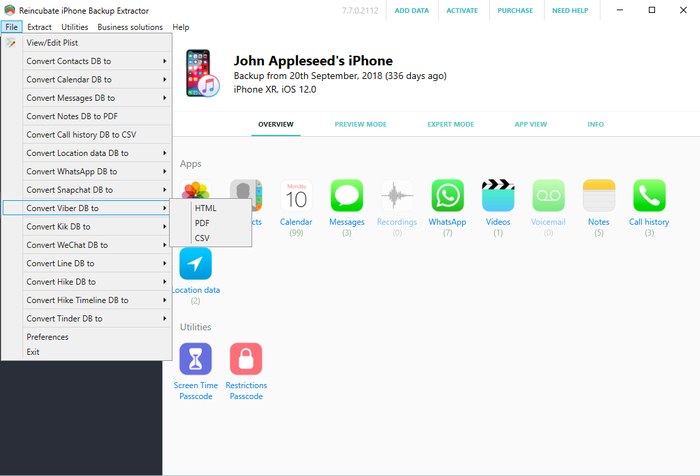
파일 메뉴로 변환하기…

파일 메뉴로 변환하기…

  1. 앱이 연락처와 메시지를 내보냅니다.
복구 성공!

복구 성공!

3. 암호화되지 않은 iPhone 백업에서 사진과 동영상 골라내기

iTunes 과정이 완료되지 않아 백업 파일이 손상되었더라도 iTunes 백업에서 사진과 동영상을 찾을 수 있습니다. 이 방법이 통하려면 백업이 암호화되지 않은 상태로 만들어졌어야 합니다.

다음과 같이 해 보세요.

  1. 해당 백업 폴더를 찾습니다(iPhone Backup Extractor에서 백업을 오른쪽 클릭하고 “상위 폴더 보기”를 선택하면 됩니다)
  2. 폴더 전체를 복사해 둡니다. 대폭 수정할 것이기 때문입니다…
  3. 폴더 안의 파일을 크기순으로 정렬하고 300KB보다 작은 파일을 모두 삭제합니다
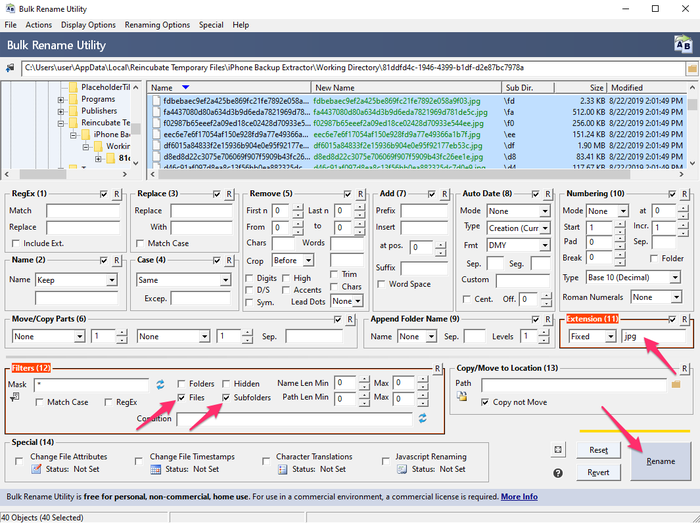
  4. Bulk Rename Utility를 다운로드하여 설치합니다. 무료이며 여기서 필요한 작업에 아주 적합합니다
  5. “Bulk Rename Utility”를 열고 복사해 둔 백업 폴더로 이동한 다음 선택합니다
  6. Add > Suffix (7) 메뉴를 사용해 Extension Section (11) 또는 .jpg(점 포함)에 jpg(점 없이)을 추가합니다
  7. 위쪽 창에서 모든 파일을 선택합니다(녹색으로 표시됩니다)
  8. “이름 바꾸기” 버튼을 클릭하면 선택한 모든 파일의 이름이 jpg 파일로 바뀝니다
Bulk Rename Utility 사용 모습

Bulk Rename Utility 사용 모습

  1. 파일을 저장한 폴더에서 Windows 탐색기나 macOS Finder의 “축소판 보기”를 선택하세요. 미리보기가 표시되므로 어떤 파일이 사진인지 확인할 수 있습니다
  2. 복구한 사진을 안전한 새 폴더로 옮긴 다음, .mov, .heic 등 다른 파일 확장자로 5단계부터 과정을 반복하여 모두 복구합니다

4. Reincubate 전문가에게 맡기기

위의 방법이 모두 통하지 않거나 너무 기술적으로 느껴진다면 언제든지 문의해 주세요. 기꺼이 도와드리겠습니다. 지원팀에서 “매니페스트 파일” 사본을 공유해 달라고 요청할 가능성이 높으며, 아래 정보 패널에 매니페스트 파일에 관한 자세한 내용이 있습니다.
작성자 소개

Alexandra Malureanu

저희는 1,000만 명 이상이 잃어버린 iPhone 데이터를 복구할 수 있도록 도왔어요.

여러분도 도와드릴게요.

댓글 (30)

unplugged 2019년 9월 13일

Dear reincubate professionals, I desperately need your help because Apple does not. I summarized the situation below. Is there any possible way that I can try to recover my photos and videos: On the date 7 September I saved a backup of my phone to my PC via iTunes. The next day (8 September) I wiped the phone and left to the service for battery change. After receiving I wiped the phone again and then I choose to restore from backup at the beginning. However iTunes asked me a password which I never entered for backup (I don't recall that I ever entered a password in iTunes). I tried the password of the phone and my Apple ID password but never worked. I searched online the case and someone suggested to enter Apple ID credentials on iTunes. At that stage iTunes sent an authentication code to my phone and I had to open my phone set as a new phone. Than clicked the button "change password" below the encrypt iPhone backup section. At the moment iTunes synchronized my phone because at default that option was set on iTunes. It appears to be the backup of my empty phone was overwritten on previous backup. I managed to restore from that backup but my whole photos, videos and contacts was gone. When I look into backup folder I see a large amount of data which is approximately 45GB. And last change dates of the most files are 7 September which is my first backup date. I think my data is still kept in my computer but I cannot access them. I think when iTunes overwrite the empty backup it changed the manifest.db file and some other files then the old files are not recognized by iTunes. I installed the iPhone Backup Extractor but no photos are found. Then I tried to chance file extensions by bulk rename utility however no images are shown I suppose because of encryption. Is there any possible way to restore my photos and videos from that backup folder. Or are they gone for good? Thank you in advance. Kind regards.

Reincubate 지원팀의 답변 2019년 9월 13일

Hi unplugged, thanks for commenting. Yes, there are a number of things we could try here. We've reached out to you directly. In the meantime, make sure the remaining files are safe from modification, and that any Time Machine backups that you may have from the time won't get overridden.

vardhan 2019년 1월 25일

Hi.. I recently sent my iPhone 7 to get the audio IC replaced. Before giving it to the technician I took a backup on itunes and wiped it clean. While the iphone 7 was with the technician, I restored the same back up to my old iphone 6S plus for use. This worked perfectly and im cureently typing from the same phone. But i had to manually delete a lot of photos and videos from my 6S as it was a 64GB. ( Roughly 5000 images + 100 videos deleted) Now my iPhone 7 has returned after getting fixed. I tried restoring from the same back up via iTunes and it gives me the following error " iTunes cannot restore the iPhone "iPhone" because and error occurred". So i tried all the usual stuff, updating of iTunes and the iPhone 7, restarting the devices, using different usb ports and different usb cables. I even tried restoring the same backup to my Wife's new iphone Xs. The entire process went through for 1.5 hours and right when it was about to finish itunes gave me and error "itunes cannot restore iphone "iphone Dee" because the backup is corrupted" I think i have tried all possible options but came up with no luck. I would really really love to have that entire backup as it was...Can you help?

Reincubate 지원팀의 답변 2019년 1월 25일

Hi vardhan, thanks for commenting. I think we can probably help here: we're emailing you directly now.

Lola 2016년 12월 10일

This month, I recently upgraded from a 4s to an iPhone 6s with Verizon-I was assured my back up would go well especially with the additional 50mb I bought on icloud; well after 7 days of back and forth at Verizon & their techs talking to Apple support techs...no one was able to explain why all of my photos were lost from my 4s to my 6s to include all of my photos that I thought were safe in my photo stream on my iCloud account. Can ANYONE please help me? This Friday, 12/16/2016, I have to break it to my middle school students that their images for the town & school paper that were safe & sound on my iCloud account are now GONE. All that remains is a their ghost of images past....a screen shot of the back up where a grey box appears with the number 837...the mysterious location where the Verizon tech assured me that the images do live on are-in fact, somewhere'... Can anyone help me to find out where they are & make them reappear?? It would surely be a Christmas miracle that would make about 90 middle schoolers very happy. Happy Holidays. Thank you so much.

Reincubate 지원팀의 답변 2016년 12월 10일

Hi Lola, we're sorry to read this! Might you have an old iPhone backup on your PC or Mac? Failing that, we have a few tricks up our sleeve to recover photos from iCloud that aren't in the app. Drop us a note and we'll see what we can do.

Francisco 2015년 11월 28일

My itunes keep saying not enough free space on computer, can't restore my iphone. I'm trying to restore my old iphone with the same backup, just to take it back and update to iOS 9. And then trying to backup again and restore my new iPhone 6s Plus with it. But the main thing it's i got 270gb free on my Mac, so I don't know what else to do. Please help I don't want to loose all my photos and data. One more thing, when i tried to restore my new iPhone with that backup, said it's corrupt or not compatible. Help!!

Reincubate 지원팀의 답변 2015년 11월 28일

Hi Francisco, things can get difficult when you've got a lot of data in a backup but little space on your PC or Mac. One solution might be to use an approach like this to move your iPhone backup into a folder on another drive (or a USB stick) and restore from there. Reach out to us if you need help!

Lahmiekah 2015년 11월 19일

I just got had to swap my phone due to issues on the phone when I try to restore from my backup it say corrupted or not compatible

Reincubate 지원팀의 답변 2015년 11월 19일

Oh no! Have you followed the steps in the guide? If so, and you're still stuck, drop us a note or ping us on live chat.

Ryan Pollock 2015년 10월 22일

Does this work in australia? I lost my iPhone 6, but luckily backed it up not long ago. Insurance have sent me another phone but when I plug it in it gives me the dreaded error saying that it is corrupt or uncompatible. I need all the files on the back up and your free version idenitifes all the files to be extracted. How much does it cost for you to put it onto my new IPhone. I am at a complete loss

Reincubate 지원팀의 답변 2015년 10월 22일

Hey Ryan, it sure does. If things are getting fiddly, please drop us an email through our support page and we'll jump on a screen share with you to help sort things out.

Robert Rayner 2015년 7월 2일

I need a way to extract music and eBooks from a corrupt backup, any ideas?

Reincubate 지원팀의 답변 2015년 7월 2일

Hey Robert. iTunes' music isn't stored in a backup, and won't be available there. However, eBooks are, and so is music from many third-party apps. Which apps are you using for the books and music?

Dave H 2015년 3월 23일

How do you extract a voice memo from a corrupted backup? Thanks!

Reincubate 지원팀의 답변 2015년 3월 23일

The simplest way is just to click "Recordings" on the main iPhone Backup Extractor window when your backup is selected. Alternately, you can find them in iPhone Backup Extractor's "Expert mode" in the folder described here.

PATRICK 2015년 1월 12일

After doing the ios 8 update on my Iphone 5 it started acting up. On and off every two minutes. Only 180 pictures were backed up into icloud from 2000. i trie backing up the rest but phone turn off and on. Can some one help me recover my pictures. they are very important because they are from a loved one that passed away. please help!

Reincubate 지원팀의 답변 2015년 1월 12일

Hi Patrick, I'd recommend backing up with iTunes, and then restoring that way. It's a lot quicker, and it's much easier to verify all of your data is there.

Glenn 2014년 11월 2일

I used time machine to replace the corrupted file that wouldn't allow me to backup from the restore files, figured out which of my iTunes backup files to replace, then clicked on that folder with all the files in it ( I figured it out based on the date modified as I had several from various iPods and an iPad and clicked on get info of each of them to figure this out ) Go in to library/application support/mobilesync/backup

Kevin McCarthy 2014년 10월 24일

Is it possible to restore messages back on an iPhone

Reincubate 지원팀의 답변 2014년 10월 24일

Hey Kevin, there sure is: check out this guide.

Val Hill 2014년 10월 16일

Got a new iPhone 6. Tried to restore it from iTunes. No backups were found in ITunes. Found the backup folder on my PC but three of the .plist files are missing. Status.plist is the only one I have and it looks incomplete. Need some help..

Reincubate 지원팀의 답변 2014년 10월 16일

Uh-oh, missing files indeed. Drop us a note and we'll guide you through recreating those missing files.

Andre Ivasenko 2014년 10월 4일

My Iphone backup was corrupt. Please help me to restore data. I found physical stored data (10GB) on my lop top. I need help to backup this data on my iphone 5. There are very important files: app - gflash, and my contacts. Please help me to restore data. Thank you a lot.

Reincubate 지원팀의 답변 2014년 10월 4일

Hi Andre, no problem. The guide above should help with accessing the backed up data, and this guide should help you restore is. Does that help?

CO 2014년 9월 27일

After being able,to extract those data from corrupted files, can theses data able to import back to the phone for data like SMS, WhatApps, other App database?

Reincubate 지원팀의 답변 2014년 9월 27일

Hi Chanco, yes, they can. We've got a guide on restoring that data here.

Stacey 2014년 9월 26일

I am trying to recover some lost voicemails using iExplorer. There are 4 backups to my phone and all are damaged. Is there a way to fix that or get the voicemails back from the damaged backup file? Any help you could give me would be greatly appreciated. The voicemails are from my gramma who passed away. Thanks.

Reincubate 지원팀의 답변 2014년 9월 26일

Yes, try iPhone Backup Extractor. If it won't automatically recover them for you, ping us on live chat and we'll help you get them back manually.

Jeffrey Nebot 2014년 9월 24일

I backed up my iPhone 5s IOS 7 in preparation of receiving my iPhone 6. I tried to restore from my backup iOS 7 onto my new iPhone 6. It downloaded all of the music all of the apps but it is being hung up on the photographs. It just keep saying downloading. It has been doing it for two days. I have used your software in the past I'm wondering if it will be helpful again for this situation? Some of the pictures downloaded but only a fraction. I didn't upgrade the 5s to IOS8 because I didn't have enough room on the 5S.

Reincubate 지원팀의 답변 2014년 9월 24일

Hi Jeffrey, it's nice to hear from you. Two days of downloading sounds like a long time! I'd recommend turning off iCloud Photo Library, before turning it back on. That should sort this out.

Elsie Leong 2014년 7월 8일

Hi, I'd extracted out all the files, but how can I restore inside my phone?

Reincubate 지원팀의 답변 2014년 7월 8일

Hi Elsie, we've got a guide for that here.

Morgan Phillips 2014년 6월 24일

Good day I would be very grateful fr a workaround for the issue I face, please. I removed the cable, like an idiot, during a backup process, it was third party software (iBackupBot) and the progress indicator had been stuck at zero for several minutes, i panicked. Right now, I can't back up to or from my device, I am pretty sure it is a corrupted manifest file. Please could you direct me to workarounds for this error: Invalid name size [E9B1] at [30E77]: (null) Prev Domain:C:\Users\........ /manifest.db Prev Path:CameraRollDomain I realise I have probably boxed this thing, is it even possible to restore a new iOS version? Thank you in advance Morgan

Reincubate 지원팀의 답변 2014년 6월 24일

Hi Morgan, that sounds nasty! We're not experts on iBackupBot, but we can certainly help with your phone. Have you tried a factory reset?

Avenshen 2014년 6월 22일

Hi, hope you can help me. I backed up my old iPhone 5 on iTunes in my laptop as the phone has a hardware defect and needs to be replaced with a new unit. I made sureall was backed up in itunes. I now got the new unit and attemptied to restore the data backed up from the old unit, however, the data restore in iTunes is greyed so I assume the data was lost. Is it still possible to recover all the lost data back up?

Reincubate 지원팀의 답변 2014년 6월 22일

Hey Avenshen, I'd guess that's because the newer device is on an older version of iOS than your newer one. If that's the case, an update will resolve the issue. If not, drop us a note and we'll get you sorted out.

carlo 2013년 10월 29일

hi! The files of my ipad get deleted. I already try the backup in itunes, but I dont have any backup there. All files are very important to me. Please help me. THANKS!

Reincubate 지원팀의 답변 2013년 10월 29일

Hi Carlo, that doesn't sound good. Have you manually checked your iTunes backup folder? There's guidance on how to find them, here. Failing that, do you have a a backup of your computer in Time Machine, or another backup service?

Noel 2013년 9월 26일

I have just upgraded my Iphone 4 to IOS7 and I lost my pictures and contacts after it got frozen showing the I tunes and USB picture. I was able to restore it, but nomore contacts and pictures in it. I did not back up any of my contacts and pictures. Can I still recoever them?

Reincubate 지원팀의 답변 2013년 9월 26일

Hi Noel, that sounds nasty! When you say you were able to restore the phone, I presume you mean from a backup? If so, it's worth looking through that backup with iPhone Backup Extractor to see if there are any traces of your images or contacts. You might get lucky.

Preau 2013년 8월 30일

good morning, my backup(11 G0) is incomplete and encrypted, i have the password. Do your soft can extract any data?

Reincubate 지원팀의 답변 2013년 8월 30일

It certainly can. Try the free version linked to the side of this page, and reach out if you need help.

Richard 2013년 7월 29일

my ipod does not work as it says my ipod back-up has been corrupted and i am unable to sync with itunes

Reincubate 지원팀의 답변 2013년 7월 29일

Reach out to us directly on live chat and we'll guide you through it with a screen-share.

Johan Bernow 2013년 6월 25일

What if I only can find status.plist? The info.plist, manifest.plist and the manifest.mbdb is missing. Is there any way to recreate them?

Reincubate 지원팀의 답변 2013년 6월 25일

Hi Johan: yes. Move your backup out safely to another folder, and then create a new backup. If the device contents are similar enough, you may be able to reuse those files. Good luck!

Sonia 2013년 6월 25일

Hi, I have updated my iphone to ios7 beta release and later on downgraded back to ios 6.1.3. But restore backup is not compatiable. Tried after changing Product version and Build Version in Info.plist. But now it says data is corrupt or not compatiable. Please help me to restore my backup data

Reincubate 지원팀의 답변 2013년 6월 25일

Right, this is a problem for a number of users. We can help you patch your messages etc. back into your older database if you drop us a message directly.

Devin 2013년 6월 24일

Hi, some how my iphone backup got corrupted. And so I tried to restore it with another back up, but it was my ipod backup and when i tried restoring it back it said "itunes could not restore the phone because the phone refused the request" and this is frustrating because it wont let me send any messages and all my contacts and stuff are gone.

Reincubate 지원팀의 답변 2013년 6월 24일

Hey Devin, drop us a note and we'll give you a hand with your backup. There'll be a way!

dominic 2013년 2월 28일

i want to simply reset my iphone pin to purchase apps for the phone. i dont require resetting my ios and i dont want to affect the ios, but can iphone extractor reveal the pin if i run it?

Reincubate 지원팀의 답변 2013년 2월 28일

Dominic: see our article on resetting the restrictions passcode for a solution to this.

Kerry Miller 2013년 2월 16일

My iPad had begun to have more and more apps crashed so I took it to the apple store. The genius read the incident report and said I had corrupt files so I needed to plug it into my MacBook and backup it up then reset the device. He said since the file would also be corrupted on the backup that I would need to start new instead of restore the backup. I did so and now I have a few apps that I have lost data from. I have since been informed that one app can't corrupt the whole iPad because of sandbox. So who do I believe and how do I proceed? I did try restoring the iPad's backup and the problem was still there so I reset and made new and that's where I'm at now.

Reincubate 지원팀의 답변 2013년 2월 16일

Oh no! That's frustrating. Drop us a note directly and we'll help you recover that data. It shouldn't be possible for any of your iOS apps to corrupt your backup.

nighto 2013년 1월 5일

Hi, My last backup of my iPhone 5 somehow got corrupted after a failed iOS 6.0.2 upgrade. I can see all the files in the backup folder but it is missing all the manifest files. I use iPhone Backup Extractor to review the Backup file and it doesn't recognize the last backup taken before the upgrade. I would like to know is there a way to recover the last backup? Thanks Nighto

Reincubate 지원팀의 답변 2013년 1월 5일

Nighto, this is because the previous backup can sometimes get overwritten after the upgrade (Yes, I did say after! And yes, this does happen ever now and then). Without the manifests it can cause issues reading files, but iPhone Backup Extractor can certain find data without the manifests by using the File menu. However if data does exist in the backup, we are experts at extracting, so please contact our help desk for more information.

haider 2012년 1월 13일

hey, i am having some problems with understanding how to re-establish all my backed up data back onto my iphone, i was wondering if there is any further help or personal assistance i could receive? thank you

Reincubate 지원팀의 답변 2012년 1월 13일

Hi Haider, of course! Drop us a note on support@reincubate.com and we'd be happy to set up a screens-share to guide you through it.


인기 게시글

King's Award for Enterprise 로고

King's Award for Enterprise: Reincubate는 영국 최고의 공식 비즈니스 영예를 네 차례 수상했으며, 가장 최근에는 지난 3년간의 뛰어난 성장을 인정받았습니다.

사용자 및 파트너와의 관계는 우리의 가치와 우리가 만드는 제품의 핵심입니다. 리뷰을(를) 통해 그들의 이야기를 들어보세요.

Centre for Assessment의 ISO 27001 인증, UKAS 공인

© 2008-2026 Reincubate Ltd. 모든 권리 보유. 잉글랜드 및 웨일스 등록 번호 5189175, VAT 번호 GB151788978. Camo®, Streamlight® 및 Reincubate®는 등록 상표입니다. 특허 출원 중.

도움말