
본문으로 건너뛰기

가이드 및 팁

iPad와 iPhone 백업은 PC나 Mac의 어디에 저장되나요?

Andy Coles게시일: 2012년 4월 23일업데이트: 2019년 8월 23일
이 페이지에서
Cover image for: iPad와 iPhone 백업은 PC나 Mac의 어디에 저장되나요?

iOS 기기에서 정보를 실수로 삭제해서 복구하고 싶다면 iTunes 백업이 큰 도움이 될 수 있습니다.

iTunes 백업은 iPad나 iPhone을 iTunes에 연결할 때마다(iCloud 백업 옵션을 켜지 않은 경우) 자동으로 만들어지거나, iTunes에서 기기를 오른쪽 클릭하고 “백업”을 선택하면 수동으로 만들어집니다. 백업은 컴퓨터에 저장되며 연락처, 문자 메시지, 캘린더, 메모, 통화 기록, 앱 데이터 같은 중요한 데이터가 들어 있습니다.

그렇다면 iPhone이나 iPad 백업은 어디에 저장될까요? 컴퓨터가 사용하는 운영 체제에 따라 다르지만, 기본 백업 위치는 iOS 버전이 달라도 같습니다.

Windows에서 iTunes 백업 폴더는 어디에 있나요?

Windows에서 iTunes 백업은 %APPDATA%\Apple Computer\MobileSync에 저장됩니다.

Windows 10, 8, 7 또는 Vista에서는 \Users\[USERNAME]\AppData\Roaming\Apple Computer\MobileSync\Backup 같은 경로입니다.

Windows XP에서는 \Documents and Settings\[USERNAME]\Application Data\Apple Computer\MobileSync\Backup과 비슷합니다.

Microsoft Store 버전의 iTunes는 조금 다릅니다. 백업을 %HOMEPATH%\Apple\MobileSync 아래에 저장하며, \Users\[USERNAME]\Apple\MobileSync\Backup 같은 경로입니다.

macOS / OS X에서 iTunes 백업 폴더는 어디에 있나요?

macOS에서 iTunes 백업은 ~/Library/Application Support/MobileSync에 저장됩니다.

이 폴더는 보통 /Users/[USERNAME]/Library/Application Support/MobileSync/Backup에 있습니다.

macOS 10.15에서는 iTunes 대신 Finder가 iPhone 백업을 만듭니다. 그래도 백업은 같은 위치에 저장됩니다.

iTunes 백업 폴더를 자동으로 찾는 방법

iPhone Backup Extractor는 iTunes 백업 폴더를 자동으로 찾아 주며 클릭 한 번으로 열 수 있습니다. 이 기능은 무료 버전에 포함되어 있으므로 비용이 들지 않습니다.

  1. iPhone Backup Extractor를 다운로드하여 설치합니다
  2. 앱의 풀다운 메뉴에서 Preferences 창을 엽니다
  3. Backups 탭을 선택합니다.
  4. 창에 “항상 기본 폴더에서 백업을 찾습니다”라고 표시된 곳에서 “기본 폴더” 링크를 클릭합니다. 간단합니다!
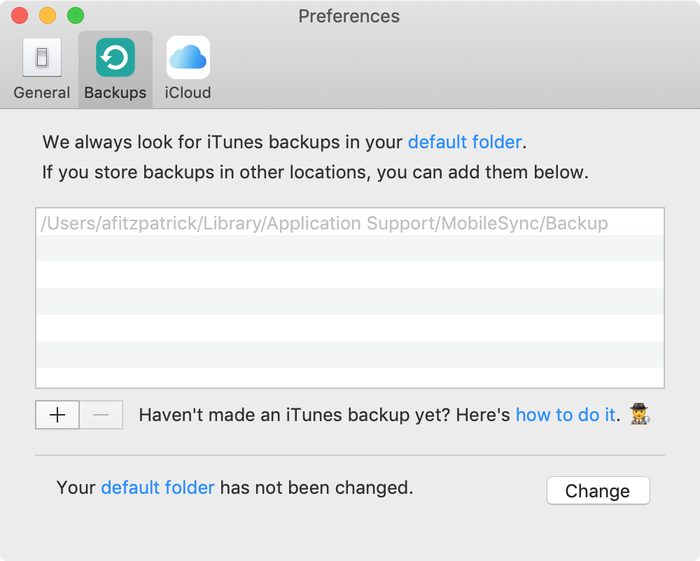
기본 iTunes 백업 폴더를 보여 주는 iPhone Backup Extractor

기본 iTunes 백업 폴더를 보여 주는 iPhone Backup Extractor

Windows에서 iTunes 백업 폴더 열기

Windows 실행 명령을 사용해 탐색기에서 기본 백업 위치를 엽니다. ⊞ Win + R을 누르면 실행 창이 나타납니다. %APPDATA%\Apple Computer\MobileSync을 입력하고 ⏎ Enter를 누릅니다.

Microsoft Store 버전의 iTunes는 다음과 같이 할 수 있습니다. ⊞ Win + R을 누르면 실행 창이 나타납니다. %HOMEPATH%\Apple\MobileSync을 입력하고 ⏎ Enter를 누릅니다.

Windows 10에서는 다음과 같이 보입니다.
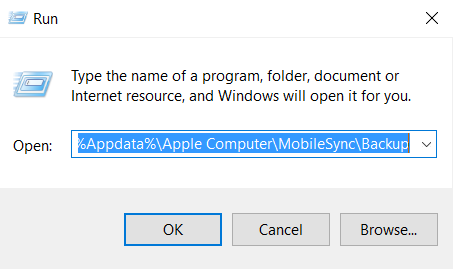
Windows 10에서 iTunes 백업 찾기

Windows 10에서 iTunes 백업 찾기

열리는 탐색기 창에 “Backup”이라는 폴더가 표시됩니다. 이 폴더에는 컴퓨터에 이미 있는 iTunes 백업이 들어 있습니다.

macOS에서 iTunes 백업 폴더 찾기

Spotlight를 사용해 Finder에서 기본 백업 위치를 표시할 수 있습니다. ⌘ Cmd + ␣ Space을 누르고 ~/Library/Application Support/MobileSync을 입력한 다음 ⏎ Enter를 누릅니다.

열리는 Finder 창에 “Backup”이라는 폴더가 표시됩니다. 이 폴더에는 컴퓨터에 이미 있는 iTunes 백업이 들어 있습니다.

iTunes 백업 폴더 위치를 바꾸고 싶으신가요?

iTunes가 기본적으로 백업하는 폴더를 바꾸고 싶다면 지원 센터에 유용한 가이드가 있습니다.

작성자 소개

Andy Coles

CCO

CCO이자 Reincubate 이사회 멤버인 Andy는 초창기부터 회사의 운영 및 전략 방향을 이끄는 데 힘써왔습니다. 그는 Camo 로드맵을 구상하고 다듬는 데 핵심적인 역할을 하며, 회사의 하드웨어 파트너십과 통합을 협상하고 관리하며 발전시키는 데 앞장서고 있습니다. Andy는 또한 iPhone Backup Extractor의 첫 출시 이후 개발과 문서화에 중요한 역할을 해왔으며, 데이터 복구 분야 전반에도 주목할 만한 기여를 해왔습니다.

저희는 1,000만 명 이상이 잃어버린 iPhone 데이터를 복구할 수 있도록 도왔어요.

여러분도 도와드릴게요.

댓글 (10)

Sohaib Ahmed 2018년 8월 8일

Thanks alot. Cheers.. .. .!!!

Jake Lown 2017년 7월 24일

Hi, I would like to restore a previous backup but I'm having trouble finding out my backup password. Can you please help me with this?

Reincubate 지원팀의 답변 2017년 7월 24일

Hey Jake, we've got a guide on password recovery. You can find it here.

Gerry Wood 2017년 6월 30일

Many thanks for enabling me to find the backup file for my iphone on my PC. When I click on the properties of the backup file it shows that I have 2.23gb backed up in 3503 files which is reassuring. If I now wish to view the contacts that have been backed up or restore them to a different device how do I do that if I've replaced my iphone with an android phone?

Reincubate 지원팀의 답변 2017년 6월 30일

Hi Gerry, thanks for asking. We're glad the article was helpful. If you install iPhone Backup Extractor, you'll see the free edition lets you browse through all of your contacts. Try that — it can export your contacts into a VCF format that your Android will easily be able to import.

Apple Repair New Orleans 2016년 4월 3일

I plan to buy an iPhone 6S Plus from a client, but they want me to transfer all their data to their old 5C. I backed it up in iTunes, then plugged in the 5C, but the 6s backup is nowhere to be seen from the drop down list! The 5C is 32GB and the 6S Plus is only 16GB, so I don't know what the problem is. Any ideas?

Reincubate 지원팀의 답변 2016년 4월 3일

Hi guys, thanks for commenting. This one's an old chestnut: it's caused by one of the phones running a different version of iOS to the backup. Upgrade one or other so that they're running the same version, then update the backup. That'll sort it out!

Justin 2015년 10월 5일

First of all; Thanks for the easy and helpful steps to get this far in the process. I am just curious as I am copying my backup off of my pc if it just as simple as me copying this backup off of my (non internet accessible) pc onto a hard drive, then I can drag and drop into the list of backups on the new Mac. I am trying to restore my old backup onto my new iPhone six, but my pc has lost ability to connect to the Internet, so I can't download the new iTunes update to be able to work with my iPhone six.

Reincubate 지원팀의 답변 2015년 10월 5일

Justin! Thanks for writing. Yes, it really is that easy. You can move iTunes backup folders between Macs, or even between Macs and PCs.

Brian Corbett 2015년 4월 11일

You have confirmed to me the preposterous nature of the iPad backup system. Why can't they use files like windows?

Reincubate 지원팀의 답변 2015년 4월 11일

Hi Brian, the iOS device does all the work when making a backup and simply relays the data to the PC or Mac (or to iCloud). They use this format partly to make it straightforward (and fast!) for the device, but also to discourage inadvertent modification of files, and to easily be able to layer encryption on top. It works pretty well in most cases!

Chris 2015년 3월 16일

i found the backup files but they look coded in jibberish. how can i read them as they would appear from my phone, opposed to being random numbers and letters? please halp

Reincubate 지원팀의 답변 2015년 3월 16일

Hi Chris, that's what iPhone Backup Extractor does. Load up the free version, and choose "Expert mode". That'll show you the structure the files decode to.

Bennie 2014년 12월 15일

My iphone and ipad was backed on the same computer, will it be a separate folder or combine on the same folder?

Reincubate 지원팀의 답변 2014년 12월 15일

Hi Bennie, they'll be in separate folders, both in the master Backups folder. Each folder will be named after the phone's UDID, which is a long phrase name of letters and numbers.

Mosin 2014년 10월 4일

How do i get the contacts from the folder on to a android? could you please let me know as soon as possible please

Reincubate 지원팀의 답변 2014년 10월 4일

Hi Mosin, thanks for commenting! We've got a guide that takes you through transferring contacts to Android here.

sf 2012년 9월 30일

would u also tell me how do i get there.. i mean where i can find Users\USERNAME\AppData\Roaming\Apple Computer\MobileSync\Backup as i am using windows 7

Reincubate 지원팀의 답변 2012년 9월 30일

Hi sf: sure! We've updated the article to make it clearer that Windows backups are stored under a different location. Does that help?


인기 게시글

King's Award for Enterprise 로고

King's Award for Enterprise: Reincubate는 영국 최고의 공식 비즈니스 영예를 네 차례 수상했으며, 가장 최근에는 지난 3년간의 뛰어난 성장을 인정받았습니다.

사용자 및 파트너와의 관계는 우리의 가치와 우리가 만드는 제품의 핵심입니다. 리뷰을(를) 통해 그들의 이야기를 들어보세요.

Centre for Assessment의 ISO 27001 인증, UKAS 공인

© 2008-2026 Reincubate Ltd. 모든 권리 보유. 잉글랜드 및 웨일스 등록 번호 5189175, VAT 번호 GB151788978. Camo®, Streamlight® 및 Reincubate®는 등록 상표입니다. 특허 출원 중.

도움말