
Vai al contenuto principale

Guide e consigli

Come riparare un backup di iPhone danneggiato e ripristinarne i dati

Alexandra MalureanuPubblicato il 25 luglio 2012Aggiornato il 2 marzo 2020
Cover image for: Come riparare un backup di iPhone danneggiato e ripristinarne i dati

Recuperare i dati da un backup di iTunes danneggiato è difficile ma non impossibile, e messaggi come «il backup è danneggiato o non compatibile con l’iPhone che si sta ripristinando» non significano che i tuoi dati siano «persi in modo irreversibile». Hai ottime possibilità di recuperare automaticamente i backup danneggiati con iPhone Backup Extractor.

Di solito è semplice recuperare i dati da un backup di iTunes danneggiato e non crittografato. I backup danneggiati crittografati sono più complicati, soprattutto se mancano i «file manifest», perché descrivono come sono stati crittografati i dati del backup e sono essenziali per il processo di decifratura.

I backup possono danneggiarsi in misura diversa. Per esempio, esaurire lo spazio su disco durante un backup, un guasto del disco rigido (o Dropbox che si mangia i tuoi file!), un aggiornamento di iOS andato male o un’interruzione di corrente durante il backup possono incidere ciascuno in modo diverso sul backup.

Quando un backup è danneggiato puoi ricevere diversi errori. Vediamo la causa e la soluzione di ciascuno.

Errori di ripristino di iTunes che indicano un danneggiamento

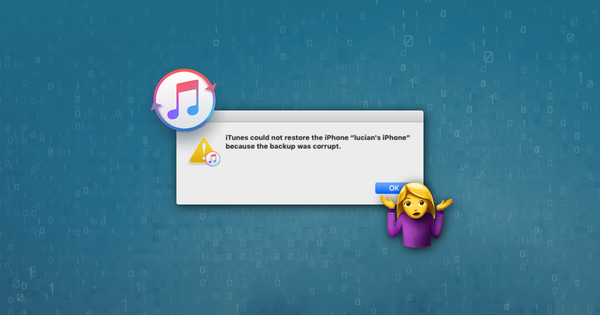
iTunes non è riuscito a ripristinare l’iPhone perché il backup è danneggiato o non compatibile con l’iPhone che si sta ripristinando

Questo primo messaggio è chiaro e ti dice che hai a che fare con un backup danneggiato. Ogni tanto, quando iTunes esegue il backup del tuo iOS, il processo può fallire senza alcun messaggio di errore. Scoprire di avere un backup danneggiato solo quando si prova a ripristinarlo con iTunes è frustrante. Recuperare i dati non è troppo difficile: leggi qui sotto la nostra guida su come estrarre i dati da un backup di iPhone danneggiato,
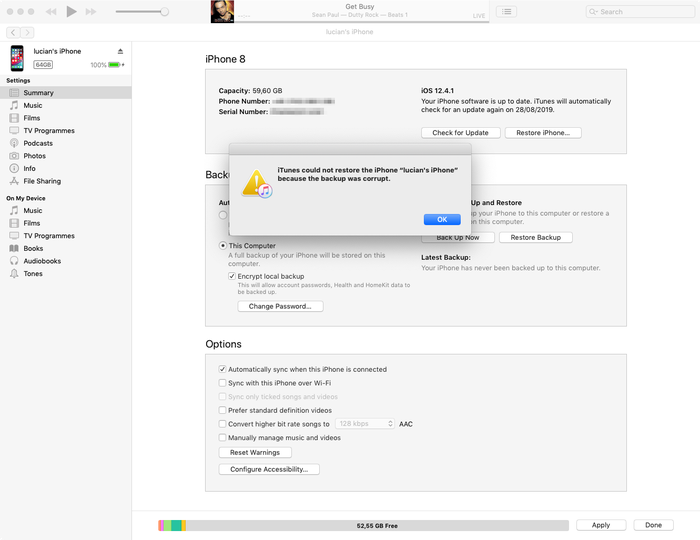
Messaggio di errore di iTunes per backup danneggiato

Messaggio di errore di iTunes per backup danneggiato

iTunes non è riuscito a ripristinare iPhone perché la sessione di backup non è riuscita

Questo errore è simile al primo e indica anch’esso che hai a che fare con un backup di iTunes danneggiato o incompleto. La causa è simile. Leggi i nostri consigli per recuperare i dati dai backup danneggiati qui sotto.

iTunes non è riuscito a ripristinare perché non riconosce il tuo dispositivo

Questo terzo messaggio richiede di verificare di usare l’ultima versione di iTunes, che il cavo USB sia collegato correttamente (e non danneggiato) e che nessun software di terze parti interferisca con iTunes.

Se quanto sopra non funziona, il problema di solito si risolve usando la modalità di recupero. La modalità di recupero cancellerà il dispositivo e lo ripristinerà: se in precedenza hai sincronizzato con iTunes o iCloud, potrai ripristinare da un backup dopo il recupero.

Nel peggiore dei casi c’è un problema di fondo con il dispositivo iOS che stai collegando. Se hai un dispositivo di riserva, prova a usare quello. In caso contrario, possiamo aiutarti a estrarre i dati da un backup di iTunes danneggiato. Continua a leggere!

Impossibile ripristinare l’iPhone. Si è verificato un errore sconosciuto

Questo errore copre una serie di problemi diversi. A seconda della causa, esistono diverse soluzioni:

  • Usare l’ultima versione di iTunes (e non una beta!) è un buon punto di partenza: aggiorna, se non l’hai già fatto
  • Per gli utenti Windows può essere utile riavviare (se segui il passaggio precedente e aggiorni iTunes, dovrai comunque riavviare)
  • Reimpostare completamente il telefono ed eseguire un ripristino in modalità DFU
  • Apple pubblica un breve documento con ulteriori suggerimenti per questo errore

Se qui non riesci a risolvere, leggi qui sotto la nostra guida sul recupero dei dati da un backup di iTunes danneggiato.

È necessario un aggiornamento software per connettersi all’iPhone

Questo messaggio implica che serve un aggiornamento per connettersi all’iPhone, e dal messaggio non è chiaro se si riferisca al PC o al Mac oppure all’iPhone. Si riferisce al computer.
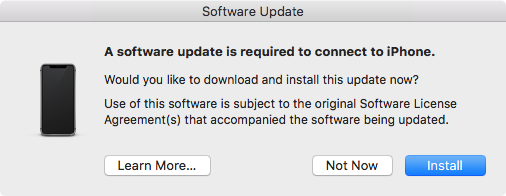
È necessario un aggiornamento software per connettersi all’iPhone

È necessario un aggiornamento software per connettersi all’iPhone

Gli utenti lo ricevono spesso se usano una versione beta di iOS ma non la corrispondente beta di iTunes. In quel caso, premere il pulsante «Installa» non funziona. Per un po’ dirà che sta scaricando un aggiornamento prima di fallire, con il messaggio «Installazione non riuscita. Impossibile installare il software perché al momento non è disponibile sul server degli aggiornamenti software.» La soluzione è installare l’ultima beta di iTunes.

4 trucchi per riparare un backup di iPhone danneggiato e recuperare i tuoi dati

iPhone Backup Extractor è pensato per aiutarti a ottenere i tuoi dati quando un backup non può essere ripristinato correttamente tramite iTunes. Apre i backup di iTunes e iCloud ed estrae dati preziosi, anche se il backup è stato danneggiato.

1. Usa la gestione integrata dei danneggiamenti di iPhone Backup Extractor

Anche la versione gratuita di iPhone Backup Extractor ha molta intelligenza integrata per gestire i backup danneggiati e potrebbe riuscire a estrarre normalmente i tuoi dati.

Prova i collegamenti rapidi per l’estrazione dei dati dalla «Panoramica» e leggi le nostre guide tradizionali sul recupero dei dati di iTunes.
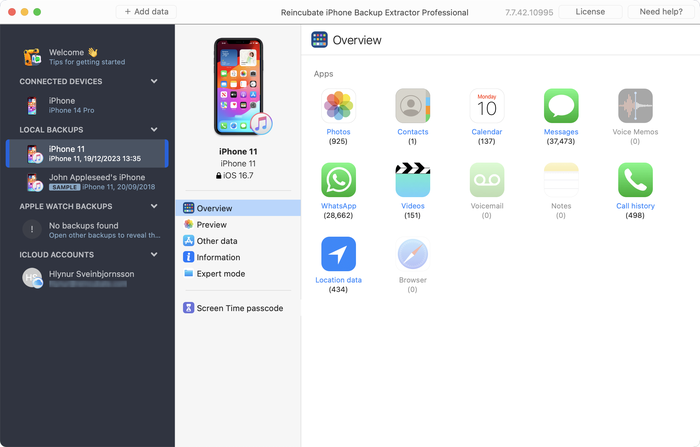
Estrazione dei dati da un backup danneggiato con iPhone Backup Extractor

Estrazione dei dati da un backup danneggiato con iPhone Backup Extractor

Se la panoramica non produce ciò che ti serve, ci sono altri due approcci da provare.

  1. Controlla la scheda «Anteprima» per vedere se ci sono dati da estrarre. Se ci sono, puoi fare clic sul nome dell’app, selezionare i messaggi che ti servono ed estrarli nel formato che preferisci. Come qui sotto:
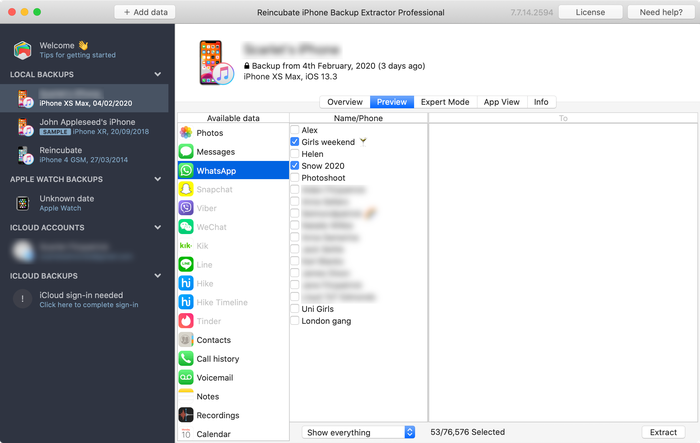
Anteprima dei messaggi

Anteprima dei messaggi

  1. Usa il menu «Estrai» per esportare i messaggi disponibili in HTML o CSV, come mostrato nello screenshot qui sotto:
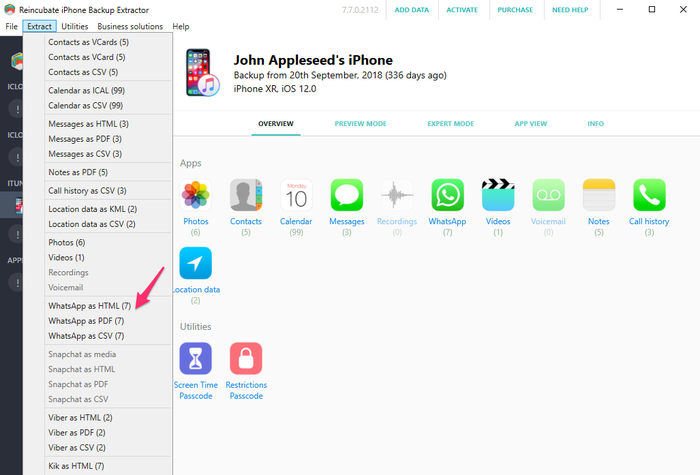
Estrazione dei messaggi con il menu «Estrai»

Estrazione dei messaggi con il menu «Estrai»

Dati come contatti, messaggi e foto possono comunque essere recuperati dal backup danneggiato, anche se i passaggi qui sopra non funzionano. Non perdere la speranza: andiamo più a fondo...

2. Usa la modalità esperto per recuperare i dati dell’iPhone dai singoli file

Se l’approccio diretto non funziona, puoi comunque usare la «Modalità esperto» e la «Vista app» per recuperare i file dal backup. Dati come contatti, calendari, SMS, posizioni e note sono salvati in file specifici del backup e, se li estrai, iPhone Backup Extractor può convertirli in formati leggibili per te.

Carica il backup con iPhone Backup Extractor, poi naviga nella «Modalità esperto» per individuare i file che rappresentano i dati che ti servono. Abbiamo un articolo su dove le app salvano i propri dati in un backup di iTunes che ti sarà utile per sapere dove cercare.
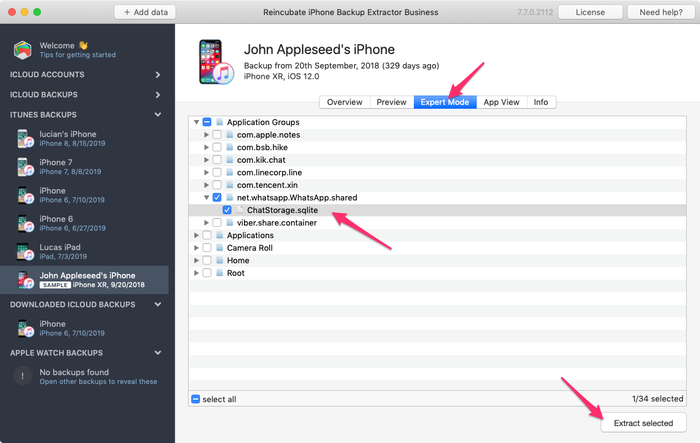
Estrazione manuale del database di WhatsApp con iPhone Backup Extractor

Estrazione manuale del database di WhatsApp con iPhone Backup Extractor

Una volta ottenuto il file necessario, puoi convertirlo in un formato leggibile:

  1. Fai clic sul menu «File» in iPhone Backup Extractor
  2. Seleziona «Converti database messaggi in CSV», «Converti database contatti in vCard» o l’opzione più adatta al tuo file
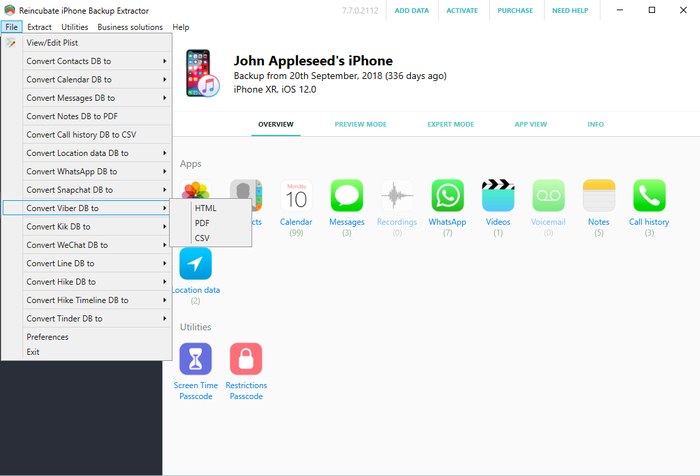
Uso del menu File per convertire...

Uso del menu File per convertire...

  1. L’app esporterà i tuoi contatti e messaggi.
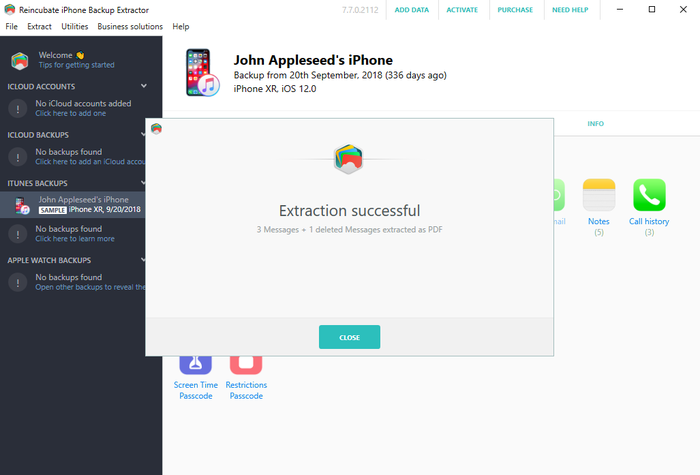
Recupero riuscito!

Recupero riuscito!

3. Passa al setaccio un backup di iPhone non crittografato in cerca di foto e video

Potresti ancora trovare foto e video nel backup di iTunes anche se il processo di iTunes è rimasto incompleto e ha prodotto un file di backup danneggiato. Perché funzioni, il backup non deve essere stato creato con la crittografia.

Prova così:

  1. Trova la cartella del backup in questione (puoi fare clic con il pulsante destro sul backup in iPhone Backup Extractor e scegliere «mostra cartella contenitore»)
  2. Crea una copia dell’intera cartella: la modificheremo pesantemente...
  3. Ordina i file al suo interno per dimensione ed elimina tutti i file più piccoli di 300 KB
  4. Scarica e installa Bulk Rename Utility: è gratuito e perfetto per quello che ci serve qui
  5. Apri «Bulk Rename Utility», vai alla copia della cartella di backup che hai creato e selezionala
  6. Aggiungi jpg (senza punto) a Extension Section (11) o .jpg (con punto) usando il menu Add > Suffix (7)
  7. Seleziona tutti i file nella finestra in alto (appariranno in verde)
  8. Fai clic sul pulsante «Rename» e tutti i file selezionati verranno rinominati in file jpg
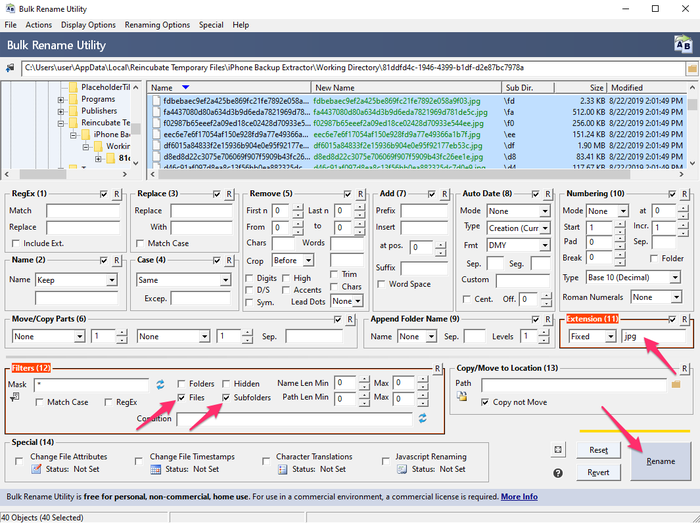
Bulk Rename Utility in azione

Bulk Rename Utility in azione

  1. Nella cartella in cui li hai salvati, seleziona la «visualizzazione Miniature» in Esplora file di Windows o nel Finder di macOS: ora dovresti riuscire a vedere quali file sono foto, perché verranno mostrati con le anteprime
  2. Sposta le foto recuperate in una nuova cartella sicura, poi ripeti il procedimento dal passaggio n. 5 con altre estensioni di file come .mov e .heic finché non le hai recuperate tutte

4. Affidati agli esperti di Reincubate

Se nessuno degli approcci qui sopra funziona, o se diventano troppo tecnici, puoi sempre contattarci. Saremo felici di aiutarti. Il nostro team di assistenza probabilmente ti chiederà di condividere una copia dei tuoi «file manifest» e qui sotto trovi un riquadro informativo con maggiori dettagli.
Informazioni sull'autore

Alexandra Malureanu

Abbiamo aiutato oltre 10.000.000 di persone a recuperare i dati persi del loro iPhone.

Lascia che aiutiamo anche te.

Commenti (30)

unplugged 13 settembre 2019

Dear reincubate professionals, I desperately need your help because Apple does not. I summarized the situation below. Is there any possible way that I can try to recover my photos and videos: On the date 7 September I saved a backup of my phone to my PC via iTunes. The next day (8 September) I wiped the phone and left to the service for battery change. After receiving I wiped the phone again and then I choose to restore from backup at the beginning. However iTunes asked me a password which I never entered for backup (I don't recall that I ever entered a password in iTunes). I tried the password of the phone and my Apple ID password but never worked. I searched online the case and someone suggested to enter Apple ID credentials on iTunes. At that stage iTunes sent an authentication code to my phone and I had to open my phone set as a new phone. Than clicked the button "change password" below the encrypt iPhone backup section. At the moment iTunes synchronized my phone because at default that option was set on iTunes. It appears to be the backup of my empty phone was overwritten on previous backup. I managed to restore from that backup but my whole photos, videos and contacts was gone. When I look into backup folder I see a large amount of data which is approximately 45GB. And last change dates of the most files are 7 September which is my first backup date. I think my data is still kept in my computer but I cannot access them. I think when iTunes overwrite the empty backup it changed the manifest.db file and some other files then the old files are not recognized by iTunes. I installed the iPhone Backup Extractor but no photos are found. Then I tried to chance file extensions by bulk rename utility however no images are shown I suppose because of encryption. Is there any possible way to restore my photos and videos from that backup folder. Or are they gone for good? Thank you in advance. Kind regards.

Risposta del supporto Reincubate 13 settembre 2019

Hi unplugged, thanks for commenting. Yes, there are a number of things we could try here. We've reached out to you directly. In the meantime, make sure the remaining files are safe from modification, and that any Time Machine backups that you may have from the time won't get overridden.

vardhan 25 gennaio 2019

Hi.. I recently sent my iPhone 7 to get the audio IC replaced. Before giving it to the technician I took a backup on itunes and wiped it clean. While the iphone 7 was with the technician, I restored the same back up to my old iphone 6S plus for use. This worked perfectly and im cureently typing from the same phone. But i had to manually delete a lot of photos and videos from my 6S as it was a 64GB. ( Roughly 5000 images + 100 videos deleted) Now my iPhone 7 has returned after getting fixed. I tried restoring from the same back up via iTunes and it gives me the following error " iTunes cannot restore the iPhone "iPhone" because and error occurred". So i tried all the usual stuff, updating of iTunes and the iPhone 7, restarting the devices, using different usb ports and different usb cables. I even tried restoring the same backup to my Wife's new iphone Xs. The entire process went through for 1.5 hours and right when it was about to finish itunes gave me and error "itunes cannot restore iphone "iphone Dee" because the backup is corrupted" I think i have tried all possible options but came up with no luck. I would really really love to have that entire backup as it was...Can you help?

Risposta del supporto Reincubate 25 gennaio 2019

Hi vardhan, thanks for commenting. I think we can probably help here: we're emailing you directly now.

Lola 10 dicembre 2016

This month, I recently upgraded from a 4s to an iPhone 6s with Verizon-I was assured my back up would go well especially with the additional 50mb I bought on icloud; well after 7 days of back and forth at Verizon & their techs talking to Apple support techs...no one was able to explain why all of my photos were lost from my 4s to my 6s to include all of my photos that I thought were safe in my photo stream on my iCloud account. Can ANYONE please help me? This Friday, 12/16/2016, I have to break it to my middle school students that their images for the town & school paper that were safe & sound on my iCloud account are now GONE. All that remains is a their ghost of images past....a screen shot of the back up where a grey box appears with the number 837...the mysterious location where the Verizon tech assured me that the images do live on are-in fact, somewhere'... Can anyone help me to find out where they are & make them reappear?? It would surely be a Christmas miracle that would make about 90 middle schoolers very happy. Happy Holidays. Thank you so much.

Risposta del supporto Reincubate 10 dicembre 2016

Hi Lola, we're sorry to read this! Might you have an old iPhone backup on your PC or Mac? Failing that, we have a few tricks up our sleeve to recover photos from iCloud that aren't in the app. Drop us a note and we'll see what we can do.

Francisco 28 novembre 2015

My itunes keep saying not enough free space on computer, can't restore my iphone. I'm trying to restore my old iphone with the same backup, just to take it back and update to iOS 9. And then trying to backup again and restore my new iPhone 6s Plus with it. But the main thing it's i got 270gb free on my Mac, so I don't know what else to do. Please help I don't want to loose all my photos and data. One more thing, when i tried to restore my new iPhone with that backup, said it's corrupt or not compatible. Help!!

Risposta del supporto Reincubate 28 novembre 2015

Hi Francisco, things can get difficult when you've got a lot of data in a backup but little space on your PC or Mac. One solution might be to use an approach like this to move your iPhone backup into a folder on another drive (or a USB stick) and restore from there. Reach out to us if you need help!

Lahmiekah 19 novembre 2015

I just got had to swap my phone due to issues on the phone when I try to restore from my backup it say corrupted or not compatible

Risposta del supporto Reincubate 19 novembre 2015

Oh no! Have you followed the steps in the guide? If so, and you're still stuck, drop us a note or ping us on live chat.

Ryan Pollock 22 ottobre 2015

Does this work in australia? I lost my iPhone 6, but luckily backed it up not long ago. Insurance have sent me another phone but when I plug it in it gives me the dreaded error saying that it is corrupt or uncompatible. I need all the files on the back up and your free version idenitifes all the files to be extracted. How much does it cost for you to put it onto my new IPhone. I am at a complete loss

Risposta del supporto Reincubate 22 ottobre 2015

Hey Ryan, it sure does. If things are getting fiddly, please drop us an email through our support page and we'll jump on a screen share with you to help sort things out.

Robert Rayner 2 luglio 2015

I need a way to extract music and eBooks from a corrupt backup, any ideas?

Risposta del supporto Reincubate 2 luglio 2015

Hey Robert. iTunes' music isn't stored in a backup, and won't be available there. However, eBooks are, and so is music from many third-party apps. Which apps are you using for the books and music?

Dave H 23 marzo 2015

How do you extract a voice memo from a corrupted backup? Thanks!

Risposta del supporto Reincubate 23 marzo 2015

The simplest way is just to click "Recordings" on the main iPhone Backup Extractor window when your backup is selected. Alternately, you can find them in iPhone Backup Extractor's "Expert mode" in the folder described here.

PATRICK 12 gennaio 2015

After doing the ios 8 update on my Iphone 5 it started acting up. On and off every two minutes. Only 180 pictures were backed up into icloud from 2000. i trie backing up the rest but phone turn off and on. Can some one help me recover my pictures. they are very important because they are from a loved one that passed away. please help!

Risposta del supporto Reincubate 12 gennaio 2015

Hi Patrick, I'd recommend backing up with iTunes, and then restoring that way. It's a lot quicker, and it's much easier to verify all of your data is there.

Glenn 2 novembre 2014

I used time machine to replace the corrupted file that wouldn't allow me to backup from the restore files, figured out which of my iTunes backup files to replace, then clicked on that folder with all the files in it ( I figured it out based on the date modified as I had several from various iPods and an iPad and clicked on get info of each of them to figure this out ) Go in to library/application support/mobilesync/backup

Kevin McCarthy 24 ottobre 2014

Is it possible to restore messages back on an iPhone

Risposta del supporto Reincubate 24 ottobre 2014

Hey Kevin, there sure is: check out this guide.

Val Hill 16 ottobre 2014

Got a new iPhone 6. Tried to restore it from iTunes. No backups were found in ITunes. Found the backup folder on my PC but three of the .plist files are missing. Status.plist is the only one I have and it looks incomplete. Need some help..

Risposta del supporto Reincubate 16 ottobre 2014

Uh-oh, missing files indeed. Drop us a note and we'll guide you through recreating those missing files.

Andre Ivasenko 4 ottobre 2014

My Iphone backup was corrupt. Please help me to restore data. I found physical stored data (10GB) on my lop top. I need help to backup this data on my iphone 5. There are very important files: app - gflash, and my contacts. Please help me to restore data. Thank you a lot.

Risposta del supporto Reincubate 4 ottobre 2014

Hi Andre, no problem. The guide above should help with accessing the backed up data, and this guide should help you restore is. Does that help?

CO 27 settembre 2014

After being able,to extract those data from corrupted files, can theses data able to import back to the phone for data like SMS, WhatApps, other App database?

Risposta del supporto Reincubate 27 settembre 2014

Hi Chanco, yes, they can. We've got a guide on restoring that data here.

Stacey 26 settembre 2014

I am trying to recover some lost voicemails using iExplorer. There are 4 backups to my phone and all are damaged. Is there a way to fix that or get the voicemails back from the damaged backup file? Any help you could give me would be greatly appreciated. The voicemails are from my gramma who passed away. Thanks.

Risposta del supporto Reincubate 26 settembre 2014

Yes, try iPhone Backup Extractor. If it won't automatically recover them for you, ping us on live chat and we'll help you get them back manually.

Jeffrey Nebot 24 settembre 2014

I backed up my iPhone 5s IOS 7 in preparation of receiving my iPhone 6. I tried to restore from my backup iOS 7 onto my new iPhone 6. It downloaded all of the music all of the apps but it is being hung up on the photographs. It just keep saying downloading. It has been doing it for two days. I have used your software in the past I'm wondering if it will be helpful again for this situation? Some of the pictures downloaded but only a fraction. I didn't upgrade the 5s to IOS8 because I didn't have enough room on the 5S.

Risposta del supporto Reincubate 24 settembre 2014

Hi Jeffrey, it's nice to hear from you. Two days of downloading sounds like a long time! I'd recommend turning off iCloud Photo Library, before turning it back on. That should sort this out.

Elsie Leong 8 luglio 2014

Hi, I'd extracted out all the files, but how can I restore inside my phone?

Risposta del supporto Reincubate 8 luglio 2014

Hi Elsie, we've got a guide for that here.

Morgan Phillips 24 giugno 2014

Good day I would be very grateful fr a workaround for the issue I face, please. I removed the cable, like an idiot, during a backup process, it was third party software (iBackupBot) and the progress indicator had been stuck at zero for several minutes, i panicked. Right now, I can't back up to or from my device, I am pretty sure it is a corrupted manifest file. Please could you direct me to workarounds for this error: Invalid name size [E9B1] at [30E77]: (null) Prev Domain:C:\Users\........ /manifest.db Prev Path:CameraRollDomain I realise I have probably boxed this thing, is it even possible to restore a new iOS version? Thank you in advance Morgan

Risposta del supporto Reincubate 24 giugno 2014

Hi Morgan, that sounds nasty! We're not experts on iBackupBot, but we can certainly help with your phone. Have you tried a factory reset?

Avenshen 22 giugno 2014

Hi, hope you can help me. I backed up my old iPhone 5 on iTunes in my laptop as the phone has a hardware defect and needs to be replaced with a new unit. I made sureall was backed up in itunes. I now got the new unit and attemptied to restore the data backed up from the old unit, however, the data restore in iTunes is greyed so I assume the data was lost. Is it still possible to recover all the lost data back up?

Risposta del supporto Reincubate 22 giugno 2014

Hey Avenshen, I'd guess that's because the newer device is on an older version of iOS than your newer one. If that's the case, an update will resolve the issue. If not, drop us a note and we'll get you sorted out.

carlo 29 ottobre 2013

hi! The files of my ipad get deleted. I already try the backup in itunes, but I dont have any backup there. All files are very important to me. Please help me. THANKS!

Risposta del supporto Reincubate 29 ottobre 2013

Hi Carlo, that doesn't sound good. Have you manually checked your iTunes backup folder? There's guidance on how to find them, here. Failing that, do you have a a backup of your computer in Time Machine, or another backup service?

Noel 26 settembre 2013

I have just upgraded my Iphone 4 to IOS7 and I lost my pictures and contacts after it got frozen showing the I tunes and USB picture. I was able to restore it, but nomore contacts and pictures in it. I did not back up any of my contacts and pictures. Can I still recoever them?

Risposta del supporto Reincubate 26 settembre 2013

Hi Noel, that sounds nasty! When you say you were able to restore the phone, I presume you mean from a backup? If so, it's worth looking through that backup with iPhone Backup Extractor to see if there are any traces of your images or contacts. You might get lucky.

Preau 30 agosto 2013

good morning, my backup(11 G0) is incomplete and encrypted, i have the password. Do your soft can extract any data?

Risposta del supporto Reincubate 30 agosto 2013

It certainly can. Try the free version linked to the side of this page, and reach out if you need help.

Richard 29 luglio 2013

my ipod does not work as it says my ipod back-up has been corrupted and i am unable to sync with itunes

Risposta del supporto Reincubate 29 luglio 2013

Reach out to us directly on live chat and we'll guide you through it with a screen-share.

Johan Bernow 25 giugno 2013

What if I only can find status.plist? The info.plist, manifest.plist and the manifest.mbdb is missing. Is there any way to recreate them?

Risposta del supporto Reincubate 25 giugno 2013

Hi Johan: yes. Move your backup out safely to another folder, and then create a new backup. If the device contents are similar enough, you may be able to reuse those files. Good luck!

Sonia 25 giugno 2013

Hi, I have updated my iphone to ios7 beta release and later on downgraded back to ios 6.1.3. But restore backup is not compatiable. Tried after changing Product version and Build Version in Info.plist. But now it says data is corrupt or not compatiable. Please help me to restore my backup data

Risposta del supporto Reincubate 25 giugno 2013

Right, this is a problem for a number of users. We can help you patch your messages etc. back into your older database if you drop us a message directly.

Devin 24 giugno 2013

Hi, some how my iphone backup got corrupted. And so I tried to restore it with another back up, but it was my ipod backup and when i tried restoring it back it said "itunes could not restore the phone because the phone refused the request" and this is frustrating because it wont let me send any messages and all my contacts and stuff are gone.

Risposta del supporto Reincubate 24 giugno 2013

Hey Devin, drop us a note and we'll give you a hand with your backup. There'll be a way!

dominic 28 febbraio 2013

i want to simply reset my iphone pin to purchase apps for the phone. i dont require resetting my ios and i dont want to affect the ios, but can iphone extractor reveal the pin if i run it?

Risposta del supporto Reincubate 28 febbraio 2013

Dominic: see our article on resetting the restrictions passcode for a solution to this.

Kerry Miller 16 febbraio 2013

My iPad had begun to have more and more apps crashed so I took it to the apple store. The genius read the incident report and said I had corrupt files so I needed to plug it into my MacBook and backup it up then reset the device. He said since the file would also be corrupted on the backup that I would need to start new instead of restore the backup. I did so and now I have a few apps that I have lost data from. I have since been informed that one app can't corrupt the whole iPad because of sandbox. So who do I believe and how do I proceed? I did try restoring the iPad's backup and the problem was still there so I reset and made new and that's where I'm at now.

Risposta del supporto Reincubate 16 febbraio 2013

Oh no! That's frustrating. Drop us a note directly and we'll help you recover that data. It shouldn't be possible for any of your iOS apps to corrupt your backup.

nighto 5 gennaio 2013

Hi, My last backup of my iPhone 5 somehow got corrupted after a failed iOS 6.0.2 upgrade. I can see all the files in the backup folder but it is missing all the manifest files. I use iPhone Backup Extractor to review the Backup file and it doesn't recognize the last backup taken before the upgrade. I would like to know is there a way to recover the last backup? Thanks Nighto

Risposta del supporto Reincubate 5 gennaio 2013

Nighto, this is because the previous backup can sometimes get overwritten after the upgrade (Yes, I did say after! And yes, this does happen ever now and then). Without the manifests it can cause issues reading files, but iPhone Backup Extractor can certain find data without the manifests by using the File menu. However if data does exist in the backup, we are experts at extracting, so please contact our help desk for more information.

haider 13 gennaio 2012

hey, i am having some problems with understanding how to re-establish all my backed up data back onto my iphone, i was wondering if there is any further help or personal assistance i could receive? thank you

Risposta del supporto Reincubate 13 gennaio 2012

Hi Haider, of course! Drop us a note on support@reincubate.com and we'd be happy to set up a screens-share to guide you through it.


Articoli popolari

Logo del King's Award for Enterprise

King's Award for Enterprise: Reincubate ha vinto quattro volte la più alta onorificenza aziendale ufficiale del Regno Unito, l'ultima in riconoscimento della straordinaria crescita dell'azienda negli ultimi tre anni.

Le nostre relazioni con utenti e partner sono al centro dei nostri valori e dei prodotti che creiamo. Consulta le nostre recensioni per scoprire cosa dicono di noi.

Certificazione ISO 27001 rilasciata dal Centre for Assessment, accreditato UKAS

© 2008-2026 Reincubate Ltd. Tutti i diritti riservati. Registrata in Inghilterra e Galles con il n. 5189175, P. IVA GB151788978. Camo®, Streamlight® e Reincubate® sono marchi registrati. Brevetti in corso di registrazione.

Assistenza