
メインコンテンツへスキップ

ガイドとヒント

iPad と iPhone のバックアップは、PC や Mac のどこに保存されますか。

Andy Coles公開日: 2012年4月23日更新日: 2019年8月23日
このページの内容
Cover image for: iPad と iPhone のバックアップは、PC や Mac のどこに保存されますか。

iOS デバイスから誤って情報を削除してしまい、復旧したい場合、iTunes バックアップが大きな助けになります。

iTunes バックアップは、iPad や iPhone を iTunes に接続するたびに自動で作成されます(iCloud バックアップのオプションをオンにしていない場合)。また、iTunes でデバイスを右クリックして「バックアップ」を選ぶと、手動でも作成できます。バックアップはコンピューターに保存され、連絡先、テキストメッセージ、カレンダー、メモ、通話履歴、アプリデータなどの重要なデータが含まれます。

では、iPhone や iPad のバックアップはどこに保存されるのでしょうか。コンピューターの OS によって異なりますが、既定のバックアップの場所は iOS のバージョンが変わっても同じです。

Windows での iTunes バックアップフォルダの場所

Windows では、iTunes バックアップは%APPDATA%\Apple Computer\MobileSyncに保存されます。

Windows 10、8、7、Vista では、\Users\[USERNAME]\AppData\Roaming\Apple Computer\MobileSync\Backupのようなパスになります。

Windows XP では、\Documents and Settings\[USERNAME]\Application Data\Apple Computer\MobileSync\Backupに似たパスになります。

Microsoft Store 版の iTunes は少し異なり、バックアップを%HOMEPATH%\Apple\MobileSyncの下に保存します。パスは\Users\[USERNAME]\Apple\MobileSync\Backupのようになります。

macOS / OS X での iTunes バックアップフォルダの場所

macOS では、iTunes バックアップは~/Library/Application Support/MobileSyncに保存されます。

このフォルダは通常、/Users/[USERNAME]/Library/Application Support/MobileSync/Backupにあります。

macOS 10.15 では、iPhone のバックアップは iTunes ではなく Finder が作成します。ただし、バックアップは同じ場所に保存されます。

iTunes バックアップフォルダを自動で見つける方法

iPhone Backup Extractor は、iTunes バックアップフォルダを自動で見つけ、ワンクリックで開けます。この機能は無料版に含まれているため、費用はかかりません。

  1. iPhone Backup Extractor をダウンロードしてインストールします
  2. アプリのプルダウンメニューからPreferencesウィンドウを開きます
  3. Backupsタブを選択します。
  4. ウィンドウに「バックアップは常に既定のフォルダで検索されます」と表示されている箇所の「既定のフォルダ」リンクをクリックします。簡単です。
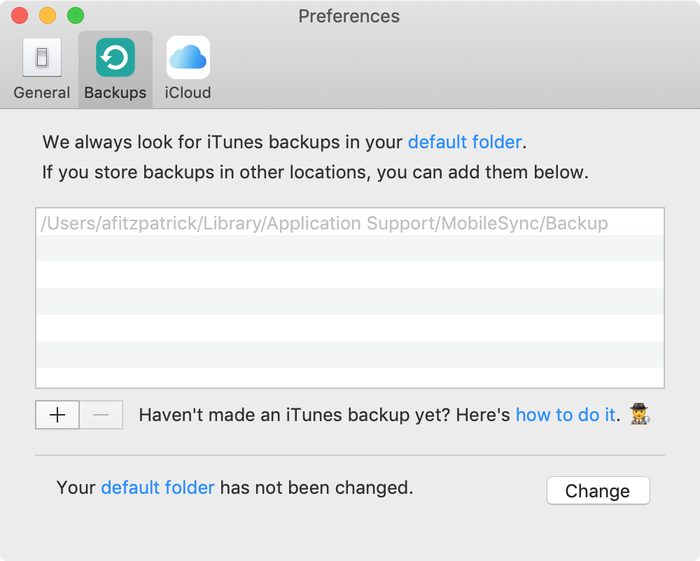
iTunes の既定のバックアップフォルダを表示している iPhone Backup Extractor

iTunes の既定のバックアップフォルダを表示している iPhone Backup Extractor

Windows で iTunes バックアップフォルダを開く

Windows の「ファイル名を指定して実行」コマンドを使って、既定のバックアップの場所をエクスプローラーで開きます。⊞ Win + Rを押すと、「ファイル名を指定して実行」ウィンドウが表示されます。%APPDATA%\Apple Computer\MobileSyncと入力して、⏎ Enterを押します。

Microsoft Store 版の iTunes の場合は、次のようにします。⊞ Win + Rを押すと、「ファイル名を指定して実行」ウィンドウが表示されます。%HOMEPATH%\Apple\MobileSyncと入力して、⏎ Enterを押します。

Windows 10 では、次のように表示されます。
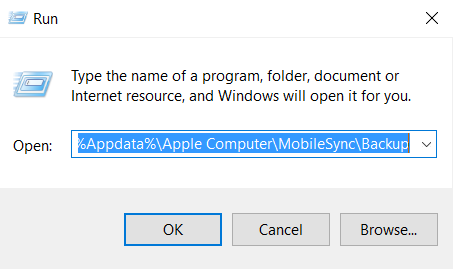
Windows 10 で iTunes バックアップを見つける

Windows 10 で iTunes バックアップを見つける

開いたエクスプローラーのウィンドウに、「Backup」という名前のフォルダが表示されます。このフォルダには、コンピューターにすでにある iTunes バックアップが含まれています。

macOS で iTunes バックアップフォルダを見つける

既定のバックアップの場所は、Spotlight を使って Finder に表示できます。⌘ Cmd + ␣ Spaceを押して~/Library/Application Support/MobileSyncと入力し、⏎ Enterを押します。

開いた Finder のウィンドウに、「Backup」という名前のフォルダが表示されます。このフォルダには、コンピューターにすでにある iTunes バックアップが含まれています。

iTunes バックアップフォルダの場所を変更するには

iTunes がバックアップを保存する既定のフォルダを変更したい場合は、サポートセンターに便利なガイドがあります。

執筆者について

Andy Coles

CCO

CCO兼Reincubate取締役会のメンバーとして、Andyは創業当初から会社の運営面・戦略面の方向性を導く役割を担ってきました。Camoのロードマップの策定と改善において重要な役割を果たすとともに、会社のハードウェアパートナーシップや連携の交渉、管理、深化を主導しています。Andyはまた、初回リリース以来iPhone Backup Extractorの開発とドキュメント作成に大きく貢献してきたほか、データ復旧という分野全体にも顕著な貢献を果たしてきました。

これまでに1,000万人以上のiPhoneデータの復元をお手伝いしてきました。

あなたのお手伝いもさせてください。

コメント (10)

Sohaib Ahmed 2018年8月8日

Thanks alot. Cheers.. .. .!!!

Jake Lown 2017年7月24日

Hi, I would like to restore a previous backup but I'm having trouble finding out my backup password. Can you please help me with this?

Reincubate サポートからの返信 2017年7月24日

Hey Jake, we've got a guide on password recovery. You can find it here.

Gerry Wood 2017年6月30日

Many thanks for enabling me to find the backup file for my iphone on my PC. When I click on the properties of the backup file it shows that I have 2.23gb backed up in 3503 files which is reassuring. If I now wish to view the contacts that have been backed up or restore them to a different device how do I do that if I've replaced my iphone with an android phone?

Reincubate サポートからの返信 2017年6月30日

Hi Gerry, thanks for asking. We're glad the article was helpful. If you install iPhone Backup Extractor, you'll see the free edition lets you browse through all of your contacts. Try that — it can export your contacts into a VCF format that your Android will easily be able to import.

Apple Repair New Orleans 2016年4月3日

I plan to buy an iPhone 6S Plus from a client, but they want me to transfer all their data to their old 5C. I backed it up in iTunes, then plugged in the 5C, but the 6s backup is nowhere to be seen from the drop down list! The 5C is 32GB and the 6S Plus is only 16GB, so I don't know what the problem is. Any ideas?

Reincubate サポートからの返信 2016年4月3日

Hi guys, thanks for commenting. This one's an old chestnut: it's caused by one of the phones running a different version of iOS to the backup. Upgrade one or other so that they're running the same version, then update the backup. That'll sort it out!

Justin 2015年10月5日

First of all; Thanks for the easy and helpful steps to get this far in the process. I am just curious as I am copying my backup off of my pc if it just as simple as me copying this backup off of my (non internet accessible) pc onto a hard drive, then I can drag and drop into the list of backups on the new Mac. I am trying to restore my old backup onto my new iPhone six, but my pc has lost ability to connect to the Internet, so I can't download the new iTunes update to be able to work with my iPhone six.

Reincubate サポートからの返信 2015年10月5日

Justin! Thanks for writing. Yes, it really is that easy. You can move iTunes backup folders between Macs, or even between Macs and PCs.

Brian Corbett 2015年4月11日

You have confirmed to me the preposterous nature of the iPad backup system. Why can't they use files like windows?

Reincubate サポートからの返信 2015年4月11日

Hi Brian, the iOS device does all the work when making a backup and simply relays the data to the PC or Mac (or to iCloud). They use this format partly to make it straightforward (and fast!) for the device, but also to discourage inadvertent modification of files, and to easily be able to layer encryption on top. It works pretty well in most cases!

Chris 2015年3月16日

i found the backup files but they look coded in jibberish. how can i read them as they would appear from my phone, opposed to being random numbers and letters? please halp

Reincubate サポートからの返信 2015年3月16日

Hi Chris, that's what iPhone Backup Extractor does. Load up the free version, and choose "Expert mode". That'll show you the structure the files decode to.

Bennie 2014年12月15日

My iphone and ipad was backed on the same computer, will it be a separate folder or combine on the same folder?

Reincubate サポートからの返信 2014年12月15日

Hi Bennie, they'll be in separate folders, both in the master Backups folder. Each folder will be named after the phone's UDID, which is a long phrase name of letters and numbers.

Mosin 2014年10月4日

How do i get the contacts from the folder on to a android? could you please let me know as soon as possible please

Reincubate サポートからの返信 2014年10月4日

Hi Mosin, thanks for commenting! We've got a guide that takes you through transferring contacts to Android here.

sf 2012年9月30日

would u also tell me how do i get there.. i mean where i can find Users\USERNAME\AppData\Roaming\Apple Computer\MobileSync\Backup as i am using windows 7

Reincubate サポートからの返信 2012年9月30日

Hi sf: sure! We've updated the article to make it clearer that Windows backups are stored under a different location. Does that help?


人気の記事

King's Award for Enterprise のロゴ

King's Award for Enterprise:Reincubate は英国最高峰の公式ビジネス表彰を4度受賞しており、直近では過去3年間にわたる同社の卓越した成長が評価されました。

ユーザーやパートナーとの関係は、私たちの価値観と開発する製品の中心にあります。レビュー をご覧いただき、皆さまの声をお聞きください。

Centre for Assessment による ISO 27001 認証取得、UKAS 認定

© 2008-2026 Reincubate Ltd. 無断複写・転載を禁じます。イングランドおよびウェールズ登記番号 5189175、VAT 番号 GB151788978。Camo®、Streamlight®、Reincubate® は登録商標です。特許出願中。

ヘルプ