
Перейти к основному содержимому

Руководства и советы

Как исправить повреждённую резервную копию iPhone и восстановить из неё данные

Alexandra MalureanuОпубликовано 25 июля 2012 г.Обновлено 2 марта 2020 г.
Cover image for: Как исправить повреждённую резервную копию iPhone и восстановить из неё данные

Восстановить данные из повреждённой резервной копии iTunes непросто, но возможно, а сообщения вроде «резервная копия повреждена или несовместима с восстанавливаемым iPhone» не означают, что данные «потеряны безвозвратно». У вас хорошие шансы автоматически восстановить повреждённые копии с помощью iPhone Backup Extractor.

Обычно данные из незашифрованной повреждённой резервной копии iTunes восстановить несложно. С зашифрованными повреждёнными копиями сложнее, особенно если отсутствуют «файлы манифеста»: они описывают, как данные в копии были зашифрованы, и необходимы для расшифровки.

Резервные копии могут быть повреждены в разной степени. Например, на копию по-разному влияют нехватка места на диске посреди резервного копирования, отказ жёсткого диска (или Dropbox, «съевший» ваши файлы!), неудачное обновление iOS или отключение питания во время копирования.

При повреждении резервной копии можно столкнуться с несколькими ошибками. Разберём причину и решение для каждой.

Ошибки восстановления iTunes, указывающие на повреждение

iTunes не удалось восстановить iPhone, потому что резервная копия повреждена или несовместима с восстанавливаемым iPhone

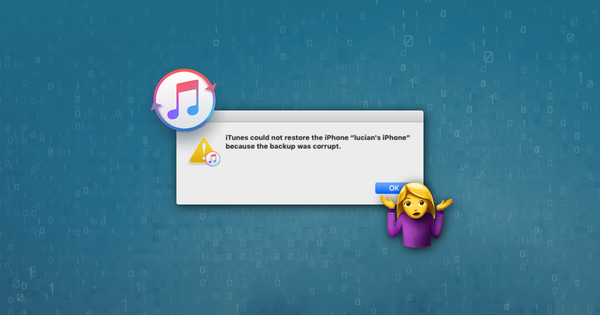
Это первое сообщение понятно и означает, что вы имеете дело с повреждённой резервной копией. Иногда при резервном копировании iOS в iTunes процесс завершается сбоем без сообщения об ошибке. Неприятно узнать о повреждённой копии только при попытке восстановления через iTunes. Достать данные не так уж сложно: ниже наше руководство по извлечению данных из повреждённой резервной копии iPhone.
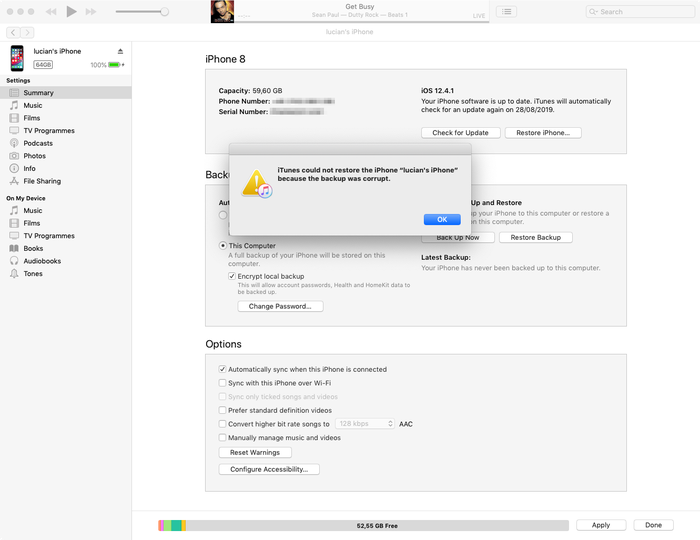
Сообщение iTunes о повреждённой резервной копии

Сообщение iTunes о повреждённой резервной копии

iTunes не удалось восстановить iPhone, потому что сеанс резервного копирования завершился сбоем

Эта ошибка похожа на первую и тоже говорит о том, что резервная копия iTunes повреждена или не завершена. Причина похожая. Ниже наши советы по восстановлению данных из повреждённых резервных копий.

iTunes не удалось восстановить, потому что iTunes не распознаёт ваше устройство

Для этого третьего сообщения проверьте, что у вас установлена последняя версия iTunes, что кабель USB подключён правильно (и не повреждён) и что работе iTunes не мешает стороннее программное обеспечение.

Если это не помогло, проблему обычно удаётся решить с помощью режима восстановления. В режиме восстановления данные на устройстве стираются, и оно восстанавливается: если вы ранее синхронизировали устройство с iTunes или iCloud, после восстановления вы сможете вернуть данные из резервной копии.

В худшем случае проблема в самом подключаемом устройстве iOS. Если у вас есть запасное устройство, попробуйте использовать его. Если и это не поможет, мы можем помочь извлечь данные из повреждённой резервной копии iTunes. Читайте дальше!

Не удалось восстановить iPhone. Произошла неизвестная ошибка

Эта ошибка охватывает целый ряд разных проблем. В зависимости от причины есть несколько решений:

  • Хорошее начало — последняя версия iTunes (не бета-версия!). Если у вас другая, обновите её
  • Пользователям Windows может помочь перезагрузка (если вы обновите iTunes, как описано выше, перезагрузка всё равно понадобится)
  • Полный сброс телефона и восстановление в режиме DFU
  • У Apple есть короткий документ с дополнительными советами по этой ошибке

Если здесь добиться результата не удалось, прочитайте ниже наше руководство по восстановлению данных из повреждённой резервной копии iTunes.

Для подключения к iPhone требуется обновление программного обеспечения

Это сообщение означает, что для подключения к iPhone нужно обновление, но из текста не ясно, нужно ли обновлять компьютер с Windows или Mac либо сам iPhone. Речь идёт о компьютере.
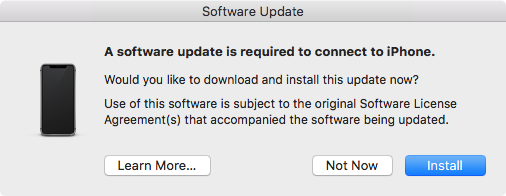
Для подключения к iPhone требуется обновление программного обеспечения

Для подключения к iPhone требуется обновление программного обеспечения

Чаще всего с этим сталкиваются пользователи, у которых установлена бета-версия iOS, но не установлена соответствующая бета-версия iTunes. В этом случае кнопка «Установить» не поможет. Некоторое время будет отображаться загрузка обновления, а затем появится сообщение «Не удалось установить. Невозможно установить программное обеспечение, так как оно сейчас недоступно на сервере обновления ПО». Решение: установить последнюю бета-версию iTunes.

4 способа починить повреждённую резервную копию iPhone и вернуть данные

iPhone Backup Extractor создан, чтобы помочь вам получить данные, когда резервную копию не удаётся нормально восстановить через iTunes. Он открывает резервные копии iTunes и iCloud и извлекает ценные данные, даже если копия повреждена.

1. Используйте встроенную обработку повреждений в iPhone Backup Extractor

Даже в бесплатной версии iPhone Backup Extractor есть много встроенных механизмов для работы с повреждёнными копиями, и вполне возможно, что данные удастся извлечь обычным способом.

Попробуйте быстрые ссылки для извлечения данных в разделе «Обзор» и посмотрите наши обычные руководства по восстановлению данных iTunes.
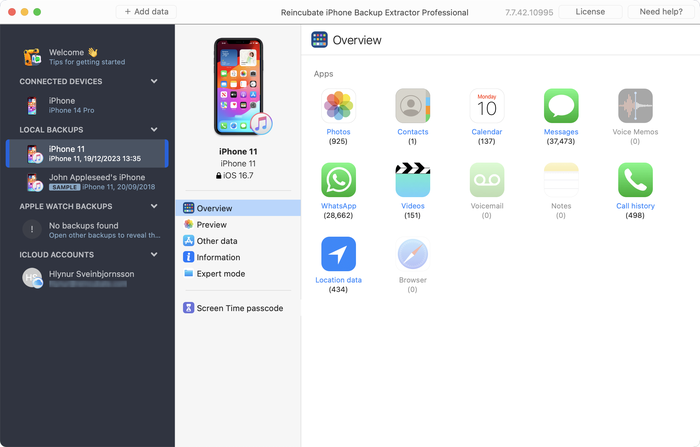
Извлечение данных из повреждённой резервной копии в iPhone Backup Extractor

Извлечение данных из повреждённой резервной копии в iPhone Backup Extractor

Если обзор не даёт того, что вам нужно, есть ещё два способа.

  1. Откройте вкладку «Просмотр» и проверьте, доступны ли данные для извлечения. Если данные есть, нажмите на название приложения, выберите нужные сообщения и извлеките их в нужном формате. Как показано ниже:
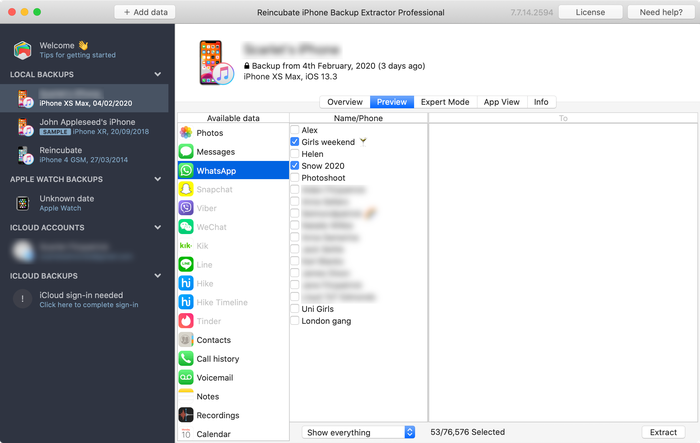
Предварительный просмотр сообщений

Предварительный просмотр сообщений

  1. Воспользуйтесь меню «Извлечь», чтобы экспортировать доступные сообщения в HTML или CSV, как показано на снимке экрана ниже:
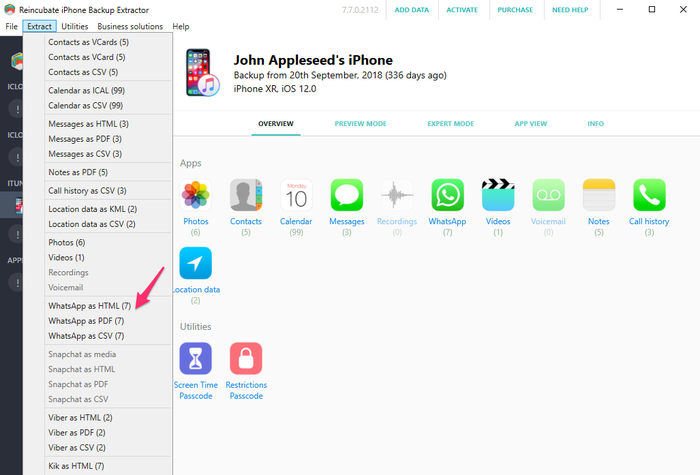
Извлечение сообщений через меню «Извлечь»

Извлечение сообщений через меню «Извлечь»

Данные вроде контактов, сообщений и фотографий всё равно можно извлечь из повреждённой копии, даже если описанные выше шаги не помогли. Не отчаивайтесь, давайте копнём глубже...

2. Восстановите данные iPhone из отдельных файлов в «Экспертный режим»

Если прямой способ не сработал, вы всё равно можете восстановить файлы из резервной копии с помощью «Экспертный режим» и «Просмотр приложений». Такие данные, как контакты, календари, SMS, местоположения и заметки, хранятся в определённых файлах резервной копии, и, если вы достанете эти файлы, iPhone Backup Extractor преобразует их в читаемые форматы.

Загрузите резервную копию в iPhone Backup Extractor и в «Экспертный режим» найдите файлы с нужными данными. У нас есть статья о том, где приложения хранят данные в резервной копии iTunes, она поможет понять, где искать.
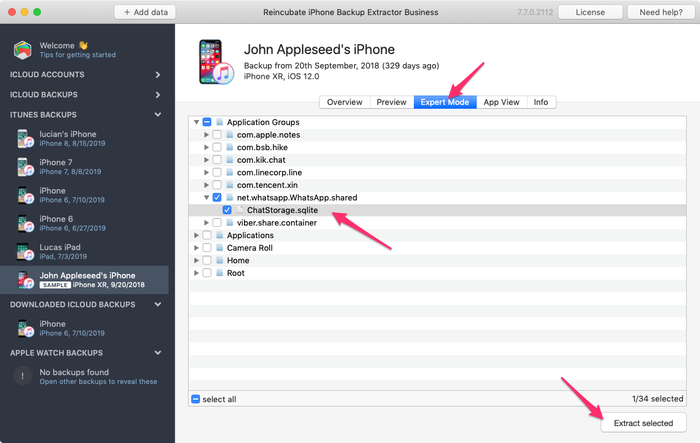
Ручное извлечение базы данных WhatsApp в iPhone Backup Extractor

Ручное извлечение базы данных WhatsApp в iPhone Backup Extractor

Когда нужный файл у вас есть, его можно преобразовать в читаемый формат:

  1. Нажмите меню «Файл» в iPhone Backup Extractor
  2. Выберите «Преобразовать базу сообщений в CSV», «Преобразовать базу контактов в vCard» или другой подходящий для вашего файла вариант
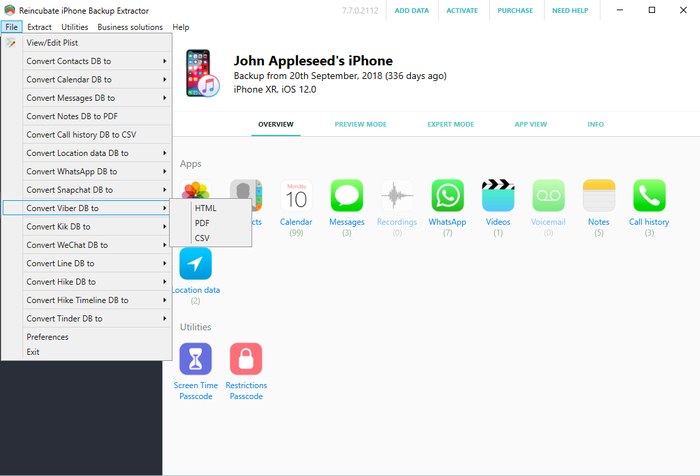
Преобразование через меню «Файл»...

Преобразование через меню «Файл»...

  1. Приложение экспортирует ваши контакты и сообщения.
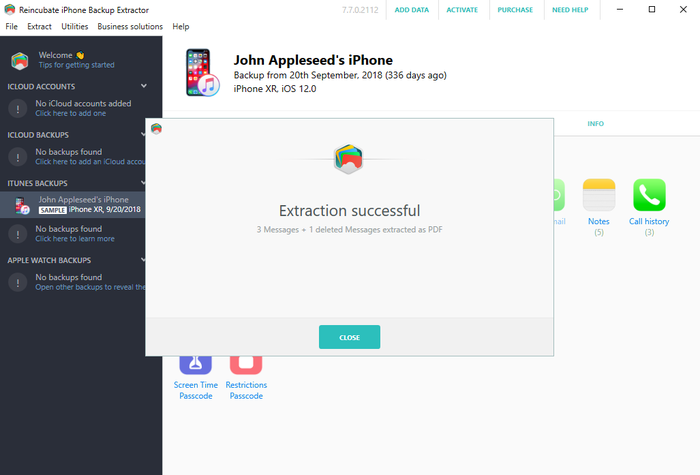
Восстановление прошло успешно!

Восстановление прошло успешно!

3. Найдите фото и видео в незашифрованной резервной копии iPhone

Фотографии и видео могут остаться в резервной копии iTunes, даже если процесс в iTunes не завершился и файл копии повреждён. Для этого копия не должна быть создана с шифрованием.

Попробуйте так:

  1. Найдите нужную папку резервной копии (в iPhone Backup Extractor можно щёлкнуть копию правой кнопкой мыши и выбрать «Показать вмещающую папку»)
  2. Сделайте копию всей папки: мы будем сильно её менять...
  3. Отсортируйте файлы внутри по размеру и удалите все файлы меньше 300 КБ
  4. Скачайте и установите Bulk Rename Utility: она бесплатна и отлично подходит для этой задачи
  5. Откройте «Bulk Rename Utility», перейдите к созданной копии папки резервной копии и выберите её
  6. Добавьте jpg (без точки) к Extension Section (11) или .jpg (с точкой) через меню Add > Suffix (7)
  7. Выделите все файлы в верхнем окне (они станут зелёными)
  8. Нажмите кнопку «Rename», и все выделенные файлы будут переименованы в файлы jpg
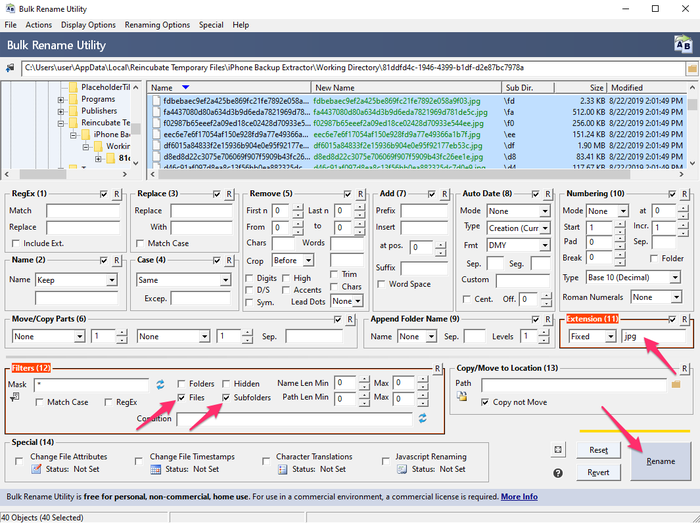
Bulk Rename Utility в работе

Bulk Rename Utility в работе

  1. В папке, где вы их сохранили, выберите режим эскизов в проводнике Windows или Finder в macOS: теперь вы увидите, какие файлы являются фотографиями, так как они отображаются с превью
  2. Переместите восстановленные фотографии в новую безопасную папку, затем повторите процесс с шага 5 для других расширений, например .mov и .heic, пока не восстановите все файлы

4. Доверьте восстановление специалистам Reincubate

Если ни один из описанных способов не помог или они слишком сложны, вы всегда можете обратиться к нам. Мы будем рады помочь. Скорее всего, наша служба поддержки попросит прислать копию ваших «файлов манифеста», а ниже есть информационная панель с подробностями о них.


Об авторе

Alexandra Malureanu

Мы уже помогли более чем 10 000 000 людей восстановить утерянные данные iPhone.

Позвольте помочь и вам.

Комментарии (30)

unplugged 13 сентября 2019 г.

Dear reincubate professionals, I desperately need your help because Apple does not. I summarized the situation below. Is there any possible way that I can try to recover my photos and videos: On the date 7 September I saved a backup of my phone to my PC via iTunes. The next day (8 September) I wiped the phone and left to the service for battery change. After receiving I wiped the phone again and then I choose to restore from backup at the beginning. However iTunes asked me a password which I never entered for backup (I don't recall that I ever entered a password in iTunes). I tried the password of the phone and my Apple ID password but never worked. I searched online the case and someone suggested to enter Apple ID credentials on iTunes. At that stage iTunes sent an authentication code to my phone and I had to open my phone set as a new phone. Than clicked the button "change password" below the encrypt iPhone backup section. At the moment iTunes synchronized my phone because at default that option was set on iTunes. It appears to be the backup of my empty phone was overwritten on previous backup. I managed to restore from that backup but my whole photos, videos and contacts was gone. When I look into backup folder I see a large amount of data which is approximately 45GB. And last change dates of the most files are 7 September which is my first backup date. I think my data is still kept in my computer but I cannot access them. I think when iTunes overwrite the empty backup it changed the manifest.db file and some other files then the old files are not recognized by iTunes. I installed the iPhone Backup Extractor but no photos are found. Then I tried to chance file extensions by bulk rename utility however no images are shown I suppose because of encryption. Is there any possible way to restore my photos and videos from that backup folder. Or are they gone for good? Thank you in advance. Kind regards.

Ответ службы поддержки Reincubate 13 сентября 2019 г.

Hi unplugged, thanks for commenting. Yes, there are a number of things we could try here. We've reached out to you directly. In the meantime, make sure the remaining files are safe from modification, and that any Time Machine backups that you may have from the time won't get overridden.

vardhan 25 января 2019 г.

Hi.. I recently sent my iPhone 7 to get the audio IC replaced. Before giving it to the technician I took a backup on itunes and wiped it clean. While the iphone 7 was with the technician, I restored the same back up to my old iphone 6S plus for use. This worked perfectly and im cureently typing from the same phone. But i had to manually delete a lot of photos and videos from my 6S as it was a 64GB. ( Roughly 5000 images + 100 videos deleted) Now my iPhone 7 has returned after getting fixed. I tried restoring from the same back up via iTunes and it gives me the following error " iTunes cannot restore the iPhone "iPhone" because and error occurred". So i tried all the usual stuff, updating of iTunes and the iPhone 7, restarting the devices, using different usb ports and different usb cables. I even tried restoring the same backup to my Wife's new iphone Xs. The entire process went through for 1.5 hours and right when it was about to finish itunes gave me and error "itunes cannot restore iphone "iphone Dee" because the backup is corrupted" I think i have tried all possible options but came up with no luck. I would really really love to have that entire backup as it was...Can you help?

Ответ службы поддержки Reincubate 25 января 2019 г.

Hi vardhan, thanks for commenting. I think we can probably help here: we're emailing you directly now.

Lola 10 декабря 2016 г.

This month, I recently upgraded from a 4s to an iPhone 6s with Verizon-I was assured my back up would go well especially with the additional 50mb I bought on icloud; well after 7 days of back and forth at Verizon & their techs talking to Apple support techs...no one was able to explain why all of my photos were lost from my 4s to my 6s to include all of my photos that I thought were safe in my photo stream on my iCloud account. Can ANYONE please help me? This Friday, 12/16/2016, I have to break it to my middle school students that their images for the town & school paper that were safe & sound on my iCloud account are now GONE. All that remains is a their ghost of images past....a screen shot of the back up where a grey box appears with the number 837...the mysterious location where the Verizon tech assured me that the images do live on are-in fact, somewhere'... Can anyone help me to find out where they are & make them reappear?? It would surely be a Christmas miracle that would make about 90 middle schoolers very happy. Happy Holidays. Thank you so much.

Ответ службы поддержки Reincubate 10 декабря 2016 г.

Hi Lola, we're sorry to read this! Might you have an old iPhone backup on your PC or Mac? Failing that, we have a few tricks up our sleeve to recover photos from iCloud that aren't in the app. Drop us a note and we'll see what we can do.

Francisco 28 ноября 2015 г.

My itunes keep saying not enough free space on computer, can't restore my iphone. I'm trying to restore my old iphone with the same backup, just to take it back and update to iOS 9. And then trying to backup again and restore my new iPhone 6s Plus with it. But the main thing it's i got 270gb free on my Mac, so I don't know what else to do. Please help I don't want to loose all my photos and data. One more thing, when i tried to restore my new iPhone with that backup, said it's corrupt or not compatible. Help!!

Ответ службы поддержки Reincubate 28 ноября 2015 г.

Hi Francisco, things can get difficult when you've got a lot of data in a backup but little space on your PC or Mac. One solution might be to use an approach like this to move your iPhone backup into a folder on another drive (or a USB stick) and restore from there. Reach out to us if you need help!

Lahmiekah 19 ноября 2015 г.

I just got had to swap my phone due to issues on the phone when I try to restore from my backup it say corrupted or not compatible

Ответ службы поддержки Reincubate 19 ноября 2015 г.

Oh no! Have you followed the steps in the guide? If so, and you're still stuck, drop us a note or ping us on live chat.

Ryan Pollock 22 октября 2015 г.

Does this work in australia? I lost my iPhone 6, but luckily backed it up not long ago. Insurance have sent me another phone but when I plug it in it gives me the dreaded error saying that it is corrupt or uncompatible. I need all the files on the back up and your free version idenitifes all the files to be extracted. How much does it cost for you to put it onto my new IPhone. I am at a complete loss

Ответ службы поддержки Reincubate 22 октября 2015 г.

Hey Ryan, it sure does. If things are getting fiddly, please drop us an email through our support page and we'll jump on a screen share with you to help sort things out.

Robert Rayner 2 июля 2015 г.

I need a way to extract music and eBooks from a corrupt backup, any ideas?

Ответ службы поддержки Reincubate 2 июля 2015 г.

Hey Robert. iTunes' music isn't stored in a backup, and won't be available there. However, eBooks are, and so is music from many third-party apps. Which apps are you using for the books and music?

Dave H 23 марта 2015 г.

How do you extract a voice memo from a corrupted backup? Thanks!

Ответ службы поддержки Reincubate 23 марта 2015 г.

The simplest way is just to click "Recordings" on the main iPhone Backup Extractor window when your backup is selected. Alternately, you can find them in iPhone Backup Extractor's "Expert mode" in the folder described here.

PATRICK 12 января 2015 г.

After doing the ios 8 update on my Iphone 5 it started acting up. On and off every two minutes. Only 180 pictures were backed up into icloud from 2000. i trie backing up the rest but phone turn off and on. Can some one help me recover my pictures. they are very important because they are from a loved one that passed away. please help!

Ответ службы поддержки Reincubate 12 января 2015 г.

Hi Patrick, I'd recommend backing up with iTunes, and then restoring that way. It's a lot quicker, and it's much easier to verify all of your data is there.

Glenn 2 ноября 2014 г.

I used time machine to replace the corrupted file that wouldn't allow me to backup from the restore files, figured out which of my iTunes backup files to replace, then clicked on that folder with all the files in it ( I figured it out based on the date modified as I had several from various iPods and an iPad and clicked on get info of each of them to figure this out ) Go in to library/application support/mobilesync/backup

Kevin McCarthy 24 октября 2014 г.

Is it possible to restore messages back on an iPhone

Ответ службы поддержки Reincubate 24 октября 2014 г.

Hey Kevin, there sure is: check out this guide.

Val Hill 16 октября 2014 г.

Got a new iPhone 6. Tried to restore it from iTunes. No backups were found in ITunes. Found the backup folder on my PC but three of the .plist files are missing. Status.plist is the only one I have and it looks incomplete. Need some help..

Ответ службы поддержки Reincubate 16 октября 2014 г.

Uh-oh, missing files indeed. Drop us a note and we'll guide you through recreating those missing files.

Andre Ivasenko 4 октября 2014 г.

My Iphone backup was corrupt. Please help me to restore data. I found physical stored data (10GB) on my lop top. I need help to backup this data on my iphone 5. There are very important files: app - gflash, and my contacts. Please help me to restore data. Thank you a lot.

Ответ службы поддержки Reincubate 4 октября 2014 г.

Hi Andre, no problem. The guide above should help with accessing the backed up data, and this guide should help you restore is. Does that help?

CO 27 сентября 2014 г.

After being able,to extract those data from corrupted files, can theses data able to import back to the phone for data like SMS, WhatApps, other App database?

Ответ службы поддержки Reincubate 27 сентября 2014 г.

Hi Chanco, yes, they can. We've got a guide on restoring that data here.

Stacey 26 сентября 2014 г.

I am trying to recover some lost voicemails using iExplorer. There are 4 backups to my phone and all are damaged. Is there a way to fix that or get the voicemails back from the damaged backup file? Any help you could give me would be greatly appreciated. The voicemails are from my gramma who passed away. Thanks.

Ответ службы поддержки Reincubate 26 сентября 2014 г.

Yes, try iPhone Backup Extractor. If it won't automatically recover them for you, ping us on live chat and we'll help you get them back manually.

Jeffrey Nebot 24 сентября 2014 г.

I backed up my iPhone 5s IOS 7 in preparation of receiving my iPhone 6. I tried to restore from my backup iOS 7 onto my new iPhone 6. It downloaded all of the music all of the apps but it is being hung up on the photographs. It just keep saying downloading. It has been doing it for two days. I have used your software in the past I'm wondering if it will be helpful again for this situation? Some of the pictures downloaded but only a fraction. I didn't upgrade the 5s to IOS8 because I didn't have enough room on the 5S.

Ответ службы поддержки Reincubate 24 сентября 2014 г.

Hi Jeffrey, it's nice to hear from you. Two days of downloading sounds like a long time! I'd recommend turning off iCloud Photo Library, before turning it back on. That should sort this out.

Elsie Leong 8 июля 2014 г.

Hi, I'd extracted out all the files, but how can I restore inside my phone?

Ответ службы поддержки Reincubate 8 июля 2014 г.

Hi Elsie, we've got a guide for that here.

Morgan Phillips 24 июня 2014 г.

Good day I would be very grateful fr a workaround for the issue I face, please. I removed the cable, like an idiot, during a backup process, it was third party software (iBackupBot) and the progress indicator had been stuck at zero for several minutes, i panicked. Right now, I can't back up to or from my device, I am pretty sure it is a corrupted manifest file. Please could you direct me to workarounds for this error: Invalid name size [E9B1] at [30E77]: (null) Prev Domain:C:\Users\........ /manifest.db Prev Path:CameraRollDomain I realise I have probably boxed this thing, is it even possible to restore a new iOS version? Thank you in advance Morgan

Ответ службы поддержки Reincubate 24 июня 2014 г.

Hi Morgan, that sounds nasty! We're not experts on iBackupBot, but we can certainly help with your phone. Have you tried a factory reset?

Avenshen 22 июня 2014 г.

Hi, hope you can help me. I backed up my old iPhone 5 on iTunes in my laptop as the phone has a hardware defect and needs to be replaced with a new unit. I made sureall was backed up in itunes. I now got the new unit and attemptied to restore the data backed up from the old unit, however, the data restore in iTunes is greyed so I assume the data was lost. Is it still possible to recover all the lost data back up?

Ответ службы поддержки Reincubate 22 июня 2014 г.

Hey Avenshen, I'd guess that's because the newer device is on an older version of iOS than your newer one. If that's the case, an update will resolve the issue. If not, drop us a note and we'll get you sorted out.

carlo 29 октября 2013 г.

hi! The files of my ipad get deleted. I already try the backup in itunes, but I dont have any backup there. All files are very important to me. Please help me. THANKS!

Ответ службы поддержки Reincubate 29 октября 2013 г.

Hi Carlo, that doesn't sound good. Have you manually checked your iTunes backup folder? There's guidance on how to find them, here. Failing that, do you have a a backup of your computer in Time Machine, or another backup service?

Noel 26 сентября 2013 г.

I have just upgraded my Iphone 4 to IOS7 and I lost my pictures and contacts after it got frozen showing the I tunes and USB picture. I was able to restore it, but nomore contacts and pictures in it. I did not back up any of my contacts and pictures. Can I still recoever them?

Ответ службы поддержки Reincubate 26 сентября 2013 г.

Hi Noel, that sounds nasty! When you say you were able to restore the phone, I presume you mean from a backup? If so, it's worth looking through that backup with iPhone Backup Extractor to see if there are any traces of your images or contacts. You might get lucky.

Preau 30 августа 2013 г.

good morning, my backup(11 G0) is incomplete and encrypted, i have the password. Do your soft can extract any data?

Ответ службы поддержки Reincubate 30 августа 2013 г.

It certainly can. Try the free version linked to the side of this page, and reach out if you need help.

Richard 29 июля 2013 г.

my ipod does not work as it says my ipod back-up has been corrupted and i am unable to sync with itunes

Ответ службы поддержки Reincubate 29 июля 2013 г.

Reach out to us directly on live chat and we'll guide you through it with a screen-share.

Johan Bernow 25 июня 2013 г.

What if I only can find status.plist? The info.plist, manifest.plist and the manifest.mbdb is missing. Is there any way to recreate them?

Ответ службы поддержки Reincubate 25 июня 2013 г.

Hi Johan: yes. Move your backup out safely to another folder, and then create a new backup. If the device contents are similar enough, you may be able to reuse those files. Good luck!

Sonia 25 июня 2013 г.

Hi, I have updated my iphone to ios7 beta release and later on downgraded back to ios 6.1.3. But restore backup is not compatiable. Tried after changing Product version and Build Version in Info.plist. But now it says data is corrupt or not compatiable. Please help me to restore my backup data

Ответ службы поддержки Reincubate 25 июня 2013 г.

Right, this is a problem for a number of users. We can help you patch your messages etc. back into your older database if you drop us a message directly.

Devin 24 июня 2013 г.

Hi, some how my iphone backup got corrupted. And so I tried to restore it with another back up, but it was my ipod backup and when i tried restoring it back it said "itunes could not restore the phone because the phone refused the request" and this is frustrating because it wont let me send any messages and all my contacts and stuff are gone.

Ответ службы поддержки Reincubate 24 июня 2013 г.

Hey Devin, drop us a note and we'll give you a hand with your backup. There'll be a way!

dominic 28 февраля 2013 г.

i want to simply reset my iphone pin to purchase apps for the phone. i dont require resetting my ios and i dont want to affect the ios, but can iphone extractor reveal the pin if i run it?

Ответ службы поддержки Reincubate 28 февраля 2013 г.

Dominic: see our article on resetting the restrictions passcode for a solution to this.

Kerry Miller 16 февраля 2013 г.

My iPad had begun to have more and more apps crashed so I took it to the apple store. The genius read the incident report and said I had corrupt files so I needed to plug it into my MacBook and backup it up then reset the device. He said since the file would also be corrupted on the backup that I would need to start new instead of restore the backup. I did so and now I have a few apps that I have lost data from. I have since been informed that one app can't corrupt the whole iPad because of sandbox. So who do I believe and how do I proceed? I did try restoring the iPad's backup and the problem was still there so I reset and made new and that's where I'm at now.

Ответ службы поддержки Reincubate 16 февраля 2013 г.

Oh no! That's frustrating. Drop us a note directly and we'll help you recover that data. It shouldn't be possible for any of your iOS apps to corrupt your backup.

nighto 5 января 2013 г.

Hi, My last backup of my iPhone 5 somehow got corrupted after a failed iOS 6.0.2 upgrade. I can see all the files in the backup folder but it is missing all the manifest files. I use iPhone Backup Extractor to review the Backup file and it doesn't recognize the last backup taken before the upgrade. I would like to know is there a way to recover the last backup? Thanks Nighto

Ответ службы поддержки Reincubate 5 января 2013 г.

Nighto, this is because the previous backup can sometimes get overwritten after the upgrade (Yes, I did say after! And yes, this does happen ever now and then). Without the manifests it can cause issues reading files, but iPhone Backup Extractor can certain find data without the manifests by using the File menu. However if data does exist in the backup, we are experts at extracting, so please contact our help desk for more information.

haider 13 января 2012 г.

hey, i am having some problems with understanding how to re-establish all my backed up data back onto my iphone, i was wondering if there is any further help or personal assistance i could receive? thank you

Ответ службы поддержки Reincubate 13 января 2012 г.

Hi Haider, of course! Drop us a note on support@reincubate.com and we'd be happy to set up a screens-share to guide you through it.


Популярные статьи

Помощь